

ChatBot - AI Chat

10M+
Installs
X PhotoKit
Developer
-
Generative AI
Category
-
Rated for 3+
Content Rating
-
63838gvqcrgr3@gmail.com
Developer Email
-
https://xphotokit.com/chatbot/policy
Privacy Policy
Screenshots
editor reviews
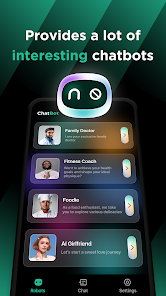
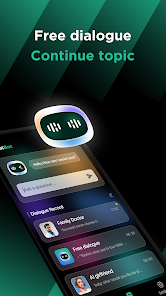
So, ChatBot - AI Chat by X PhotoKit is exactly what it sounds like: an AI chat app. You download it, install it, and basically start talking to an AI assistant right away. It's sitting on Google Play and the App Store, free to grab though obviously it pushes in-app purchases and shows ads. The install count seems decent from what I saw, but I didn't dig into exact numbers. First impression? Honestly, it felt like any other chat AI at launch. The interface is clean but nothing special. You open it, there's a chat screen, a text bar at the bottom, and you just type whatever. The onboarding is quick: a couple of prompts, maybe a pop-up about premium version perks, and you're off. Nothing mind-blowing so far, but it works.
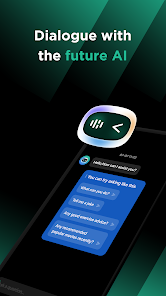
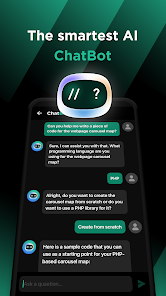
After using it for a week, the actual hands-on experience is pretty straightforward. You type a question, get a response. The first message loads quickly, but follow-ups sometimes have a slight delay. The interface is simple: your messages on one side, AI replies on the other, standard stuff. One thing I noticed—there's no obvious tutorial or tips, so you just figure things out as you go. If you want the AI to write a story, you ask. If you need a recipe, you ask. It handles casual chat fine, but deeper technical queries? Not so much. There's no memory of past conversations unless you specifically save them, which is a bit manual. A small trick I picked up: using very specific wording gets better results than vague requests. Still, the app feels a little barebones compared to others I've tried.
After a while, my personal judgment is that this app fits someone who just needs a basic AI chat tool without fancy features. If you're casually curious about AI or want quick answers for everyday stuff, it's fine. But honestly, if you're into more advanced AI interactions, it falls short. What makes it different from something like ChatGPT or Gemini? Not much, honestly. It's slower, the responses feel less nuanced, and the free tier is pretty limited by ads and paywalls. I can see someone keeping it installed if they don't want a subscription elsewhere, but I'd personally uninstall it because there are free alternatives that do the same thing better. For the price of free, it's okay, but don't expect anything outstanding.
features
- 🔹 The app offers a multi-language chat feature, letting you switch between languages mid-conversation. Compared to ChatGPT, which handles this seamlessly, ChatBot's implementation feels a bit clunky. You have to manually set the language in settings, and it doesn't always recognize the shift naturally, so you end up with a few weird replies before it catches on.
- 🔹 There's a “creative mode” that aims to generate more imaginative responses, like for storytelling or brainstorming. It stands out against something like Google Gemini, which focuses more on factual accuracy. In practice, this mode works okay for short prompts but starts to repeat itself or get nonsensical if you push it too far.
- 🔹 Another notable point is the built-in text-to-speech for AI replies. Unlike Replika or other chatbots that require a subscription for this feature, ChatBot offers it for free on a limited daily basis. The voice quality is decent, though not as natural as newer apps, and the daily cap can be annoying for heavy users.
- 🔹 Lastly, the app includes a “chat history export” feature, letting you save conversations as text files. That's rare among free AI chatbots; most like Character.AI don't offer this at all. It's handy for reference, and it actually works well without extra fees.
pros
- 💪 First major strength is the “write with AI” tool for composing emails or social posts. Compared to ChatGPT, which requires you to manually paste prompts, ChatBot has a dedicated mode that structures the output more cleanly for specific contexts. It's especially useful for quick drafts without tweaking settings.
- 💪 The offline mode is another big plus. Unlike Gemini or most AI assistants that need constant internet, ChatBot lets you access some pre-loaded responses or cached queries without connectivity. It's not full functionality, but it's handy when data runs out.
- 💪 Customizable response length is also a win. In Replika, you get what you get, but here you can choose between short, medium, or long replies per session. It helps in controlling the flow of casual vs. detailed conversations.
- 💪 Finally, the “daily challenge” prompts for creative writing are a fun, unique addition. No other app I've tried offers this, and it keeps the experience fresh for daily use, though it's not a core feature.
cons
- ⚠️ The ad frequency is a big downside. Compared to ChatGPT's completely ad-free experience, ChatBot throws in video ads between every 3-4 messages on the free tier. It kills momentum and makes it hard to stay engaged in longer conversations.
- ⚠️ Response accuracy is hit-or-miss. For factual queries, it often provides outdated or incomplete info, unlike Google Gemini which integrates real-time search. I asked about a recent event and got a generic answer from 2022.
- ⚠️ The free tier has a severe daily message limit. In contrast, apps like Character.AI allow unlimited free chats, whereas ChatBot caps you at maybe 30 messages a day before prompting the premium upgrade. It's very restrictive for a casual user.
- ⚠️ Lack of context memory across sessions is a significant flaw. Unlike Replika, which remembers your name and past topics, ChatBot treats each session as a blank slate. You have to re-explain your preferences every time you open it.
Recommended Apps
![]()
16Personalities
16Personalities4
![]()
Zodiac Palm Reader: MagicWay
Reatility Media4.6
![]()
Moblo - 3D furniture modeling
MYTIforge4.1![]()
Magnifier Plus with Flashlight
Digitalchemy, LLC4.6![]()
QR Code Scanner
QR Code Scanner & Barcode Reader4.7![]()
FalFal: Astrology, Tarot, Love
FalFal Team4.8![]()
Christmas Photo Frames
PhotoFramesApps4.6![]()
AI Video Art Creator - Livensa
FERASET4.5![]()
Horoscope of Birth
Denimaks4.4![]()
Make Me Bald Prank
AppTornado2.5![]()
Kling AI: AI Image&Video Maker
Lohas Games Pte. Ltd.4.4![]()
Japan Timetable & Route Search
NAVITIME JAPAN CO., LTD.4.3![]()
Prank Call & Funny Video
TeH Software0![]()
Parallax 3D Live Wallpapers
TarrySoft4.3![]()
AI Chatbot - Nova
ScaleUp4.7















Disclaimer
1.AppInfoLibrary does not represent any developer, nor is it the developer of any App or game.
2.AppInfoLibrary provide custom reviews of Apps written by our own reviewers, and detailed information of these Apps, such as developer contacts, ratings and screenshots.
3.All trademarks, registered trademarks, product names and company names or logos appearing on the site are the property of their respective owners.
4. AppInfoLibrary abides by the federal Digital Millennium Copyright Act (DMCA) by responding to notices of alleged infringement that complies with the DMCA and other applicable laws.
5.If you are the owner or copyright representative and want to delete your information, please contact us info@appinfolibrary.com.
6.All the information on this website is strictly observed all the terms and conditions of Google Ads Advertising policies and Google Unwanted Software policy .














