
Pedometer - Step Counter

50M+
Installs
Simple Design Ltd.
Developer
-
Health & Fitness
Category
-
Rated for 3+
Content Rating
-
support@simpledesign.ltd
Developer Email
-
https://simpledesign.ltd/privacypolicy.html?pkg=pedometer.stepcounter.calorieburner.pedometerforwalking
Privacy Policy
Screenshots
editor reviews
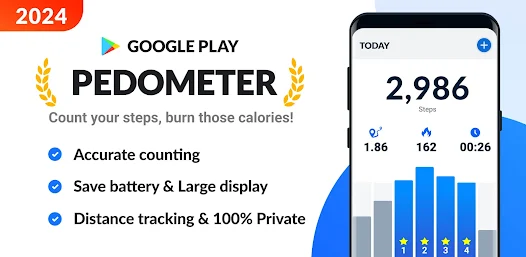
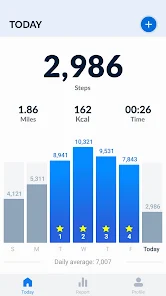
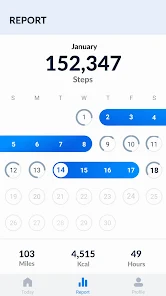
The Pedometer - Step Counter by Simple Design Ltd. is exactly what it sounds like: a basic, no-fuss step tracking app for Android and iOS. You download it from Google Play or the App Store, install it, and the whole point is to count how many steps you take each day. I installed it because I wanted something simpler than the fitness apps that try to do a million things at once. When you first launch it, the interface is clean and straightforward—just a big number showing your step count, a small graph, and a few icons. There's no login screen, no account creation, which was a relief. The install count seems modest for a free app, and I didn't spot any splash ads immediately, though there might be some hidden in settings.
After using it for a few days, the experience is pretty smooth. The app uses your phone's built-in accelerometer, so you just carry your phone with you. The main screen updates in real time, and tapping it shows your daily progress. There's no complicated onboarding; it just starts counting. I noticed it sometimes misses steps if your phone is in a bag or if you walk slowly, but that's common with phone-based pedometers. The only small quirk is that the step count resets at midnight automatically, which is fine, but there's no way to manually adjust it if you start a walk right after midnight. A handy tip: keep the app open in the background and don't kill it from recent apps, or it might pause counting.
After a week, I can say this app is perfect for people who just want a simple step counter without any extra fluff. It's great if you're trying to hit a vague daily step goal but hate the clutter of apps like Google Fit or Samsung Health that nag about heart points or calories. On the flip side, if you want detailed stats like altitude climbed or active minutes, this app won't cut it. It stands out because it's lightweight and uses almost no battery, but it also feels a bit barebones. I kept it installed because it's discreet, but I can see someone uninstalling it if they realize they want more motivation or social features. Overall, it does one thing well, but nothing more.
features
- 📱 Simple design: The app looks clean and minimal, with a focus on just your step count and a small graph. There's no distracting UI or nested menus, unlike Pacer or Google Fit which bury things in tabs.
- ⚡ Low battery drain: It uses the phone accelerometer efficiently, so it doesn't kill your battery like more complex trackers such as MapMyWalk, which needs GPS for everything.
- 🔒 No sign-up required: You install and start counting instantly. No accounts, no permissions beyond motion, which is a huge win compared to apps like Fitbit that force you to log in.
- 💰 Free with no paywalls: It's completely free to use all features, unlike Stepz or similar apps that lock historical data or ad removal behind subscriptions.
pros
- 👍 Battery-friendly: Unlike Google Fit, which keeps waking up for background syncing, this app uses almost zero extra battery because it just reads the sensor. Ideal for older phones or people who forget to charge.
- 👍 Fully offline: You don't need internet to track steps, unlike Pacer which prompts you to backup to cloud. This makes it usable anywhere, even in basements or on flights.
- 👍 No bloatware: It doesn't nag about tracking food, water, or sleep like Samsung Health does. Just steps, pure and simple.
cons
- 👎 No accuracy calibration: Unlike Pedometer++ which lets you adjust sensitivity, this app has no settings to improve step detection for different walking speeds. It can miss steps if you walk slowly or swing your arms less.
- 👎 Minimal historical data: You can't view past weeks easily. Apps like Step Counter - Free Pedometer show weekly or monthly trends, but this one only keeps the current day and a basic line graph.
- 👎 No goal customization: There's no way to set a specific step goal beyond the default 10,000. Google Fit allows personalized targets, which is more motivating for some people.
- 👎 No integration: It doesn't sync with Apple Health or Google Fit, so if you use other health apps, this data stays isolated, which is limiting compared to most modern pedometers.
Recommended Apps
![]()
16Personalities
16Personalities4
![]()
Zodiac Palm Reader: MagicWay
Reatility Media4.6
![]()
Moblo - 3D furniture modeling
MYTIforge4.1![]()
Magnifier Plus with Flashlight
Digitalchemy, LLC4.6![]()
QR Code Scanner
QR Code Scanner & Barcode Reader4.7![]()
FalFal: Astrology, Tarot, Love
FalFal Team4.8![]()
Christmas Photo Frames
PhotoFramesApps4.6![]()
AI Video Art Creator - Livensa
FERASET4.5![]()
Horoscope of Birth
Denimaks4.4![]()
Make Me Bald Prank
AppTornado2.5![]()
Kling AI: AI Image&Video Maker
Lohas Games Pte. Ltd.4.4![]()
Japan Timetable & Route Search
NAVITIME JAPAN CO., LTD.4.3![]()
Prank Call & Funny Video
TeH Software0![]()
Parallax 3D Live Wallpapers
TarrySoft4.3![]()
AI Chatbot - Nova
ScaleUp4.7















Disclaimer
1.AppInfoLibrary does not represent any developer, nor is it the developer of any App or game.
2.AppInfoLibrary provide custom reviews of Apps written by our own reviewers, and detailed information of these Apps, such as developer contacts, ratings and screenshots.
3.All trademarks, registered trademarks, product names and company names or logos appearing on the site are the property of their respective owners.
4. AppInfoLibrary abides by the federal Digital Millennium Copyright Act (DMCA) by responding to notices of alleged infringement that complies with the DMCA and other applicable laws.
5.If you are the owner or copyright representative and want to delete your information, please contact us info@appinfolibrary.com.
6.All the information on this website is strictly observed all the terms and conditions of Google Ads Advertising policies and Google Unwanted Software policy .














