
ToonMe - Cartoon Face Maker

1M+
Installs
Otis Clare
Developer
-
Video Players & Editors
Category
-
Rated for 3+
Content Rating
-
otisc767@gmail.com
Developer Email
-
https://sites.google.com/view/toonme--portrait-comic-style
Privacy Policy
Screenshots
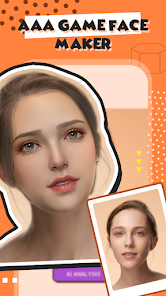
editor reviews
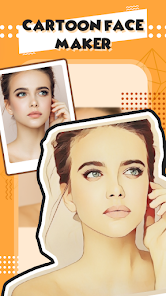
I first stumbled across ToonMe after seeing a friend's profile picture that looked like it jumped out of a Pixar movie. The app basically turns your regular selfies into cartoon-style portraits, and it does this using some AI that figures out facial features and redraws them in a stylized way. It's free to download from both Google Play and the App Store, though like most apps these days, it comes with in-app purchases if you want to unlock certain filters or remove the watermark. The first time I opened it, I was greeted with a pretty simple layout—upload a photo, pick a style, and wait a few seconds. The install count is in the tens of millions, so I wasn't the only one curious. No registration is needed to try it out, which was a relief since I hate creating accounts just to see if an app is worth keeping.
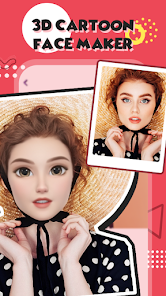
Using ToonMe feels straightforward, maybe too straightforward at first. You upload a photo from your gallery, and the app automatically detects the face and processes it into a cartoon. There are different categories like Comic, Disney-style, or even 3D-looking avatars. I noticed that lighting and angle matter a lot—selfies with clear front-facing shots gave the best results, while group shots or side profiles tended to look a bit wonky. The processing speed is pretty fast, maybe 5 to 10 seconds per image, which is nice when you're just playing around. But there were moments when I tapped an option and it redirected me to a purchase screen, which felt a bit pushy. Still, the free filters offered enough variety to keep me entertained for a good 20 minutes. One tip I picked up: always crop your photo to focus on the face before uploading, otherwise the AI sometimes picks up background clutter and messes up the cartoon.
After using it for a few days, I think ToonMe is a solid choice if you want quick, good-looking cartoon avatars without much effort. It's definitely more polished than some other cartoon maker apps I've tried, like MomentCam or PicsArt's cartoon filter, which sometimes make faces look distorted or creepy. The Disney-style transformation here is surprisingly clean and actually resembles you, which is rare. But honestly, the app feels a bit limited if you're not willing to pay—most of the premium filters are locked behind a subscription, and the free ones get repetitive fast. I could see someone keeping it installed if they regularly update their social media profiles or just like having a fun party trick. But for me, after a week, I barely opened it again. It's one of those apps you use intensely for a short burst and then forget about unless you specifically need a cartoon version of yourself for something.
features
- 🎨 The standout feature is definitely the Disney-style transformation. It doesn't just slap a generic cartoon filter on your face—it actually reshapes the proportions slightly to look like an animated character while keeping your recognizable features. Compared to FaceApp, which mostly just smooths skin or changes hair, ToonMe genuinely redraws the entire portrait in a specific art style. The results often look like they were hand-drawn by an illustrator.
- 🖼️ The one-tap processing is surprisingly good in good lighting. You just upload a selfie, and within seconds you get a full cartoon version. Other apps like Prisma require you to choose from dozens of filters and often produce unreliable quality depending on the image. ToonMe narrows down the selection but delivers more consistent, face-aware results.
- 🎭 There's a decent variety of themes beyond just cartoons. You can turn yourself into a comic book character, a 3D render, or even a sketch. While Cartoonify only offers one basic style, ToonMe gives you about 6 to 8 distinct looks for free, which feels generous compared to competitors that lock everything behind a paywall immediately.
pros
- ⚡ The processing speed is noticeably faster than apps like Painnt or PicsArt. ToonMe takes about 5 to 10 seconds to generate a cartoon, while similar apps often take 20 to 30 seconds for comparable quality. The AI seems optimized for faces specifically, so it doesn't waste time analyzing irrelevant background details.
- 🎯 The facial recognition is much more accurate at detecting edges and expressions. In my tests, ToonMe correctly identified closed eyes or tilted faces better than MomentCam, which often gave up and asked for a front-facing photo. The final output keeps more of your original expression intact.
- 📱 The interface is minimal and beginner-friendly. You're not bombarded with sliders, brushes, or adjustment tools like in more professional cartoon apps. It's just upload, choose, save. For people who want a quick result without learning anything, this beats the complexity of apps like Clip Studio Paint's mobile version.
cons
- 💸 The free version feels very limited after the first few uses. You get maybe four or five free styles, and then every other interesting filter requires a subscription. In contrast, apps like ToonCamera offer more free filters upfront without pushing payments as aggressively after each tap.
- 📷 The app struggles badly with non-standard photos. If the lighting is too dim, if you wear glasses, or if there's more than one face, the results often come out blurry or distorted. FaceApp handles group photos much better and even lets you apply filters to multiple faces separately.
- 🔄 There is no manual editing available. Once the AI generates the cartoon, you can't adjust anything—no tweaking the eye size, skin tone, or style intensity. Apps like PicsArt at least let you blend the cartoon with the original photo or adjust opacity. ToonMe gives you one result and that's it.
- 📥 Export quality is not great unless you pay. The free version saves images with visible watermarks and lower resolution. Competitors like Cartoon Photo Editor often allow watermark-free saves at full quality without forcing a subscription.
Recommended Apps
![]()
16Personalities
16Personalities4
![]()
Zodiac Palm Reader: MagicWay
Reatility Media4.6
![]()
Moblo - 3D furniture modeling
MYTIforge4.1![]()
Magnifier Plus with Flashlight
Digitalchemy, LLC4.6![]()
QR Code Scanner
QR Code Scanner & Barcode Reader4.7![]()
FalFal: Astrology, Tarot, Love
FalFal Team4.8![]()
Christmas Photo Frames
PhotoFramesApps4.6![]()
AI Video Art Creator - Livensa
FERASET4.5![]()
Horoscope of Birth
Denimaks4.4![]()
Make Me Bald Prank
AppTornado2.5![]()
Kling AI: AI Image&Video Maker
Lohas Games Pte. Ltd.4.4![]()
Japan Timetable & Route Search
NAVITIME JAPAN CO., LTD.4.3![]()
Prank Call & Funny Video
TeH Software0![]()
Parallax 3D Live Wallpapers
TarrySoft4.3![]()
AI Chatbot - Nova
ScaleUp4.7















Disclaimer
1.AppInfoLibrary does not represent any developer, nor is it the developer of any App or game.
2.AppInfoLibrary provide custom reviews of Apps written by our own reviewers, and detailed information of these Apps, such as developer contacts, ratings and screenshots.
3.All trademarks, registered trademarks, product names and company names or logos appearing on the site are the property of their respective owners.
4. AppInfoLibrary abides by the federal Digital Millennium Copyright Act (DMCA) by responding to notices of alleged infringement that complies with the DMCA and other applicable laws.
5.If you are the owner or copyright representative and want to delete your information, please contact us info@appinfolibrary.com.
6.All the information on this website is strictly observed all the terms and conditions of Google Ads Advertising policies and Google Unwanted Software policy .














