

Cut Paste Photo Seamless Edit

50M+
Installs
Peml Art FZC LLC
Developer
-
Video Players & Editors
Category
-
Rated for 3+
Content Rating
-
support@peml.art
Developer Email
-
https://peml.art/privacy-policy.html
Privacy Policy
Screenshots


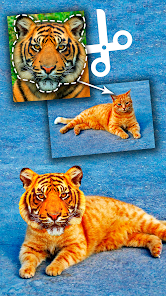

editor reviews
Cut Paste Photo Seamless Edit is a mobile utility app, the kind you grab when you need to quickly extract a person or object from one photo and drop them into another. It's not a full-blown editor like Photoshop; it's more of a focused tool for compositing, built around the core task of creating clean cutouts. You'd download something like this from Google Play or the App Store if you want to make memes, combine group shots, or just play around with backgrounds without learning complex software. The install count seems healthy for this niche, and it's free to download, though you'll quickly notice prompts for in-app purchases and the occasional ad. The first impression after launching is honestly a bit busy—the interface throws a lot of buttons and options at you, which can feel overwhelming for a tool that's supposed to be simple. But once you get past that initial shock, the purpose becomes clear.
After you actually start using it, the hands-on experience improves. The app guides you to pick a source photo, then you basically paint over what you want to keep or remove, and the AI does its best to figure out the edges. In practice, it works well for clear, high-contrast subjects—like a person against a solid wall—but struggles with tricky details like hair or fuzzy objects. The onboarding doesn't hold your hand much, so you learn by trial and error. A common workflow is to use the brush tool a few times, zoom in to refine edges, then export the cutout onto a new background. There's a small tip I picked up: using the “eraser” mode to clean up leftover bits after the auto-selection saves a lot of frustration. The app can feel smooth when the subject is easy, but it gets laggy with larger images, and some menu icons aren't labeled clearly, so you might tap the wrong thing more than once.
After spending some time with Cut Paste Photo Seamless Edit, I'd say it's a decent pick for casual users who don't want to pay for something like Adobe Photoshop Express or the full version of PicsArt. If you just need to slap your face onto a vacation photo or fix a group picture where someone blinked, this app gets the job done. But if you're into serious editing with layer control or precision masking, you'll quickly hit its limits. What makes it stand out from similar free tools is the dedicated focus on cutouts—it doesn't try to be a swiss army knife. That said, the constant ads and the paywall for higher-resolution exports might make you uninstall it after a few uses. I kept it installed because it's handy for quick edits on the go, but I can see someone deleting it if they find a more streamlined alternative without the clutter.
features
- ✅ Seamless cutout AI: The app's main draw is its auto-selection tool, which does a surprisingly decent job at detecting edges for simple subjects. Compared to something like Background Eraser, the AI here feels more refined, handling curves and straight lines better without leaving jagged artifacts.
- ✅ Manual refinement tools: You get a brush and eraser to fix the auto-cut, plus a “smooth” option to soften rough edges. This is handy for things like hair strands, though it's not as precise as the magic wand in Photoshop Express—it's more forgiving for thumbs.
- ✅ Background replacement: Once you've cut out your subject, you can swap in a solid color, another photo, or a blurred effect. The blur is a standout feature for a free app, making cutouts look more natural, unlike PicsArt's basic solid fill.
pros
- ➕ Simple cutout focus: Unlike PicsArt, which buries this feature under menus, the app keeps the process front and center. You don't waste time navigating tabs.
- ➕ Good for quick memes: The export speed is fast for low-res images, beating Background Eraser for casual social media posts where you don't need perfection.
- ➕ Affordable paid tier: The pro version unlocks higher exports and removes ads for a one-time fee, which is cheaper than a Photoshop subscription for occasional use.
cons
- ➖ Cluttered interface: The screen is packed with buttons and sliders, making it confusing to find the basic cutout tool. Background Eraser has a cleaner, more intuitive layout.
- ➖ Ads are intrusive: A pop-up shows after almost every action, which slows down editing. PicsArt's free version has ads too, but they're less frequent during use.
- ➖ Struggles with fine details: Hair, fur, or transparent objects (like glass) come out messy, requiring manual cleanup. Photoshop Express handles these much better with its edge detection.
- ➖ Limited resolution: Free exports cap at medium quality, so you can't use images for printing. Other free editors like Snapseed don't have this restriction for basic cuts.
Recommended Apps
![]()
16Personalities
16Personalities4
![]()
Zodiac Palm Reader: MagicWay
Reatility Media4.6
![]()
Moblo - 3D furniture modeling
MYTIforge4.1![]()
Magnifier Plus with Flashlight
Digitalchemy, LLC4.6![]()
QR Code Scanner
QR Code Scanner & Barcode Reader4.7![]()
FalFal: Astrology, Tarot, Love
FalFal Team4.8![]()
Christmas Photo Frames
PhotoFramesApps4.6![]()
AI Video Art Creator - Livensa
FERASET4.5![]()
Horoscope of Birth
Denimaks4.4![]()
Make Me Bald Prank
AppTornado2.5![]()
Kling AI: AI Image&Video Maker
Lohas Games Pte. Ltd.4.4![]()
Japan Timetable & Route Search
NAVITIME JAPAN CO., LTD.4.3![]()
Prank Call & Funny Video
TeH Software0![]()
Parallax 3D Live Wallpapers
TarrySoft4.3![]()
AI Chatbot - Nova
ScaleUp4.7















Disclaimer
1.AppInfoLibrary does not represent any developer, nor is it the developer of any App or game.
2.AppInfoLibrary provide custom reviews of Apps written by our own reviewers, and detailed information of these Apps, such as developer contacts, ratings and screenshots.
3.All trademarks, registered trademarks, product names and company names or logos appearing on the site are the property of their respective owners.
4. AppInfoLibrary abides by the federal Digital Millennium Copyright Act (DMCA) by responding to notices of alleged infringement that complies with the DMCA and other applicable laws.
5.If you are the owner or copyright representative and want to delete your information, please contact us info@appinfolibrary.com.
6.All the information on this website is strictly observed all the terms and conditions of Google Ads Advertising policies and Google Unwanted Software policy .














