

Home Design 3D

10M+
Installs
Anuman
Developer
-
Lifestyle
Category
-
Everyone
Content Rating
-
support@homedesign3d.net
Developer Email
-
https://en.homedesign3d.net/privacy-policy/
Privacy Policy
Screenshots
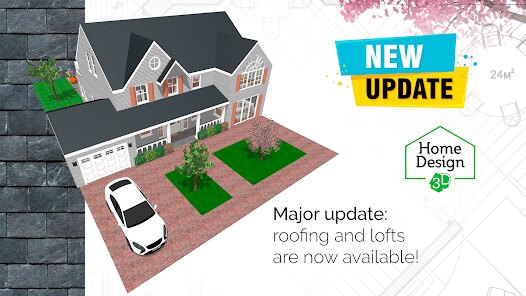
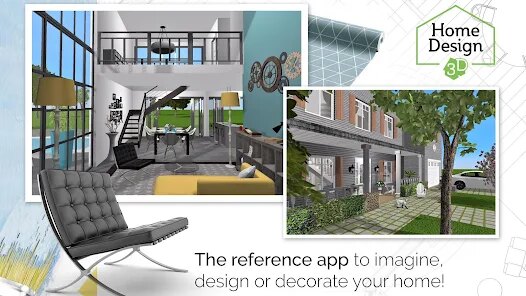
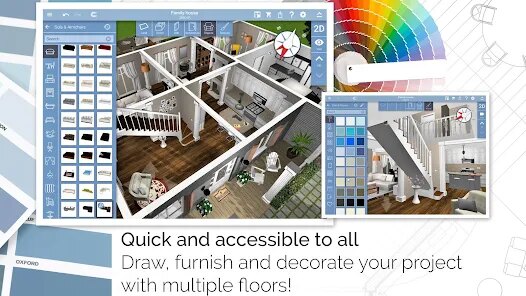


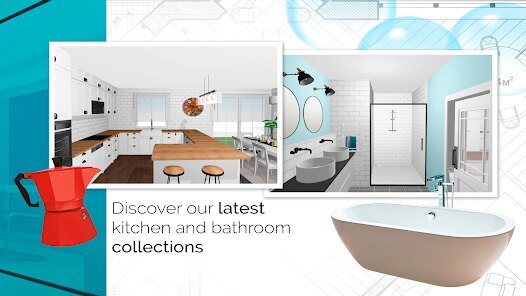
editor reviews
Home Design 3D is a solid sandbox-style home renovation and interior design app. It's not a game with levels or a point system; instead, it's a tool where you essentially get a blank canvas or a pre-built floor plan to decorate and furnish. I remember downloading it from the App Store because I was moving into a new apartment and wanted to visualize where my couch and bed would actually fit without having to guess with a tape measure. After launching the app for the first time, the initial impression was pretty good—the interface looks clean, and the 3D rendering gives you an instant feel for the space. It's a free download, and while you can get started right away, the full experience is locked behind a paid upgrade to unlock more furniture and tools. There isn't a mandatory registration, which is nice, but you'll run into in-app purchase prompts pretty quickly once you try to place anything beyond the basic catalog.
When you actually start using it, the hands-on experience is mostly intuitive. The first thing I did was import a basic room shape and then started drawing walls. The touch controls are responsive; you can pinch to zoom and drag to rotate the 3D view, which feels natural. The onboarding doesn't hold your hand too much, but you can figure out the main toolbar after a few taps. A common workflow is picking a wall, changing its color, then switching to the furniture tab to drag a sofa into the room. There were definitely some confusing moments, though—placing an object at the exact correct angle required some patience, and the snapping system felt a bit loose. A small practical tip I picked up was using the "cross-section" view to see whether a table was blocking a window from the top-down perspective. This step alone saved me from making a silly mistake with a dining table placement.
After using it for a while, my personal judgment is that this app is really perfect for casual planning, like rearranging a bedroom or testing out paint colors before buying paint. However, if you're an architect or serious interior designer, you will find it too limited. Compared to something like Houzz or SketchUp, this app feels more like a toy than a professional tool, but that's not necessarily a bad thing—it's much simpler to jump into. What makes it different is the ease of switching between 2D floor plan view and 3D walkthrough, which is genuinely useful for visual types. I ended up keeping it installed because I use it whenever I buy a new piece of furniture to see if it works in my living room, but I can see someone uninstalling it quickly if they don't enjoy fiddling with digital floor plans.
features
- 🎨 Drag-and-Drop Furnishing – Unlike Planner 5D, which requires you to precisely align items on a grid, Home Design 3D lets you simply tap and drag furniture into the room. This feels much more like playing with real dollhouse pieces than working with CAD software, making it faster for quick designs.
- 🔍 2D and 3D Cross-View Syncing – This app shines here because any change you make in the 2D blueprint instantly updates the 3D model. Rival apps like Roomstyler often have a delay or require a manual refresh, but Home Design 3D keeps both views perfectly synced in real-time.
- 📏 Free-Form Wall Drawing – You can draw walls by tracing your finger, which is a standout feature. Competing apps like MagicPlan force you to take real-world measurements with your camera, but Home Design 3D lets you sketch out a fantasy layout without any real-life constraints.
pros
- 🖼 Instant Visual Feedback – The strongest selling point is how fast you see a room transform. In comparison to SketchUp, which needs you to render or change views manually, Home Design 3D gives you a lifelike 3D picture the second you drop a chair into the scene.
- 🤏 Optimized for Mobile – It loads smoothly on older phones and doesn't crash even with lots of objects, whereas Houzz's AR feature tends to lag or require a newer device to function properly.
- 🧩 Simple Export Options – You can easily take a screenshot of your design to show a contractor or friend without needing to create an account or link to a cloud service, which is simpler than similar apps that bury the export function behind menus.
cons
- 💸 Aggressive Paywall – The free version gives you only a handful of basic furniture items and wall colors. Compared to Live Home 3D, which offers a generous free trial with many assets, Home Design 3D pushes you to pay very early in the process, which can be discouraging.
- 🏛 No Real-World Product Links – Unlike Pinterest or IKEA Place, you can't tap on a sofa and actually buy it from a real store. This app only shows you generic 3D models, so it's good for inspiration but useless for actual shopping.
- 🔄 Undo Button Flaws – The undo function sometimes reverses two steps instead of one, which is frustrating when you're trying to fine-tune a room. Competing apps like HomeByMe have a much more reliable undo history system.
Recommended Apps
![]()
16Personalities
16Personalities4
![]()
Zodiac Palm Reader: MagicWay
Reatility Media4.6
![]()
Moblo - 3D furniture modeling
MYTIforge4.1![]()
Magnifier Plus with Flashlight
Digitalchemy, LLC4.6![]()
QR Code Scanner
QR Code Scanner & Barcode Reader4.7![]()
FalFal: Astrology, Tarot, Love
FalFal Team4.8![]()
Christmas Photo Frames
PhotoFramesApps4.6![]()
AI Video Art Creator - Livensa
FERASET4.5![]()
Horoscope of Birth
Denimaks4.4![]()
Make Me Bald Prank
AppTornado2.5![]()
Kling AI: AI Image&Video Maker
Lohas Games Pte. Ltd.4.4![]()
Japan Timetable & Route Search
NAVITIME JAPAN CO., LTD.4.3![]()
Prank Call & Funny Video
TeH Software0![]()
Parallax 3D Live Wallpapers
TarrySoft4.3![]()
AI Chatbot - Nova
ScaleUp4.7















Disclaimer
1.AppInfoLibrary does not represent any developer, nor is it the developer of any App or game.
2.AppInfoLibrary provide custom reviews of Apps written by our own reviewers, and detailed information of these Apps, such as developer contacts, ratings and screenshots.
3.All trademarks, registered trademarks, product names and company names or logos appearing on the site are the property of their respective owners.
4. AppInfoLibrary abides by the federal Digital Millennium Copyright Act (DMCA) by responding to notices of alleged infringement that complies with the DMCA and other applicable laws.
5.If you are the owner or copyright representative and want to delete your information, please contact us info@appinfolibrary.com.
6.All the information on this website is strictly observed all the terms and conditions of Google Ads Advertising policies and Google Unwanted Software policy .














