
PicLab - Photo Editor

10M+
Installs
Maple Media
Developer
-
Video Players & Editors
Category
-
Rated for 12+
Content Rating
-
contact@maplemedia.io
Developer Email
-
https://maplemedia.io/privacy/
Privacy Policy
Screenshots


editor reviews
You know those moments when you snap a picture and it just needs a little something extra? That is exactly why I ended up downloading PicLab - Photo Editor from the Play Store. It is one of those all-in-one creative tools that sits somewhere between a serious editing suite like Adobe Lightroom and a playful sticker app. The install was quick, and I remember noticing it had over ten million downloads, which gave me some confidence before I even launched it. It is free to download, though obviously there are in-app purchases and ads that pop up here and there. The first impression after opening it was pretty clean and modern. No registration wall either, which was a relief. You just pick a photo from your gallery or snap a new one, and you are basically ready to mess around with it right away.
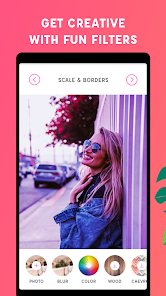
The actual hands-on experience is where PicLab starts to show its personality. Once you load an image, the interface feels pretty straightforward. The bottom toolbar gives you options like filters, text, overlays, and effects, and you can just tap and slide to adjust things. The fonts and stickers are decent, and the app does not slow down much unless you layer a ton of effects. I remember spending a solid fifteen minutes just playing with the light leak and bokeh overlays. One thing that caught me off guard is how the app handles text. You can rotate, resize, and even curve the text, which feels more flexible than what I expected from a free editor. The undo button is easy to find too, which saved me more than once when I overdid the vintage filter. There is no clunky onboarding tutorial, you just figure it out by tapping around, and that honestly works better than a forced walkthrough.
After using PicLab for a while, I can see why some people keep it installed and why others might delete it after a week. For someone who just wants to add filters, text overlays, or artistic touches without diving into complex layer masks, this app hits the sweet spot. It is great if you are into making collages, social media posts, or just want to give your photos a more artistic look. On the other hand, if you are the kind of person who needs precise control over exposure curves or raw file editing, this is not going to replace something like Snapseed or Lightroom. Compared to Canva, PicLab feels more focused on editing photos rather than designing graphics from scratch. I think the reason I kept it installed is that it is lightweight and does not ask for too much commitment. It feels like a fun sidekick for casual editing, not a replacement for serious tools.
features
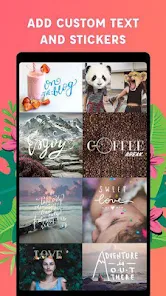
- ✨ One standout feature is the text tool. Unlike some basic editors where you just pick a font and drop it on the image, PicLab actually lets you curve the text, adjust spacing, and blend it with layers. It feels a lot like what you would get in PicsArt, but less cluttered and easier to navigate.
- ✨ The overlay collection is another strong point. You get light leaks, bokeh, dust, and even double exposure presets. In Adobe Photoshop Express, you would need to hunt for these or create them manually. Here, they are baked right in with adjustable intensity, which saves a lot of time.
- ✨ PicLab also has a texturizer effect that is surprisingly solid. You can apply paper grain, canvas texture, or even film grain to your photos. VSCO has something similar but only for film grain. PicLab gives you more variety in one place.
- ✨ The collage maker is not the main focus, but it works well enough for quick layouts. Unlike Canva, which overwhelms you with templates, PicLab keeps it simple. You just pick a grid, drop in photos, and adjust the spacing.
pros
- ✅ The interface is a lot cleaner than PicsArt. There is no weird menu maze or ads interrupting your workflow every ten seconds. Everything is laid out in a single row at the bottom, which makes editing feel less chaotic.
- ✅ The app runs smoothly even on older phones. I tested it on a mid-range device, and it did not lag during filter changes or text rendering. That is something Snapseed also does well, but PicLab adds more creative overlays without sacrificing performance.
- ✅ The free version actually gives you a decent amount of content before pushing in-app purchases. Compared to Pixlr, where half the good filters are locked, PicLab feels more generous in its base offering.
cons
- ❌ The ads are pretty intrusive. After every few saves or exports, a full-screen video ad pops up. PicsArt and Canva handle ad interruptions more gracefully, usually placing them in the sidebar instead.
- ❌ There is no layer system like in Photoshop Express or PicsArt. If you want to stack multiple text boxes, stickers, and effects, you are stuck with the order the app applies them unless you undo and redo everything.
- ❌ Export resolution feels limited unless you pay. The free version saves images at a lower quality, and if you need high-res output for printing, you will have to subscribe. Snapseed gives you full resolution for free without any fuss.
Recommended Apps
![]()
16Personalities
16Personalities4
![]()
Zodiac Palm Reader: MagicWay
Reatility Media4.6
![]()
Moblo - 3D furniture modeling
MYTIforge4.1![]()
Magnifier Plus with Flashlight
Digitalchemy, LLC4.6![]()
QR Code Scanner
QR Code Scanner & Barcode Reader4.7![]()
FalFal: Astrology, Tarot, Love
FalFal Team4.8![]()
Christmas Photo Frames
PhotoFramesApps4.6![]()
AI Video Art Creator - Livensa
FERASET4.5![]()
Horoscope of Birth
Denimaks4.4![]()
Make Me Bald Prank
AppTornado2.5![]()
Kling AI: AI Image&Video Maker
Lohas Games Pte. Ltd.4.4![]()
Japan Timetable & Route Search
NAVITIME JAPAN CO., LTD.4.3![]()
Prank Call & Funny Video
TeH Software0![]()
Parallax 3D Live Wallpapers
TarrySoft4.3![]()
AI Chatbot - Nova
ScaleUp4.7















Disclaimer
1.AppInfoLibrary does not represent any developer, nor is it the developer of any App or game.
2.AppInfoLibrary provide custom reviews of Apps written by our own reviewers, and detailed information of these Apps, such as developer contacts, ratings and screenshots.
3.All trademarks, registered trademarks, product names and company names or logos appearing on the site are the property of their respective owners.
4. AppInfoLibrary abides by the federal Digital Millennium Copyright Act (DMCA) by responding to notices of alleged infringement that complies with the DMCA and other applicable laws.
5.If you are the owner or copyright representative and want to delete your information, please contact us info@appinfolibrary.com.
6.All the information on this website is strictly observed all the terms and conditions of Google Ads Advertising policies and Google Unwanted Software policy .














