
Neon LED Keyboard: RGB & Emoji

50M+
Installs
AZ Mobile Software
Developer
-
Productivity
Category
-
Rated for 3+
Content Rating
-
azmobilesoftware@gmail.com
Developer Email
-
https://sites.google.com/view/cutewallpapersstudio
Privacy Policy
Screenshots
editor reviews
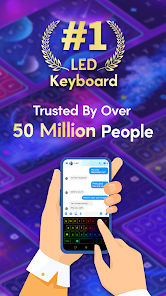
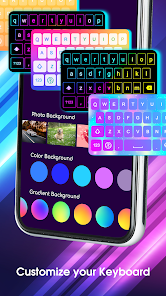
Neon LED Keyboard: RGB & Emoji is a third-party keyboard app that tries to turn your typing experience into something a bit more flashy and fun. It's essentially a customization tool for your phone's keyboard, letting you swap out the standard look for glowing, colorful backlighting, animated effects, and a library of emoji and stickers. The main draw here is the visual flair—if you're tired of the same old boring keyboard on your Android device, this app promises a way to spice things up with neon-style themes. I grabbed it off the Play Store where it shows a few million installs, and it's free to download, although you'll quickly run into ads and prompts for in-app purchases once you start using it. On first launch, you're hit with a lot of bright, flashy menus and a video tutorial that feels a bit overwhelming, but the core idea is clear: pick a glow color, choose a font, and start typing.
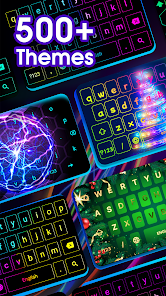
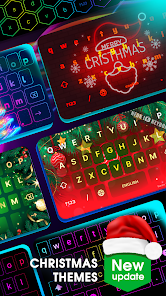
Once you actually set it up and enable the keyboard in your system settings, the hands-on experience is mixed. The onboarding walks you through enabling it as your default input method, which is a necessary but slightly annoying step for most third-party keyboards. After that, you land on a home screen with a few preset neon themes—options like "Cyberpunk" or "Aurora" that apply different color gradients and glow effects. Typing itself feels okay, but the keyboard layout can be a bit cramped on smaller screens, and the suggestions bar sometimes lags behind. A neat touch is the emoji search, which is faster than digging through categories. The biggest confusion point is navigating the settings—there are a ton of sliders for brightness, animation speed, and sound effects, and it's easy to accidentally change something and not know how to undo it. One practical tip: turn off the vibration feedback if you want to save battery, because the haptics are surprisingly strong.
After using it for a week or so, I think this app is really for people who enjoy personalizing their phone down to the smallest detail. If you like custom launchers or RGB lighting on your PC, you'll probably get a kick out of this. That said, it's not for everyone. The keyboard eats up more battery than the default one because of the constant animations, and the ads can get intrusive—you'll see a full-screen popup every few typing sessions unless you pay for the pro version. Compared to something like Gboard or SwiftKey, this app offers way more visual pizzazz but falls short on core typing accuracy, autocorrect, and swipe gestures. It's the kind of app you might keep installed for a party trick or to show off to a friend, but I can see most people uninstalling it after a week when the novelty wears off and the lag starts to grate on you.
features
- 🎨 You can fully customize the glow colors, animation speed, and background opacity for nearly every key. This lets you create a unique look that matches your phone's wallpaper or your mood, which is something Gboard's basic themes can't touch.
- 😄 The built-in emoji library is huge and supports instant search by keyword. You don't have to scroll through endless pages like in the default Samsung keyboard; typing "cat" pulls up every cat emoji right away.
- ⚡ The app offers live neon animations that change as you type, like pulsing lights or trailing effects. This real-time visual feedback makes typing feel more dynamic than the static themes on SwiftKey.
- 🔊 There is a sound effects engine that triggers different noises per key press, from cyberpunk beeps to soft clicks. This adds an extra layer of immersion that standard keyboards don't provide.
pros
- ✨ The visual customization here blows Gboard and SwiftKey out of the water. You can set a gradient glow that shifts colors while you type, and those apps just give you flat backgrounds or simple gradients.
- ⚡ The typing responsiveness is surprisingly snappy after you turn off the extra animations. Once you dial in the settings, the key press registration feels just as fast as the default keyboard.
- 🚀 The emoji sticker integration is seamless. You can access GIFs, stickers, and standard emoji all from the same panel, which is more convenient than switching tabs in Samsung Keyboard.
cons
- 📴 The battery drain is noticeable after a day of heavy typing. The constant LED animations keep the screen's display driver active more than a static keyboard would, and Gboard doesn't have this issue at all.
- 🔇 The autocorrect and word prediction are mediocre. It often misses simple typos or suggests words that don't fit the context, while SwiftKey has a much smarter prediction engine that learns your habits.
- 🛑 The free version has obtrusive banner ads at the bottom of the keyboard, which can accidentally be tapped while typing. The pro version removes them, but the $4.99 price tag feels steep for a keyboard app.
- ⚙️ The settings menu is cluttered and poorly organized. Changing a simple thing like the key popup size requires going through three submenus, whereas Gboard keeps its settings clean and easy to navigate.
Recommended Apps
![]()
16Personalities
16Personalities4
![]()
Zodiac Palm Reader: MagicWay
Reatility Media4.6
![]()
Moblo - 3D furniture modeling
MYTIforge4.1![]()
Magnifier Plus with Flashlight
Digitalchemy, LLC4.6![]()
QR Code Scanner
QR Code Scanner & Barcode Reader4.7![]()
FalFal: Astrology, Tarot, Love
FalFal Team4.8![]()
Christmas Photo Frames
PhotoFramesApps4.6![]()
AI Video Art Creator - Livensa
FERASET4.5![]()
Horoscope of Birth
Denimaks4.4![]()
Make Me Bald Prank
AppTornado2.5![]()
Kling AI: AI Image&Video Maker
Lohas Games Pte. Ltd.4.4![]()
Japan Timetable & Route Search
NAVITIME JAPAN CO., LTD.4.3![]()
Prank Call & Funny Video
TeH Software0![]()
Parallax 3D Live Wallpapers
TarrySoft4.3![]()
AI Chatbot - Nova
ScaleUp4.7















Disclaimer
1.AppInfoLibrary does not represent any developer, nor is it the developer of any App or game.
2.AppInfoLibrary provide custom reviews of Apps written by our own reviewers, and detailed information of these Apps, such as developer contacts, ratings and screenshots.
3.All trademarks, registered trademarks, product names and company names or logos appearing on the site are the property of their respective owners.
4. AppInfoLibrary abides by the federal Digital Millennium Copyright Act (DMCA) by responding to notices of alleged infringement that complies with the DMCA and other applicable laws.
5.If you are the owner or copyright representative and want to delete your information, please contact us info@appinfolibrary.com.
6.All the information on this website is strictly observed all the terms and conditions of Google Ads Advertising policies and Google Unwanted Software policy .














