

AI Photo Editor, Collage-Fotor

10M+
Installs
AI Art Photo Editor | Everimaging Ltd.
Developer
-
Video Players & Editors
Category
-
Rated for 3+
Content Rating
-
support@fotor.com
Developer Email
-
http://www.fotor.com/privacy.html
Privacy Policy
Screenshots
editor reviews
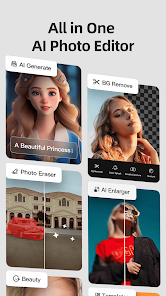
Fotor is a photo editing and collage-making app developed by Everimaging Ltd., sitting comfortably in the image enhancement and design tools category. You'd mainly use it for quick touch-ups, applying filters, or throwing together a collage for social media. Plenty of people probably download it because they want something more powerful than their phone's built-in editor but less intimidating than something like Lightroom. The first impression after opening it is that it's a bit busy—there's a lot going on with the home screen showing various templates, tools, and AI features all at once. It's free to download on both Google Play and the App Store, and it's been installed over 500 million times, which says plenty about its reach. You don't have to register to start editing, but some presets and premium features sit behind a subscription, and there are ads, though they're not too aggressive.
After jumping into a project, the interface feels fairly intuitive once you figure out where everything lives. You pick a photo from your gallery or choose a template, and then the real work begins. The basic editing tools—crop, rotate, exposure, color—are all laid out in a bottom toolbar that's easy to swipe through. Making a collage is straightforward: you select a layout, drag in your images, and adjust borders or backgrounds with a couple taps. There are moments where the app feels slightly sluggish, especially when applying heavy filters or using the AI background removal tool, which is a neat trick but sometimes misses edges. A practical tip: you can save your edits as a project and come back later, which is handy if you're indecisive. The main workflow feels natural for casual editing, but advanced users might find the sheer number of one-tap filters and stickers a bit limiting.
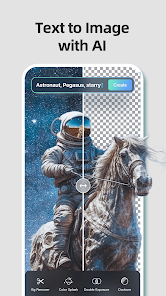
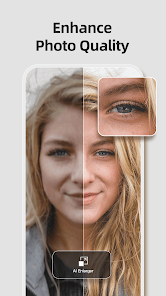
After spending some real time with Fotor, I think it's a solid middle-ground app. It's best for people who want quick, decent-looking edits without learning curves or complex layers. Someone who already uses Snapseed or Adobe Express might not feel the need to switch, because those apps offer similar tools with cleaner interfaces. What makes Fotor stand out is its built-in collage layouts and AI-assisted tools, like the portrait retouching and background changer. On the flip side, I could see someone uninstalling it if they dislike the subscription nudge or if the ad placements start to annoy during editing sessions. It's the kind of app I keep on my phone for when I need a quick social post or want to fix a snapshot in under a minute, but I probably wouldn't use it for serious photo work.
features
- 🎨 Fotor's collage layouts are the star here. You get dozens of preset grids, freestyle arrangements, and even scrapbook-style templates. Compared to Canva, which also does collages, Fotor's layouts feel more like a dedicated photo editor than a design tool, giving you finer control over spacing, border width, and corner rounding without needing to dig into menus.
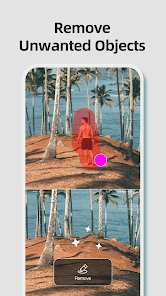
- 📸 The AI-powered background removal is a standout. It works fast, usually within a couple seconds, and handles hair details better than most free apps. I find it more reliable than what you get in PicsArt's free tier, though it's not quite as precise as the paid tools in Photoshop Express.
- 🖌️ The one-tap filters and beauty effects are surprisingly decent for quick fixes. There's a "Beauty" tab that whiten teeth, smooth skin, and remove blemishes with one tap. It's not as nuanced as FaceTune, but for a free tool, it gives you passable results without manually adjusting sliders.
pros
- 👍 The free version actually offers a lot. You can do basic edits, apply filters, and create collages without paying a cent, which is more generous than apps like Adobe Express that lock many templates behind a subscription.
- 👍 The batch processing feature saves time if you need to resize or apply the same filter to multiple photos. Snapseed doesn't do batch editing at all, so this is a clear win for Fotor's workflow.
- 👍 The app runs on both mobile and web, so I can start an edit on my phone and finish it on my laptop. That kind of cross-platform sync isn't common in free photo editors, and it's handy for quick projects.
cons
- 👎 The interface feels cluttered. There's too many buttons and tabs on the home screen, and it takes a bit of hunting to find the tool you actually want. Snapseed's minimalist layout is way easier to navigate from the start.
- 👎 The AI features are hit or miss. The background removal sometimes leaves jagged edges, and the portrait retouching can oversmooth skin, making it look unnatural. Photoshop Express does a cleaner job with similar tools.
- 👎 Ads pop up after saving or switching between modes, which breaks the editing flow. You can't remove them without paying for the premium version, unlike Canva's free tier which keeps ads minimal.
- 👎 The export quality drops slightly if you don't pay. Free users get compressed images, while premium users get the full resolution. Apps like PicsArt don't compress exports on the free plan, so it feels like a downside here.
Recommended Apps
![]()
16Personalities
16Personalities4
![]()
Zodiac Palm Reader: MagicWay
Reatility Media4.6
![]()
Moblo - 3D furniture modeling
MYTIforge4.1![]()
Magnifier Plus with Flashlight
Digitalchemy, LLC4.6![]()
QR Code Scanner
QR Code Scanner & Barcode Reader4.7![]()
FalFal: Astrology, Tarot, Love
FalFal Team4.8![]()
Christmas Photo Frames
PhotoFramesApps4.6![]()
AI Video Art Creator - Livensa
FERASET4.5![]()
Horoscope of Birth
Denimaks4.4![]()
Make Me Bald Prank
AppTornado2.5![]()
Kling AI: AI Image&Video Maker
Lohas Games Pte. Ltd.4.4![]()
Japan Timetable & Route Search
NAVITIME JAPAN CO., LTD.4.3![]()
Prank Call & Funny Video
TeH Software0![]()
Parallax 3D Live Wallpapers
TarrySoft4.3![]()
AI Chatbot - Nova
ScaleUp4.7















Disclaimer
1.AppInfoLibrary does not represent any developer, nor is it the developer of any App or game.
2.AppInfoLibrary provide custom reviews of Apps written by our own reviewers, and detailed information of these Apps, such as developer contacts, ratings and screenshots.
3.All trademarks, registered trademarks, product names and company names or logos appearing on the site are the property of their respective owners.
4. AppInfoLibrary abides by the federal Digital Millennium Copyright Act (DMCA) by responding to notices of alleged infringement that complies with the DMCA and other applicable laws.
5.If you are the owner or copyright representative and want to delete your information, please contact us info@appinfolibrary.com.
6.All the information on this website is strictly observed all the terms and conditions of Google Ads Advertising policies and Google Unwanted Software policy .














