
Photo Collage - Pic Grid Maker

10M+
Installs
Magic Photo Collage & Photo Editor - CollageArt
Developer
-
Video Players & Editors
Category
-
Rated for 3+
Content Rating
-
photoapps.feedback@gmail.com
Developer Email
-
https://photocollage.github.io/privacy_policy.html
Privacy Policy
Screenshots

editor reviews
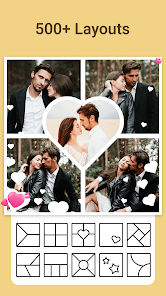
Photo Collage - Pic Grid Maker is exactly what it sounds like – a straightforward app for stitching multiple photos into a single grid or collage layout. It lands squarely in the photo editing and collage maker category, which is honestly a crowded space on both Google Play and the App Store. You'd typically download something like this when you want to share several vacation shots on Instagram without spamming your feed, or maybe create a quick memory board for a friend's birthday. After launching it, the first impression is pretty clean and uncluttered. The home screen shows off a bunch of layout templates right away, so you're not fumbling through menus. It's a free download with a decent install count, though you'll run into in-app purchases and occasional ads if you want to unlock certain templates or remove watermarks. Registration isn't required, which I appreciate – nobody wants another account to remember.
Once you start using it, the flow feels fairly natural. You pick a layout style, tap to add images from your camera roll, and the app arranges them instantly. The interface is mostly intuitive – drag and drop to rearrange photos, pinch to zoom, and swipe to apply filters. The onboarding doesn't throw a tutorial in your face, which is a relief; you can just jump in. A small trick I picked up: double-tapping a photo lets you adjust its position within the frame, which isn't immediately obvious but makes a big difference when one pic looks off-center. On the flip side, sometimes the app feels a bit sluggish when loading high-resolution images, especially if you're switching between layouts quickly. The built-in stickers and text options are decent but nothing groundbreaking – they get the job done without wowing you.
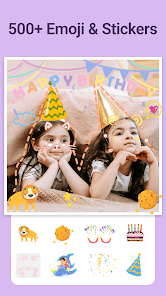
After using it for a few weeks, I'd say this app is a solid pick if you just want quick collages without overthinking the design. People who enjoy casual photo sharing, like posting travel recaps or family moments, will probably keep it around. But if you're looking for advanced editing tools or highly customizable layouts, you might feel limited compared to something like Canva or PicsArt. What sets it apart is the sheer variety of grid templates – there are hundreds of layout combinations, and they're genuinely good for social media formatting. That said, the ads can get annoying mid-session, and some layouts are locked behind paywalls. For someone like me, who only makes collages once a week, the free version works fine. But I could see power users uninstalling it if they bump into too many features they can't access without paying.
features
- 🎨 The template library is massive compared to something like Layout from Instagram. You get hundreds of grid patterns, including asymmetrical and freeform arrangements. Instagram's Layout app has maybe a dozen templates, so this feels like a significant upgrade if you want variety without jumping between apps.
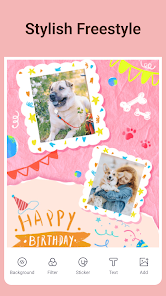
- 🖼️ Background customization goes further than most collage makers. You can pick solid colors, gradients, or even blur the edge of a photo as the background. In Canva, you'd need to manually crop and layer everything to achieve this effect – here it's one tap away.
- ✨ One-tap filters are surprisingly decent. They don't just slap a generic Instagram-style look on your photos; the app adjusts exposure and contrast per photo individually. Snapseed obviously gives more control, but for a quick batch edit on a collage, this is way more convenient.
- 📐 Aspect ratio presets are tailored for specific platforms. You get ratios for Instagram stories, Facebook covers, Twitter headers, and even WhatsApp status images. That's a feature I haven't seen in PicsArt's collage builder, which mostly just forces you to manually crop later.
pros
- 👍 Free version offers a huge selection of layouts without forcing a purchase. Unlike Canva, which locks most collage templates behind a Pro subscription, this app keeps hundreds of options open. You only pay for the really fancy ones.
- 👍 The export quality stays sharp. PicsArt sometimes compresses images when saving, especially in the free tier. Here, even on the free plan, my collages came out crisp and full resolution, which matters if you're printing them or sharing on a PC.
- 👍 No forced account creation. Apps like Canva and BeFunky nag you to sign up before you can even start. This one lets you use it immediately, which is a nice touch for privacy-conscious users or people in a hurry.
cons
- 👎 Watermark appears on free exports unless you watch an ad. Instagram's Layout app has zero watermarks at all, so this feels like a downgrade if you're just making simple grids. Having to watch a 30-second video to get a clean image is tedious.
- 👎 Performance drops with large photo batches. When you try to make a 9-grid collage with high-res images, the app stutters and sometimes crashes. PicsArt handles similar loads much smoother, even on older phones.
- 👎 Editing tools are basic compared to dedicated apps. You can't fine-tune colors, remove objects, or do advanced retouching. Snapseed users will feel like they've downgraded significantly if they rely on photo edits alongside collage making.
- 👎 Ads pop up between every save. Canva on the free tier is less intrusive – you get ads in the interface but not after every single export. Here, it disrupts the workflow when you're batch-making several collages in a row.
Recommended Apps
![]()
16Personalities
16Personalities4
![]()
Zodiac Palm Reader: MagicWay
Reatility Media4.6
![]()
Moblo - 3D furniture modeling
MYTIforge4.1![]()
Magnifier Plus with Flashlight
Digitalchemy, LLC4.6![]()
QR Code Scanner
QR Code Scanner & Barcode Reader4.7![]()
FalFal: Astrology, Tarot, Love
FalFal Team4.8![]()
Christmas Photo Frames
PhotoFramesApps4.6![]()
AI Video Art Creator - Livensa
FERASET4.5![]()
Horoscope of Birth
Denimaks4.4![]()
Make Me Bald Prank
AppTornado2.5![]()
Kling AI: AI Image&Video Maker
Lohas Games Pte. Ltd.4.4![]()
Japan Timetable & Route Search
NAVITIME JAPAN CO., LTD.4.3![]()
Prank Call & Funny Video
TeH Software0![]()
Parallax 3D Live Wallpapers
TarrySoft4.3![]()
AI Chatbot - Nova
ScaleUp4.7















Disclaimer
1.AppInfoLibrary does not represent any developer, nor is it the developer of any App or game.
2.AppInfoLibrary provide custom reviews of Apps written by our own reviewers, and detailed information of these Apps, such as developer contacts, ratings and screenshots.
3.All trademarks, registered trademarks, product names and company names or logos appearing on the site are the property of their respective owners.
4. AppInfoLibrary abides by the federal Digital Millennium Copyright Act (DMCA) by responding to notices of alleged infringement that complies with the DMCA and other applicable laws.
5.If you are the owner or copyright representative and want to delete your information, please contact us info@appinfolibrary.com.
6.All the information on this website is strictly observed all the terms and conditions of Google Ads Advertising policies and Google Unwanted Software policy .














