

Meitu- Photo Editor & AI Art

50M+
Installs
Meitu (China) Limited
Developer
-
Video Players & Editors
Category
-
Rated for 12+
Content Rating
-
app@meitu.com
Developer Email
-
https://pro.meitu.com/xiuxiu/agreements/gdpr.html?lang=en#en-policy
Privacy Policy
Screenshots

editor reviews
So, Meitu is this photo-editing app that's been around for ages, originally getting huge for its beauty filters and retouching tools. It's basically a full-on photo and video editing suite, but with a heavy focus on AI-powered features like AI art generation, portrait touch-ups, and those trendy cartoon-style avatars. You can download it from both Google Play and the App Store, and it's free to install with over 100 million downloads on the Play store alone. When you first launch it, you're hit with a pretty polished interface, though it's immediately clear this isn't a bare-bones editor – there are a ton of features and tabs right on the home screen. It feels like they're trying to be everything at once: a beauty app, a creative AI tool, and a social platform all rolled into one.
After using it for a bit, the real hands-on experience is a mixed bag. The onboarding is quick, but once you're in, you start poking around. The main actions are all there: you tap the big camera button to take a new photo or select one from your gallery. From there, you can jump into specific tools like "AI Art" or "Beauty." The AI Art feature is genuinely impressive – you pick a photo, choose a style like anime or watercolor, and it generates something new in about 20 seconds. But navigating between all the different editing modes can feel cluttered. One practical tip is to use the "Quick Tools" section at the bottom for basic stuff like cropping or adjusting brightness, because diving into the full editor can overwhelm you with icons and sliders. It's smooth for the most part, but sometimes loading times for the heavy AI features can test your patience.
After sticking with it for a while, I think Meitu is a solid pick for anyone who loves taking selfies and wants quick, dramatic retouching or fun AI-generated portraits. It's not really for someone who just wants a clean, simple photo editor to tweak exposure or color – that's where apps like Snapseed or Lightroom are way more straightforward. What makes Meitu different is its over-the-top beauty tools and its commitment to AI trends, like turning your photo into a Pixar-style character. I might keep it installed for the occasional AI art project, but honestly, the constant prompts to try premium features and the ad placement in the free version make me consider uninstalling it once the novelty wears off. It's fun, but it's also a bit exhausting.
features
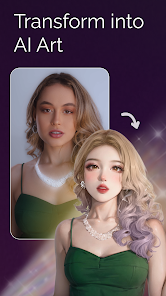
- 🤖 AI Art Generator – This is Meitu's standout feature. You can turn any portrait into a digital painting, anime character, or even a clay sculpture. It's way more accessible than specialized AI art tools like Midjourney, because you just upload a photo and pick a style – no need to write complex prompts.
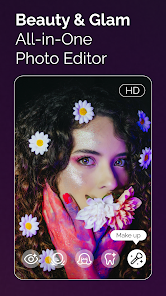
- ✨ Automatic Beauty Retouching – Unlike apps like Facetune where you manually adjust everything, Meitu's face detection is aggressive and automatic. It'll smooth skin, brighten eyes, and even reshape your jawline with one tap. It's almost too much for casual users, but perfect for quick social media posts.
- 🖼️ Cartoon & Avatar Creation – This is a specific AI feature that lets you generate a full-body avatar in a cartoon or 3D style. Compared to apps like Snapchat or Zepeto, Meitu's results look more realistic and detailed – the AI actually keeps your facial expressions and hair texture.
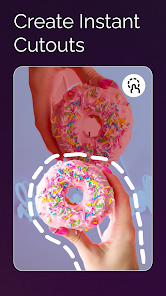
- 📱 All-in-One Editing Suite – It combines basic photo editing (crop, filter, text) with advanced AI tools and video editing. Unlike Adobe Lightroom which is purely about exposure and color, or PicsArt which is more sticker-heavy, Meitu tries to be the single app for creative transformations.
pros
- ⚡ Fast and intuitive beauty filters – Compared to apps like BeautyPlus or Snow, Meitu's filters feel more natural and less plastic-looking. You can apply a "natural glow" effect without looking like a mannequin.
- 🎨 Wide range of AI art styles – Unlike many apps that only offer one or two cartoon filters, Meitu has styles like watercolor, oil painting, sketch, and even fantasy themes. It gives you more creative flexibility without needing to switch apps.
- 🆓 Free core features – While there are in-app purchases, you can still use the basic beauty tools, filters, and some AI styles without paying a cent. That's better than apps like PicsArt which lock many decent filters behind a subscription.
cons
- ❗ Aggressive monetization – Every few steps, the app pushes you to buy Meitu VIP for HD exports, remove watermarks, or access premium AI styles. It's way more aggressive than Snapseed or Lightroom, which are almost entirely free.
- ⚠️ Privacy concerns – The app asks for access to your photo gallery and camera roll, and in the past, it faced backlash in some countries over data handling. Compared to apps like VSCO that emphasize privacy, this is a real downside.
- 🐢 Heavy and slow at times – The AI features take a while to process, and the app itself is quite large (over 200 MB). It's noticeably slower than a lightweight editor like Snapseed, especially on older phones.
- 🔒 Watermark on free exports – All images saved from the free tier get a Meitu watermark. Most apps like Adobe Express or Canva either don't have watermarks or place them less intrusively.
Recommended Apps
![]()
16Personalities
16Personalities4
![]()
Zodiac Palm Reader: MagicWay
Reatility Media4.6
![]()
Moblo - 3D furniture modeling
MYTIforge4.1![]()
Magnifier Plus with Flashlight
Digitalchemy, LLC4.6![]()
QR Code Scanner
QR Code Scanner & Barcode Reader4.7![]()
FalFal: Astrology, Tarot, Love
FalFal Team4.8![]()
Christmas Photo Frames
PhotoFramesApps4.6![]()
AI Video Art Creator - Livensa
FERASET4.5![]()
Horoscope of Birth
Denimaks4.4![]()
Make Me Bald Prank
AppTornado2.5![]()
Kling AI: AI Image&Video Maker
Lohas Games Pte. Ltd.4.4![]()
Japan Timetable & Route Search
NAVITIME JAPAN CO., LTD.4.3![]()
Prank Call & Funny Video
TeH Software0![]()
Parallax 3D Live Wallpapers
TarrySoft4.3![]()
AI Chatbot - Nova
ScaleUp4.7















Disclaimer
1.AppInfoLibrary does not represent any developer, nor is it the developer of any App or game.
2.AppInfoLibrary provide custom reviews of Apps written by our own reviewers, and detailed information of these Apps, such as developer contacts, ratings and screenshots.
3.All trademarks, registered trademarks, product names and company names or logos appearing on the site are the property of their respective owners.
4. AppInfoLibrary abides by the federal Digital Millennium Copyright Act (DMCA) by responding to notices of alleged infringement that complies with the DMCA and other applicable laws.
5.If you are the owner or copyright representative and want to delete your information, please contact us info@appinfolibrary.com.
6.All the information on this website is strictly observed all the terms and conditions of Google Ads Advertising policies and Google Unwanted Software policy .














