

Yoshion - Pic Collage Maker

1M+
Installs
Joseph Jenny
Developer
-
Video Players & Editors
Category
-
Rated for 3+
Content Rating
-
jj9403058@gmail.com
Developer Email
-
https://sites.google.com/view/yoshion---pic-collage-maker/home
Privacy Policy
Screenshots


editor reviews
Yoshion - Pic Collage Maker is a photo editing and collage app that lets you combine multiple pictures into one frame. You download it from Google Play or the App Store, and after a quick install, the first thing you notice is how straightforward the landing screen looks. It's one of those free apps that doesn't ask you to sign up right away, which is nice because you can jump straight into making something. The initial impression is that it's clean but a bit generic, like a tool that does what it says without trying to impress you with fancy animations.
When you actually start using it, the workflow is pretty simple. You tap the collage button, pick a layout from the grid, and then select photos from your gallery. The app puts them into the template instantly, and you can pinch to zoom or drag to reposition each image. The interface is mostly intuitive, though sometimes the menu icons feel a bit cramped on smaller screens. A small tip: if you want to adjust the border width, you have to dig into a settings icon in the top corner. I found that a little hidden. But for quick collages, it gets the job done without much fuss.
After using it for a while, I think this app works best for someone who needs a no-nonsense collage maker for social media posts or memory snapshots. It's not trying to compete with heavy hitters like Canva or PicsArt, which offer tons of stickers and filters. Instead, it sticks to the basics. You might keep it installed if you dislike bloated apps, but you'll probably uninstall it if you crave more creative freedom. It's fine for what it is, but don't expect any surprises.
features
- 🎨 Layout variety: The app gives you plenty of grid options, from simple 2-photo splits to complex 9-photo mosaics. You can swap images around easily, which beats manually arranging them in a basic editor like Google Photos.
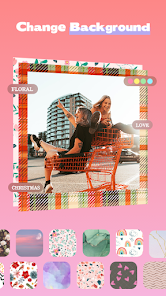
- 🖼️ Background control: You can change the background color or even use a blurred version of your photo as the backdrop. That's a nice touch that apps like Adobe Spark Post don't always include in their free tiers.
- 📏 Border tweaks: The ability to resize borders and round corners is more detailed than what you get in Instagram's built-in collage feature. It's not groundbreaking, but it gives you a bit more polish.
pros
- 👍 No sign-up needed: Unlike Canva, which pushes you to create an account, Yoshion lets you edit and export without any registration. That removes friction for a casual user.
- 👍 Quick export: Saving your collage takes a few seconds, and you get decent resolution. It's faster than PicsArt, which sometimes lags when rendering larger projects.
- 👍 Minimal ads: The ads are there but not overwhelming. You don't get a full-screen popup after every action, which is better than many free collage apps.
cons
- 👎 Limited filters: Compared to PicsArt, the filter selection is tiny. You only get a handful of basic ones, and they look a bit dated. If you want moody aesthetics, you're out of luck.
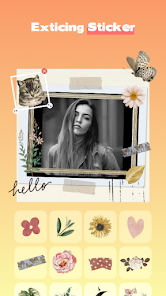
- 👎 No text editing: Unlike Canva, there's no option to add custom text or fonts. You can't even overlay a simple caption, which limits its use for creating quotes or invitations.
- 👎 Stale updates: The app doesn't seem to get regular feature updates. Instagram's collage templates have evolved faster than this app's library.
- 👎 Occasional crashes: On older phones, I noticed the app would freeze after selecting multiple high-res photos. That's frustrating when you've already arranged everything.
Recommended Apps
![]()
16Personalities
16Personalities4
![]()
Zodiac Palm Reader: MagicWay
Reatility Media4.6
![]()
Moblo - 3D furniture modeling
MYTIforge4.1![]()
Magnifier Plus with Flashlight
Digitalchemy, LLC4.6![]()
QR Code Scanner
QR Code Scanner & Barcode Reader4.7![]()
FalFal: Astrology, Tarot, Love
FalFal Team4.8![]()
Christmas Photo Frames
PhotoFramesApps4.6![]()
AI Video Art Creator - Livensa
FERASET4.5![]()
Horoscope of Birth
Denimaks4.4![]()
Make Me Bald Prank
AppTornado2.5![]()
Kling AI: AI Image&Video Maker
Lohas Games Pte. Ltd.4.4![]()
Japan Timetable & Route Search
NAVITIME JAPAN CO., LTD.4.3![]()
Prank Call & Funny Video
TeH Software0![]()
Parallax 3D Live Wallpapers
TarrySoft4.3![]()
AI Chatbot - Nova
ScaleUp4.7















Disclaimer
1.AppInfoLibrary does not represent any developer, nor is it the developer of any App or game.
2.AppInfoLibrary provide custom reviews of Apps written by our own reviewers, and detailed information of these Apps, such as developer contacts, ratings and screenshots.
3.All trademarks, registered trademarks, product names and company names or logos appearing on the site are the property of their respective owners.
4. AppInfoLibrary abides by the federal Digital Millennium Copyright Act (DMCA) by responding to notices of alleged infringement that complies with the DMCA and other applicable laws.
5.If you are the owner or copyright representative and want to delete your information, please contact us info@appinfolibrary.com.
6.All the information on this website is strictly observed all the terms and conditions of Google Ads Advertising policies and Google Unwanted Software policy .














