

MomentCam Cartoons & Stickers

50M+
Installs
Battery Stats Saver
Developer
-
Video Players & Editors
Category
-
Rated for 3+
Content Rating
-
support.momentcamcartoons@repairbatterylife.com
Developer Email
-
https://mojipop.com/mcprivacypolicy.html
Privacy Policy
Screenshots
editor reviews
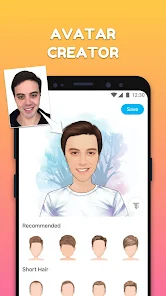
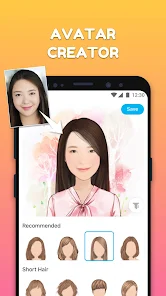
MomentCam is a fun photo-to-cartoon app that turns your regular selfies into illustrated avatars, comic-style stickers, and even animated characters. It's the kind of app you download when you're bored with standard photo filters and want something more playful for your messaging apps or social media profiles. On Google Play, it's been installed over 50 million times, which gives you an idea of how many people have given it a shot. The first thing you notice after opening it is the bright, slightly cluttered interface that screams "try me" with all kinds of sticker packs and cartoon styles. It's free to download, though you'll run into ads pretty quickly, and there's a premium subscription if you want to unlock everything without waiting.
Using MomentCam feels like stepping into a digital dressing room for your face. You take a selfie, and the app instantly maps your features onto dozens of cartoon templates—things like cute animals, superheroes, or classic manga characters. The onboarding is straightforward: you snap a photo, adjust the crop, and then pick a style. What's nice is that you can tweak the result by changing hair, glasses, or background colors, so it doesn't feel completely cookie-cutter. The sticker maker is where the app really shines; you can generate custom stickers for WhatsApp, Telegram, or just save them to your camera roll. That said, the app can be a bit sluggish after heavy use, and some styles look more polished than others. A small practical tip: good lighting on your selfie makes a huge difference in how accurate the cartoon looks.
After spending a few days with MomentCam, I'd say it's best for people who love customizing their online presence with unique, goofy avatars rather than serious photo editing. It's not for someone who needs professional retouching or realistic portraits—apps like FaceApp or Remini are way better for that. What sets MomentCam apart is the sheer variety of cartoon filters and the sticker integration; it's more like fun disposable content than a daily productivity tool. I kept it installed because it's good for a laugh when I'm messaging friends, but I can see someone uninstalling it after a week if they're not into sticker collecting or avatar swaps. The ads can get annoying, but the free version is generous enough to give you a real taste of what it offers.
features
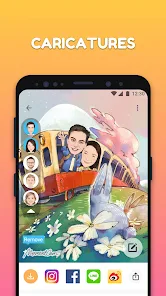
- 🎨 MomentCam turns your selfies into cartoon avatars with dozens of themed styles, from cute animals to superhero costumes. Compared to Prisma, which focuses on artistic painting filters, MomentCam leans heavily into caricature and sticker creation rather than realistic art transformation.
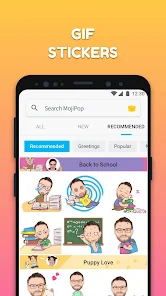
- 🖼️ The sticker maker lets you create custom chat stickers for WhatsApp, Telegram, and iMessage, instantly downloadable into those apps. Prisma doesn't offer sticker integration at all, so MomentCam wins on messaging practicality.
- ⚡ The cartoon styles update regularly with seasonal themes like Halloween pumpkins or Christmas elves, keeping the content fresh. Prisma's filter library is more static and centered on classic painting styles, while MomentCam thrives on trendy, meme-ready looks.
pros
- 👍 MomentCam's cartoon variety is massive—you get dozens of free styles that actually look different from each other, unlike apps like ZMO that recycle similar templates. The character designs feel hand-drawn rather than generic.
- 👍 The sticker integration is seamless: you can create a custom sticker pack in under 30 seconds and use it right away in chats. Other apps like Cartoonify require manual saving and importing, which kills the momentum.
- 👍 The app is lightweight and runs smoothly on older Android phones, which is more than you can say for heavy editors like PicsArt that lag on budget devices.
cons
- 👎 Ads pop up after every sticker export or style change, sometimes pausing your workflow just as you're about to save. Free alternatives like ToonApp are less aggressive with ad placement.
- 👎 The cartoon results often miss subtle facial features—glasses get distorted, and skin tone mapping can look off. Prisma handles facial details with more accuracy and respect for the original photo.
- 👎 The interface feels cluttered with premium upsells and locked sticker packs, making it hard to quickly find what's free. ZMO's interface is cleaner and more transparent about what you actually get without paying.
Recommended Apps
![]()
16Personalities
16Personalities4
![]()
Zodiac Palm Reader: MagicWay
Reatility Media4.6
![]()
Moblo - 3D furniture modeling
MYTIforge4.1![]()
Magnifier Plus with Flashlight
Digitalchemy, LLC4.6![]()
QR Code Scanner
QR Code Scanner & Barcode Reader4.7![]()
FalFal: Astrology, Tarot, Love
FalFal Team4.8![]()
Christmas Photo Frames
PhotoFramesApps4.6![]()
AI Video Art Creator - Livensa
FERASET4.5![]()
Horoscope of Birth
Denimaks4.4![]()
Make Me Bald Prank
AppTornado2.5![]()
Kling AI: AI Image&Video Maker
Lohas Games Pte. Ltd.4.4![]()
Japan Timetable & Route Search
NAVITIME JAPAN CO., LTD.4.3![]()
Prank Call & Funny Video
TeH Software0![]()
Parallax 3D Live Wallpapers
TarrySoft4.3![]()
AI Chatbot - Nova
ScaleUp4.7















Disclaimer
1.AppInfoLibrary does not represent any developer, nor is it the developer of any App or game.
2.AppInfoLibrary provide custom reviews of Apps written by our own reviewers, and detailed information of these Apps, such as developer contacts, ratings and screenshots.
3.All trademarks, registered trademarks, product names and company names or logos appearing on the site are the property of their respective owners.
4. AppInfoLibrary abides by the federal Digital Millennium Copyright Act (DMCA) by responding to notices of alleged infringement that complies with the DMCA and other applicable laws.
5.If you are the owner or copyright representative and want to delete your information, please contact us info@appinfolibrary.com.
6.All the information on this website is strictly observed all the terms and conditions of Google Ads Advertising policies and Google Unwanted Software policy .














