
AI Mirror: AI Art Photo Editor

5M+
Installs
POLYVERSE INC.
Developer
-
Generative AI
Category
-
Rated for 18+
Content Rating
-
aimirror-support@polyversestudio.com
Developer Email
-
https://aimirror.fun/policy
Privacy Policy
Screenshots

editor reviews
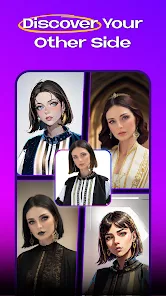
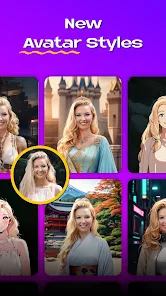
So I stumbled upon AI Mirror the other day, which is basically an all-in-one AI art and photo editing app from POLYVERSE INC. It's not just a simple filter app; it's more like a whole creative studio you carry in your pocket. You can use it to generate brand new images from text prompts, turn your regular selfies into anime or painting styles, and even fix up old blurry photos. The first thing that caught my eye on the Play Store was its massive install count, but honestly, what sealed the deal was that it's free to download and doesn't force you to sign up for anything right away. When I first launched it, the interface felt immediately busy but in an exciting way, like walking into a candy store. There are a ton of buttons and style categories flashing everywhere, and while it can feel a bit overwhelming at first glance, it does a good job hinting at what you can actually do with it.
After getting past the initial sensory overload, actually using the app is pretty straightforward for most tasks. The onboarding doesn't hit you with a tutorial, which I appreciated because I hate being forced to watch a slideshow. I just jumped in and started with the "Anime" style for one of my vacation photos. You pick your source image from the gallery, scroll through the different artistic transformations, and hit apply. The generation takes a good ten to fifteen seconds, so it's not instant, but it's not a dealbreaker. A small tip I found after a few tries is that the results are heavily dependent on how clear your original photo is; a sharp face works wonders, while a blurry group shot comes out pretty muddy. The app also has a text-to-image tool hidden in the menu, though I found it a bit less intuitive than the photo stylization parts because the prompt interpretation can sometimes be way off. It's not completely smooth sailing; occasionally an effect will freeze and you need to restart, but for the most part, it works as advertised.
After messing around with it for a few weeks, I think this app is a genuinely good time for someone who loves seeing their photos transformed into different aesthetics without learning any complex software. However, I don't think it's for people who need precise control or professional-grade editing. What really sets it apart from similar apps like Meitu or FaceApp is the sheer variety of styles; you're not just stuck with beauty filters or aging effects, but you get stuff like 3D cartoon, cyberpunk, and watercolor. The reason I have kept it installed is that it's a quick, fun way to make a phone wallpaper or a funny profile picture. But I can also see someone uninstalling it after a month because the free daily generation credits run out fast, and the app starts pushing that premium subscription pretty aggressively. It's a solid casual tool, but it doesn't replace a proper editor like Lightroom for real photo work.
features
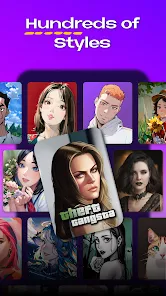
- 🧙 Best Style Variety — Unlike something like Remini which is laser-focused on photo enhancement, AI Mirror gives you tons of art styles, from anime and 3D cartoon to oil painting and retro art. It's less of a utility tool and more of a creative playground, which makes it way more addictive to explore.
- 🧙 Ease of Use for Beginners — The core workflow is extremely simple. You pick a photo, choose a style, and wait. There's no layers, no sliders for exposure or curves, just one-click transformation. Compared to professional tools like Photoshop, this app does all the heavy lifting for you, which is exactly what a casual user wants.
- 🧙 No Mandatory Account — A huge plus is that you can start using the core features without setting up an account. Many similar apps, including Picsart, force you to sign up before even seeing the main interface. AI Mirror lets you play around immediately, which lowers the barrier to entry significantly.
pros
- ✨ Massive Style Library — The biggest strength here is definitely the endless variety of artistic filters. While apps like FaceApp are limited to simple age or gender swaps, AI Mirror offers a massive library of creative styles that actually look distinct from each other, giving you more bang for your buck.
- ✨ Great for Social Media Content — If you like to post unique profile pictures or stories, this app is a goldmine. It turns mediocre selfies into eye-catching art pieces in seconds. Tools like Snapseed are better for correction, but AI Mirror is unmatched for pure visual flair and novelty.
- ✨ One-Stop Shop for Fun Edits — Instead of jumping between a face-smoothing app, a background eraser, and a text-to-image generator, AI Mirror puts most of these tools in one place. This convenience saves a lot of time when you just want to mess around with a single photo.
cons
- 🔥 Aggressive Monetization — The free credits run out surprisingly fast, maybe after ten or fifteen transformations. Then the app relentlessly pushes its subscription. Compared to a one-purchase app like Facetune, the weekly subscription model here feels a bit predatory and stingy.
- 🔥 Inconsistent Output Quality — Not every style works well on every photo. A lot of the time, the AI turns your face into a distorted mess, especially with group photos or complex backgrounds. Apps like Remini are much more reliable at guessing what a face should look like.
- 🔥 Slow Generation Speed — Processing a single image takes a solid 15-30 seconds depending on the style, which feels sluggish when you want to try out multiple effects in a row. This is a lot slower than the near-instant filters you get in basic camera apps like Snapchat.
- 🔥 Lacks Pro Editing Tools — If you need to adjust brightness, remove a specific blemish, or do any fine-tuned correction, this app is not the tool for that. It's strictly for style transfer. Serious photographers will find it useless and will stick with Lightroom or Snapseed.
Recommended Apps
![]()
16Personalities
16Personalities4
![]()
Zodiac Palm Reader: MagicWay
Reatility Media4.6
![]()
Moblo - 3D furniture modeling
MYTIforge4.1![]()
Magnifier Plus with Flashlight
Digitalchemy, LLC4.6![]()
QR Code Scanner
QR Code Scanner & Barcode Reader4.7![]()
FalFal: Astrology, Tarot, Love
FalFal Team4.8![]()
Christmas Photo Frames
PhotoFramesApps4.6![]()
AI Video Art Creator - Livensa
FERASET4.5![]()
Horoscope of Birth
Denimaks4.4![]()
Make Me Bald Prank
AppTornado2.5![]()
Kling AI: AI Image&Video Maker
Lohas Games Pte. Ltd.4.4![]()
Japan Timetable & Route Search
NAVITIME JAPAN CO., LTD.4.3![]()
Prank Call & Funny Video
TeH Software0![]()
Parallax 3D Live Wallpapers
TarrySoft4.3![]()
AI Chatbot - Nova
ScaleUp4.7















Disclaimer
1.AppInfoLibrary does not represent any developer, nor is it the developer of any App or game.
2.AppInfoLibrary provide custom reviews of Apps written by our own reviewers, and detailed information of these Apps, such as developer contacts, ratings and screenshots.
3.All trademarks, registered trademarks, product names and company names or logos appearing on the site are the property of their respective owners.
4. AppInfoLibrary abides by the federal Digital Millennium Copyright Act (DMCA) by responding to notices of alleged infringement that complies with the DMCA and other applicable laws.
5.If you are the owner or copyright representative and want to delete your information, please contact us info@appinfolibrary.com.
6.All the information on this website is strictly observed all the terms and conditions of Google Ads Advertising policies and Google Unwanted Software policy .














