
Photo Effects, Photo Editor

10M+
Installs
Lyrebird Studio
Developer
-
Video Players & Editors
Category
-
Rated for 3+
Content Rating
-
lyrebirdstudio@gmail.com
Developer Email
-
https://lyrebirdstudio.net/privacy_policy.htm
Privacy Policy
Screenshots
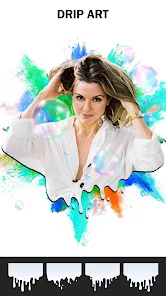
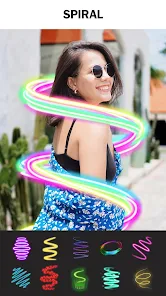

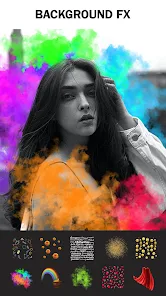
editor reviews
Photo Effects, Photo Editor by Lyrebird Studio is one of those photo enhancement tools you find on Google Play that promises a lot without asking for much upfront. It sits in the crowded photo editing category, right alongside bigger names like PicsArt and Snapseed, but tries to stand out by focusing heavily on preset filters and artistic effects. A normal user might download it simply because they want quick, nice-looking edits without learning layers or curves or any of that technical stuff. The first impression after launching is honestly a bit mixed—you see a clean enough layout with your gallery at the bottom, but there are ads right away, which feels a little pushy for a freshly installed app. Still, the download is free, no mandatory registration, and the install count seems decent, so it doesn't feel like a total waste of time right off the bat.
Once you start actually using it, the experience becomes a lot smoother. You pick a photo from your camera roll, and the app immediately presents you with a row of effect categories at the bottom—things like Vintage, Artistic, or Glitch. Tapping one applies the effect instantly, and you can adjust the intensity with a slider, which is nice. The onboarding is minimal; basically, you just start tapping and sliding. For daily use, the workflow is straightforward: import a photo, browse effects, tweak the strength, maybe crop or add a simple frame, and then export. Some moments feel a little clunky, like when you want to undo an effect and have to back out completely instead of just stepping back once. But small tips—like double-tapping to reset the intensity slider—make it smoother once you figure them out. The interface is not the prettiest, but it gets out of your way, which matters more for quick edits.
After using it for a little while, I think this app fits best for someone who just wants to throw a filter on a photo and share it fast—like for Instagram stories or casual posts. People who enjoy digging into professional-grade tools like Lightroom or even VSCO might find it too shallow, as there is no real layer support or advanced color grading. What makes it different from the pack is the sheer variety of effects, especially the artistic ones that transform photos into sketches or oil paintings—those actually look pretty decent for a free app. However, the constant ads and the lack of a proper undo history make it hard to recommend for serious editing. I could see someone keeping it installed just for those art filters, but most people might uninstall it after a few uses and go back to something more polished like Snapseed.
features
- 💡 Preset Effects Library: The app offers a massive collection of one-tap effects, from retro film looks to glitch and grunge styles. Compared to PicsArt, which buries effects inside menus, this app puts them all on the main screen for instant preview and application.
- 💡 Intensity Slider: Every effect comes with a simple slider to control how strong it looks. In something like VSCO, you often have to poke around separately for fine-tuning, but here it is built right in, making the adjustment feel seamless.
- 💡 Artistic Filters: The standout feature is the set of filters that magically turn ordinary photos into sketch drawings or oil paintings. I have not seen anything quite this accessible in apps like Snapseed, which focuses more on natural photo corrections.
- 💡 No Login Wall: You do not need to create an account or sign in just to edit a photo. That is still rare in this category, where apps like PicsArt push registration immediately to unlock basic tools.
pros
- 🌟 Wide Effect Variety: Compared to Snapseed, which is more about precision tools, this app simply has more creative and fun filters. If you just want to experiment visually, you get more options without extra work.
- 🌟 Simple Interface: Unlike PicsArt, which can feel cluttered with social feeds and store pages, Photo Effects keeps the screen focused on your photo and the tools you need. It respects your time.
- 🌟 Low Learning Curve: You do not need to watch tutorials or read manuals. Everything is based on taps and a single slider. For casual users, that beats Lightroom's complexity every day.
- 🌟 Free to Use: The core editing functions are completely free. Not many apps in this league can say the same without forcing a subscription plan after the first edit.
cons
- 🔴 Aggressive Ads: After almost every edit, an ad plays before you can save your photo. Snapseed, for comparison, has none at all. It really ruins the flow when you are just trying to export quickly.
- 🔴 Limited Advanced Tools: There is no healing brush, no curves adjustment, no layer support. If you need precise retouching, even the free version of PicsArt gives you more control.
- 🔴 No Undo History: You can only undo the last action. If you apply five effects and then realize you want to go back to step two, you are out of luck. That is something even basic editors handle better.
- 🔴 Export Quality Worries: The app does not clearly show if you are exporting at full resolution. In VSCO, you can set output quality, but here it feels like a gamble whether your photo loses sharpness.
Recommended Apps
![]()
16Personalities
16Personalities4
![]()
Zodiac Palm Reader: MagicWay
Reatility Media4.6
![]()
Moblo - 3D furniture modeling
MYTIforge4.1![]()
Magnifier Plus with Flashlight
Digitalchemy, LLC4.6![]()
QR Code Scanner
QR Code Scanner & Barcode Reader4.7![]()
FalFal: Astrology, Tarot, Love
FalFal Team4.8![]()
Christmas Photo Frames
PhotoFramesApps4.6![]()
AI Video Art Creator - Livensa
FERASET4.5![]()
Horoscope of Birth
Denimaks4.4![]()
Make Me Bald Prank
AppTornado2.5![]()
Kling AI: AI Image&Video Maker
Lohas Games Pte. Ltd.4.4![]()
Japan Timetable & Route Search
NAVITIME JAPAN CO., LTD.4.3![]()
Prank Call & Funny Video
TeH Software0![]()
Parallax 3D Live Wallpapers
TarrySoft4.3![]()
AI Chatbot - Nova
ScaleUp4.7















Disclaimer
1.AppInfoLibrary does not represent any developer, nor is it the developer of any App or game.
2.AppInfoLibrary provide custom reviews of Apps written by our own reviewers, and detailed information of these Apps, such as developer contacts, ratings and screenshots.
3.All trademarks, registered trademarks, product names and company names or logos appearing on the site are the property of their respective owners.
4. AppInfoLibrary abides by the federal Digital Millennium Copyright Act (DMCA) by responding to notices of alleged infringement that complies with the DMCA and other applicable laws.
5.If you are the owner or copyright representative and want to delete your information, please contact us info@appinfolibrary.com.
6.All the information on this website is strictly observed all the terms and conditions of Google Ads Advertising policies and Google Unwanted Software policy .














