

Fulldive VR - Virtual Reality

10M+
Installs
Browser by Fulldive Co.
Developer
-
Entertainment
Category
-
Rated for 3+
Content Rating
-
support@fulldive.com
Developer Email
-
https://fulldive.com/privacy-policy.html
Privacy Policy
Screenshots
editor reviews
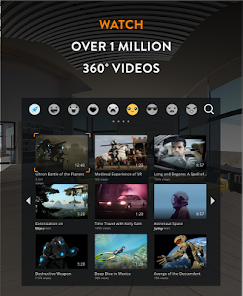
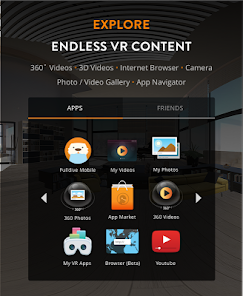
Fulldive VR is a virtual reality browser and content platform that turns your smartphone into a 360-degree viewing device. It's a mixed-genre app, part browser and part media player, letting you explore VR websites, watch 360 videos, and view panoramic photos. Dropping out of nowhere on Google Play and the App Store, this free download sits at over a million installs, though you'll need to register an account to save bookmarks or sync content. The first impression after launch is a bit of a mixed bag—the interface screams minimalist with a dark theme and floating icons, but the initial tutorial is so brief you might feel lost. It just throws you into a hollow virtual room with a few app options, and you're left to figure out how to navigate using a touchpad or head movements. No in-app purchases or forced ads pop up right away, but the lack of guidance makes the start feel clumsier than expected, like stepping into a VR world with no signposts.
Once you get past the onboarding fumble, the hands-on experience reveals a capable tool. You tilt your head to move a cursor and tap to click, which works surprisingly well for browsing web sites in VR. Common steps involve launching the app, selecting a 360 video from a built-in YouTube-like feed, then watching it by tilting your head to look around. The interface stays clean with categories for videos, photos, and websites, but switching between them can be sluggish, and some 3D scenes load with a lag that breaks immersion. A practical tip I picked up: use the voice search feature (if your phone supports it) to skip the tedious virtual keyboard typing. Smooth moments come when you're watching a high-res VR travel clip—the sense of presence is solid and the head tracking feels responsive. But confusing bits creep in when you try to save a webpage; the bookmark system is clunky, with no clear folder organization. For daily use, it's a decent sidekick for quick VR browsing, but the loading times and occasional crashes on older phones remind you it's still a beta-like tool.
After using Fulldive for a while, my judgment is mixed but leaning positive for curious explorers. This app is perfect for people who want a cheap way to peek into VR without buying a headset for a hundred bucks—just pop your phone into a cardboard viewer and go. It's less appealing if you're a hardcore gamer or expect smooth 4K streaming, since the video quality caps at 1440p and the app drains battery fast. Compared to rivals like Jaunt VR or Within, Fulldive leans more into browsing and less into curated content libraries, which gives it a flexible edge but also a rougher polish. What sets it apart is the web browser angle—no other VR app lets you surf random VR sites this directly. I'd keep it installed for the occasional 360 photo session or quick website check, but the app's instability might push casual users to uninstall it after a week. It's a nifty tool, but not a daily driver unless you're really into VR exploration.
features
- 🌐 Built-in 3D Web Browser: Unlike Jaunt VR's fixed content feed, Fulldive lets you type in any URL and browse standard websites in a 360 view, with a virtual keyboard that feels surprisingly functional for poking out short searches.
- 🎥 360 Video Player: It plays local 360 videos from your phone's storage, plus streams from platforms like YouTubeVR, supporting head tracking that feels snappy. Jaunt VR blocks local playback, making this a more open alternative for personal media.
- 📸 Panorama Viewer: You can import panoramic photos and view them with depth cues, which is rare for free apps like this. Within focuses solely on cinematic VR movies, missing this photo utility entirely.
- 🔥 Social Bookmarks Sync: Fulldive offers cloud syncing for your VR bookmarks across devices, a feature absent in basic VR browsers like Firefox Reality, letting you jump from phone to phone without losing your saved spots.
pros
- 🆓 Completely Free with No Ads: While Jaunt VR sneaks in sponsor clips and Within has occasional banner ads, Fulldive stays clean—no pop-ups or paywalls, which is rare in this VR app space.
- 📱 Works with Any Cardboard Headset: Unlike Samsung Internet VR that demands a Gear VR, Fulldive runs on any generic cardboard viewer, making it accessible for budget users with older phones.
- 🔧 Open File Format Support: It handles MP4, JPEG, and PNG files directly from your phone's memory, a step ahead of Jaunt VR's propriety formats that force you to use their own library.
cons
- 🐌 Slow Loading Speeds: The app takes ages to fetch VR websites compared to Jaunt VR's optimized streaming, often freezing mid-load on a 4G connection and making quick browsing a chore.
- 📉 Limited Content Curation: Unlike Within which pushes high-quality movies from creators, Fulldive's feed is mostly random user-uploaded clips, so you waste time sifting through low-res garbage.
- 🔋 Heavy Battery Drain: It sucks juice fast—one 360 video session eats 30% in 20 minutes on a Galaxy S20—while Samsung Internet VR manages power much better with its browser mode.
- 💻 Clunky Virtual Keyboard: Typing URLs or search terms involves painfully rotating your head to select each letter, a nightmare compared to Jaunt VR's voice input, which is faster and less awkward.
Recommended Apps
![]()
16Personalities
16Personalities4
![]()
Zodiac Palm Reader: MagicWay
Reatility Media4.6
![]()
Moblo - 3D furniture modeling
MYTIforge4.1![]()
Magnifier Plus with Flashlight
Digitalchemy, LLC4.6![]()
QR Code Scanner
QR Code Scanner & Barcode Reader4.7![]()
FalFal: Astrology, Tarot, Love
FalFal Team4.8![]()
Christmas Photo Frames
PhotoFramesApps4.6![]()
AI Video Art Creator - Livensa
FERASET4.5![]()
Horoscope of Birth
Denimaks4.4![]()
Make Me Bald Prank
AppTornado2.5![]()
Kling AI: AI Image&Video Maker
Lohas Games Pte. Ltd.4.4![]()
Japan Timetable & Route Search
NAVITIME JAPAN CO., LTD.4.3![]()
Prank Call & Funny Video
TeH Software0![]()
Parallax 3D Live Wallpapers
TarrySoft4.3![]()
AI Chatbot - Nova
ScaleUp4.7















Disclaimer
1.AppInfoLibrary does not represent any developer, nor is it the developer of any App or game.
2.AppInfoLibrary provide custom reviews of Apps written by our own reviewers, and detailed information of these Apps, such as developer contacts, ratings and screenshots.
3.All trademarks, registered trademarks, product names and company names or logos appearing on the site are the property of their respective owners.
4. AppInfoLibrary abides by the federal Digital Millennium Copyright Act (DMCA) by responding to notices of alleged infringement that complies with the DMCA and other applicable laws.
5.If you are the owner or copyright representative and want to delete your information, please contact us info@appinfolibrary.com.
6.All the information on this website is strictly observed all the terms and conditions of Google Ads Advertising policies and Google Unwanted Software policy .














