
PREQUEL AI Filter Photo Editor

10M+
Installs
Prequel Inc.
Developer
-
Video Players & Editors
Category
-
Rated for 3+
Content Rating
-
support@prequelapp.com
Developer Email
-
https://prequel.app/privacy-policy/
Privacy Policy
Screenshots
editor reviews
Prequel is a photo and video editing app that sits right in the popular AI-filter space, aiming to give your regular snapshots a bit of an artistic or moody lift. I first noticed it after getting tired of the same old filters on my usual editing apps, and the install count on Google Play seemed pretty solid, so I figured why not give it a try. Downloading and launching it was straightforward, no forced registration at the start, just a quick look at some flashy before-and-after examples, which honestly made me a little skeptical but also curious. The first impression was that it looks clean and very current, but with the kind of interface that feels like it wants you to tap on things right away, which I guess is the point for a quick-fix editor.
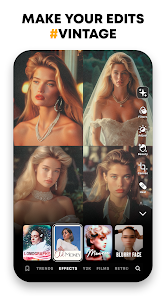
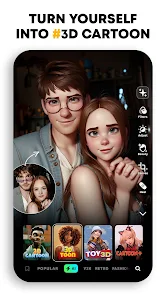
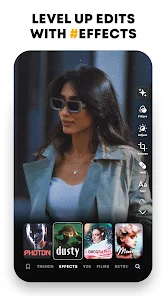
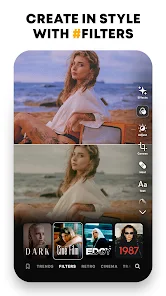
Once I actually started using it, I hit the usual routine: pick a photo from my gallery, then scroll through a long row of filter packs. The interface is pretty minimal, you just tap a pack to see a preview overlaid on your image, and each pack has a handful of different filter variations. There are options for things like retro film looks, anime-style transformations, and more dramatic lighting effects. I spent a good few minutes just tapping through different ones, and the preview loads fast enough that I didn't get bored. One small tip I picked up is that sliding your finger left or right on the filter name lets you adjust the intensity, which is tucked away and easy to miss. Some filters feel like magic, completely changing the mood of a boring selfie, while others feel a bit over-processed and artificial, especially the AI cartoon ones.
After a couple of weeks, I think Prequel is a fun tool for anyone who loves posting stylized content on social media and wants something a bit more distinctive than the standard Instagram filters. It definitely stands out from apps like VSCO or Snapseed by focusing on these bold, almost futuristic looks rather than on the subtle editing controls. The main thing that makes me hesitate is that many of the best-looking filters are locked behind a subscription, which feels a bit stingy when similar apps offer a wider free selection. I can see casual users installing it, using a couple of free filters for a week, then forgetting about it, while dedicated creators might actually find the paid packs worth the money. For now, I am keeping it installed because a couple of the film emulation tones look really nice on my travel photos, but I am not sure how long that novelty will last.
features
- 🎨 The library of AI filters is genuinely diverse, ranging from subtle grain overlays to full-on anime transformations, which feels much broader than what you get in something like Snapseed. Whereas other apps may give you ten versions of a "vintage" look, Prequel offers distinct styles like 90's Horror, AI Portraits, and Cyberpunk that actually change the subject's features, not just the color palette. That variety makes it easy to find a specific mood for a photo without having to manually tweak sliders.
- ⚡ Processing speed is notably fast for AI-heavy effects. I compared it side-by-side with a similar app called Facetune, and Prequel applied its AI cartoon filter in about three seconds, while Facetune took nearly ten seconds for a similar effect on the same image. That quick turn-around makes a big difference when you are editing a batch of photos for an album or a social media post.
- 📱 The integration with video editing is a standout feature that many photo-focused editors don't have. While apps like Afterlight focus purely on stills, Prequel lets you apply many of the same AI filters to short video clips. For example, I used the "Glitch" filter on a ten-second clip of a city street, and it gave it a cool sci-fi vibe without needing to export to a separate video app.
pros
- 👍 Its biggest strength is the sheer variety of ready-to-use creative styles. Apps like Lightroom give you incredible control but require time and skill to achieve a unique look. Prequel hands you that finished aesthetic with one tap, perfect for someone who wants a sophisticated result without the learning curve.
- 👍 The app feels very polished and modern with a clean, intuitive interface. Unlike some older editors like PicsArt which can feel cluttered with ads and too many tools, Prequel's layout is simple. You pick a photo, browse filters, adjust intensity, and export, and that's it. No random pop-ups or confusing menus.
- 👍 It offers genuinely unique effects that are hard to replicate elsewhere. The "Anime" and "Neon" filters, for instance, produce a stylized look that doesn't just feel like a generic overlay but actually analyzes the photo's content to create something artistic, which sets it apart from the simple color presets in most competitors.
cons
- 👎 The free version is very limited, showing you tempting previews of most filters but locking the actual application behind a weekly subscription. Apps like VSCO give you a much larger selection of free presets, and Prequel's model feels overly aggressive. In my first week, I could only use about four filters fully without paying.
- 👎 Some of the more extreme AI filters, like the cartoon or painting effects, produce inconsistent results. On a portrait with clear lighting, it looked great. On a group shot with messy backgrounds, the same filter created blurry artifacts and warped faces, which was pretty disappointing. You often have to experiment to see if an effect will actually work on your specific photo.
- 👎 The app lacks any real manual editing tools. If you want to adjust exposure, contrast, or crop a photo to a specific ratio, you cannot do it inside Prequel. You would have to use a separate app like Snapseed for basic edits before importing it into Prequel for the stylized filters, which adds an extra step to your workflow.
Recommended Apps
![]()
16Personalities
16Personalities4
![]()
Zodiac Palm Reader: MagicWay
Reatility Media4.6
![]()
Moblo - 3D furniture modeling
MYTIforge4.1![]()
Magnifier Plus with Flashlight
Digitalchemy, LLC4.6![]()
QR Code Scanner
QR Code Scanner & Barcode Reader4.7![]()
FalFal: Astrology, Tarot, Love
FalFal Team4.8![]()
Christmas Photo Frames
PhotoFramesApps4.6![]()
AI Video Art Creator - Livensa
FERASET4.5![]()
Horoscope of Birth
Denimaks4.4![]()
Make Me Bald Prank
AppTornado2.5![]()
Kling AI: AI Image&Video Maker
Lohas Games Pte. Ltd.4.4![]()
Japan Timetable & Route Search
NAVITIME JAPAN CO., LTD.4.3![]()
Prank Call & Funny Video
TeH Software0![]()
Parallax 3D Live Wallpapers
TarrySoft4.3![]()
AI Chatbot - Nova
ScaleUp4.7















Disclaimer
1.AppInfoLibrary does not represent any developer, nor is it the developer of any App or game.
2.AppInfoLibrary provide custom reviews of Apps written by our own reviewers, and detailed information of these Apps, such as developer contacts, ratings and screenshots.
3.All trademarks, registered trademarks, product names and company names or logos appearing on the site are the property of their respective owners.
4. AppInfoLibrary abides by the federal Digital Millennium Copyright Act (DMCA) by responding to notices of alleged infringement that complies with the DMCA and other applicable laws.
5.If you are the owner or copyright representative and want to delete your information, please contact us info@appinfolibrary.com.
6.All the information on this website is strictly observed all the terms and conditions of Google Ads Advertising policies and Google Unwanted Software policy .














