
FaceLab: Face Editor, Aging

10M+
Installs
Lyrebird Studio
Developer
-
Video Players & Editors
Category
-
Rated for 3+
Content Rating
-
lyrebirdstudio@gmail.com
Developer Email
-
https://lyrebirdstudio.net/privacy_policy.htm
Privacy Policy
Screenshots
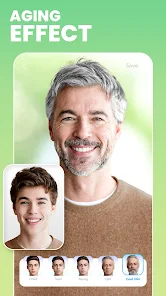
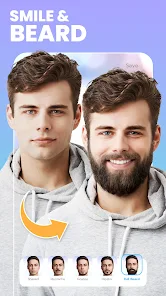
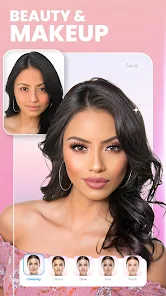

editor reviews
FaceLab is one of those face-editing apps that took over social media feeds a while back, mostly because it lets you do that creepy-cool aging filter where you suddenly look 70. It's basically a selfie editor with a heavy focus on transforming your face – think making yourself look older, younger, changing your gender, or altering your hair and makeup. When you first download it from the App Store (it's free to install, but you'll hit paywalls fast), the launch screen is slick with big promises. The first impression is that it's polished, very visual, and clearly designed for quick, shareable results. You don't need to log in or register anything right away, which is nice because you can just tap "Aging" or "Gender Swap" straight from the main menu and see results in seconds. But you'll notice that almost every cool effect is locked behind a watermark or credits system, which gives you a hint about where the app makes its money.
Using FaceLab is mostly a point-and-wait experience. You pick a photo from your gallery, tap an effect like "Make Me Younger," and the app processes it for a few seconds. The interface is clean, with all the main tools lined up at the bottom – Aging, Young, Gender Swap, Beauty, and a few more. The onboarding is basically non-existent; you figure it out by tapping. For a normal user, the main action is: take a good front-facing photo with even lighting, choose an effect, wait for the processing, and then either share it to Instagram or save it. The results can be surprisingly good when the photo is clear, but they can also be hilarious misses – like transforming your nose into something from a cartoon if the lighting is weird. A practical tip is to use a photo without glasses or heavy shadows, or the app tends to warp those areas. It can feel a bit frustrating when you need to watch an ad or spend credits just to remove the watermark from a decent result.
After spending some time with it, FaceLab feels like a novelty tool rather than a daily driver. I think people who enjoy posting funny aging or gender-swapped photos on social media will get a kick out of it, especially for a few nights with friends. But if you just want a general-purpose photo editor like FaceApp, which has more stable results, FaceLab feels a bit limited. What makes it stand out is the sheer variety of weird filters – you can turn into a zombie, a cartoon, or a wax figure – which other apps don't always offer. But the constant push for in-app purchases and the hit-or-miss quality on non-ideal photos make it hard to recommend keeping it installed. Many users probably download it, use the free aging filter a few times, then uninstall when they want to save a clean image without paying. It's fun for a quick laugh, but not something you'd use every day.
features
- 😬 The aging and face transformation filters are the standout feature here. FaceLab's "Aging" mode tends to produce more dramatic wrinkling and skin texture changes than something like FaceApp, which keeps it subtler. If you want to look like you've lived through three wars instead of just a few extra decades, this is your app. But it can overshoot into "this looks like a wax figure" territory if the lighting is uncooperative.
- 😬 The polish interface is probably the best part. Menus are straightforward, effects load quickly, and you can preview changes instantly without digging into settings. Compared to YouCam Perfect, which buries features under endless tabs, FaceLab keeps its core transformations front and center, making it dead simple for first-time users who just want to see their face age.
- 😬 The "Rescue" feature is a small surprise – it automatically brightens and enhances old or dark photos before you apply effects. This actually helps the app process low-quality selfies better than most competitors. FaceApp often requires a clear high-res image, but FaceLab gives decent results even from dimmer shots, though they still get a bit messy around hair edges.
pros
- 💪 The aging filter is more extreme than FaceApp's. FaceApp is subtle and realistic, but FaceLab goes for pure shock value – deeper wrinkles, more sun spots, and even receding hairlines. Great for laughs at a party, not great if you want a realistic preview of your future self.
- 💪 The gender swap effect handles facial structure better than older apps like Reflect. FaceLab adjusts jawlines and eyebrows more naturally, though it still struggles with heavy makeup or facial hair in the original photo.
- 💪 The cartoon and anime filters are more detailed than those in Meitu. They don't just smooth your face; they actually reshape features into different art styles, which is rare in this price range.
cons
- 👎 Watermarking is aggressive. Almost every free result slaps a giant FaceLab logo across your face, and removing it requires either paying for credits or watching an ad. FaceApp, by contrast, lets you save at least a few clean images daily without payment.
- 👎 Processing can be inconsistent. The app sometimes distorts background objects or multiple faces in the frame. On group selfies, it often picks the wrong face or gives only one person the effect, leaving others untouched.
- 👎 The free model is quite restrictive. You run out of credits quickly, and most interesting filters are locked behind a subscription. Compared to YouCam Perfect, which gives you more free tools without hitting a paywall as fast, FaceLab feels stingier.
- 👎 It doesn't handle side-angle photos well. FaceApp and Meitu still work decently on three-quarter profiles, but FaceLab struggles with those and often warps the nose or jawline into unnatural shapes.
Recommended Apps
![]()
16Personalities
16Personalities4
![]()
Zodiac Palm Reader: MagicWay
Reatility Media4.6
![]()
Moblo - 3D furniture modeling
MYTIforge4.1![]()
Magnifier Plus with Flashlight
Digitalchemy, LLC4.6![]()
QR Code Scanner
QR Code Scanner & Barcode Reader4.7![]()
FalFal: Astrology, Tarot, Love
FalFal Team4.8![]()
Christmas Photo Frames
PhotoFramesApps4.6![]()
AI Video Art Creator - Livensa
FERASET4.5![]()
Horoscope of Birth
Denimaks4.4![]()
Make Me Bald Prank
AppTornado2.5![]()
Kling AI: AI Image&Video Maker
Lohas Games Pte. Ltd.4.4![]()
Japan Timetable & Route Search
NAVITIME JAPAN CO., LTD.4.3![]()
Prank Call & Funny Video
TeH Software0![]()
Parallax 3D Live Wallpapers
TarrySoft4.3![]()
AI Chatbot - Nova
ScaleUp4.7















Disclaimer
1.AppInfoLibrary does not represent any developer, nor is it the developer of any App or game.
2.AppInfoLibrary provide custom reviews of Apps written by our own reviewers, and detailed information of these Apps, such as developer contacts, ratings and screenshots.
3.All trademarks, registered trademarks, product names and company names or logos appearing on the site are the property of their respective owners.
4. AppInfoLibrary abides by the federal Digital Millennium Copyright Act (DMCA) by responding to notices of alleged infringement that complies with the DMCA and other applicable laws.
5.If you are the owner or copyright representative and want to delete your information, please contact us info@appinfolibrary.com.
6.All the information on this website is strictly observed all the terms and conditions of Google Ads Advertising policies and Google Unwanted Software policy .














