
Photo Blender: Picture Mixer

10M+
Installs
VysionApps
Developer
-
Video Players & Editors
Category
-
Rated for 3+
Content Rating
-
vysionapps@gmail.com
Developer Email
-
https://www.iubenda.com/privacy-policy/7995834
Privacy Policy
Screenshots
editor reviews
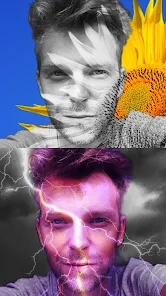
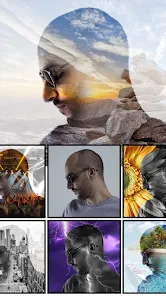
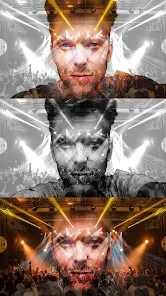
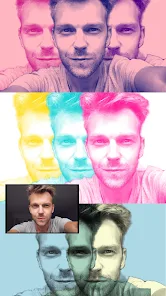
Photo Blender: Picture Mixer is a mobile app that you can grab from Google Play for free. It's exactly what it sounds like - a tool for merging two or more photos together on your phone. You might download it because you want to create a double exposure effect, overlay a texture onto a portrait, or just mash up a few vacation shots without needing Photoshop. The first time you launch it, the interface feels pretty straightforward. There's no account signup, no tutorial shoving in your face, just a main screen with a "Create" button. That kind of simplicity makes you want to actually try it instead of closing it out of frustration. With over 10 million installs, it's clearly a go-to for quick photo blending on Android.
When you actually start using it, you pick a base photo from your gallery, then layer another image on top. The app gives you a slider to adjust transparency, so you can fade the second image in or out. After that, you can tap on blend modes - like Multiply, Screen, Overlay - to change how the two photos interact. The real trick is to use the eraser tool to clean up edges, which works pretty smoothly with your finger. The downside? The interface feels a bit dated, like it hasn't been redesigned in years. But the workflow makes sense: select, blend, adjust, save. You can export the final image in decent resolution, though sometimes colors shift slightly after saving. Small tip: zoom in with two fingers before erasing, it makes a huge difference.
After using it for a few weeks, I think it's a solid pick if you want quick, no-nonsense photo blending without paying for a subscription. It's different from apps like PicsArt or Snapseed because it's laser-focused on this one task, which means less clutter and fewer distractions. Someone who just wants to double expose a profile picture or make a cool album cover will love it. But if you need layers, masks, or text overlays, you'll move on pretty fast. The lack of updates worries me a bit, but since it still works fine on Android 14, I'm keeping it installed for quick edits. For the casual user who doesn't want complexity, this is a hidden gem.
features
- 😀 The blend mode variety is decent - you get about 15 options like Multiply, Screen, Hard Light, and Soft Light. That's enough to create dramatic double exposures or subtle texture overlays, way more than the basic fade slider you'd see in a simple photo editor.
- 😀 The eraser tool lets you fine-tune edges with adjustable brush size and hardness. Unlike QuickPic's basic blending, you can actually remove unwanted overlaps pixel by pixel, which gives a more polished result.
- 😀 You can adjust opacity with a precise slider, not just preset percentages. This is way smoother than in Photo Editor Pro, where you have to type in a number manually.
- 😀 Export resolution stays near the original - you don't get that ugly compression hit that happens in many free blending apps, like when you use Image Blender Lite and it drops to 720p.
pros
- 🌟 Completely free with no watermark - that alone beats PicsArt, which slaps a watermark on everything unless you subscribe. No daily limits either, so you can blend ten photos in a row without a paywall.
- 🌟 No account required. Unlike Adobe Express Mix, which forces a login, you just open Photo Blender and start working immediately. That's a huge time saver.
- 🌟 Lightweight app size - it installs under 20MB, way smaller than Snapseed at over 50MB. It won't clog up your phone's storage, and it loads fast even on older devices.
cons
- 😕 No layers support. You can only blend two photos at once, while PicsArt lets you stack multiple images with individual controls. So if you want a triple exposure, you're out of luck here.
- 😕 The interface looks old and clunky - icons are tiny, text is small, and the layout feels like it's from 2015. Snapseed's modern design makes Photo Blender feel outdated immediately.
- 😕 Occasional color shifts when saving - a blue sky might turn slightly cyan after export, which doesn't happen in Lightroom Mobile. It's a minor bug but annoying when you need precise colors.
- 😕 No undo button in the eraser tool - one slip and you have to start over, while QuickPic's editor has a proper history panel.
Recommended Apps
![]()
16Personalities
16Personalities4
![]()
Zodiac Palm Reader: MagicWay
Reatility Media4.6
![]()
Moblo - 3D furniture modeling
MYTIforge4.1![]()
Magnifier Plus with Flashlight
Digitalchemy, LLC4.6![]()
QR Code Scanner
QR Code Scanner & Barcode Reader4.7![]()
FalFal: Astrology, Tarot, Love
FalFal Team4.8![]()
Christmas Photo Frames
PhotoFramesApps4.6![]()
AI Video Art Creator - Livensa
FERASET4.5![]()
Horoscope of Birth
Denimaks4.4![]()
Make Me Bald Prank
AppTornado2.5![]()
Kling AI: AI Image&Video Maker
Lohas Games Pte. Ltd.4.4![]()
Japan Timetable & Route Search
NAVITIME JAPAN CO., LTD.4.3![]()
Prank Call & Funny Video
TeH Software0![]()
Parallax 3D Live Wallpapers
TarrySoft4.3![]()
AI Chatbot - Nova
ScaleUp4.7















Disclaimer
1.AppInfoLibrary does not represent any developer, nor is it the developer of any App or game.
2.AppInfoLibrary provide custom reviews of Apps written by our own reviewers, and detailed information of these Apps, such as developer contacts, ratings and screenshots.
3.All trademarks, registered trademarks, product names and company names or logos appearing on the site are the property of their respective owners.
4. AppInfoLibrary abides by the federal Digital Millennium Copyright Act (DMCA) by responding to notices of alleged infringement that complies with the DMCA and other applicable laws.
5.If you are the owner or copyright representative and want to delete your information, please contact us info@appinfolibrary.com.
6.All the information on this website is strictly observed all the terms and conditions of Google Ads Advertising policies and Google Unwanted Software policy .














