
Photo Editor by BeFunky

10M+
Installs
BeFunky
Developer
-
Video Players & Editors
Category
-
Rated for 3+
Content Rating
-
support@befunky.com
Developer Email
-
http://www.befunky.com/privacy/
Privacy Policy
Screenshots
editor reviews
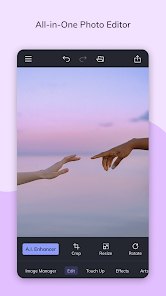
I stumbled across Photo Editor by BeFunky a few weeks ago when I needed to quickly resize a bunch of images for a blog post. It's basically a full-featured photo editing suite packed into a mobile app, sitting somewhere between a simple filter app and a full desktop editor like Photoshop. On the Google Play Store, it's got over 10 million downloads and it's free to download, though you do get prompted to buy the premium version pretty early on. First impression after launching? Honestly, it felt a bit crowded. There are a ton of buttons and options right there on the main screen, which can be a little overwhelming if you're just looking to crop something fast. But once you start poking around, you realize that clutter actually means power.
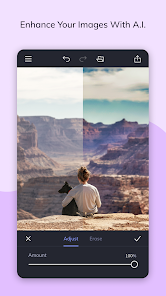
The actual hands-on experience is where BeFunky shines once you get past the initial shock. The onboarding is pretty minimal—you just pick a photo from your gallery or take a new one, and then you're dropped into the editing workspace. The interface is laid out pretty intuitively: bottom toolbar for the main tools like crop, rotate, exposure, and effects, with a top bar for undo, redo, and save. I found the sliders for adjustments responsive and satisfying, and the one-tap auto-fix actually did a decent job on most of my photos. One thing that tripped me up at first was the 'Effects' category—there are dozens of filters, but some are locked behind the premium paywall. It's a bit annoying to tap on a cool effect only to see a padlock. But for basic edits like straightening horizons or boosting colors, it works without a hitch. A small tip: use the built-in 'Batch Editor' mode if you have a bunch of similar photos to process—it saves a ton of time.
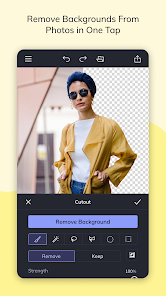
After using it for a while, I'd say BeFunky is fantastic for casual users who want more than just Instagram filters but don't want to learn layers and masks in something like Snapseed or Lightroom Mobile. The big difference here is the sheer breadth of tools—things like the 'Dodgeburn' tool and 'Focus Enhance' are rare in mobile editors. That said, the constant upselling to premium can feel pushy, and some core features like removing backgrounds are premium-only. Compared to PicsArt, it's less cluttered with social features and more focused on actual editing. I ended up keeping it installed because for quick fixes and creative effects, it does the job well, but I can see someone uninstalling if they just need a simple crop now and then.
features
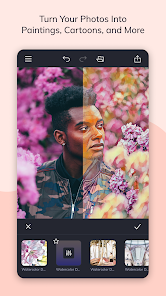
- 🎨 The Effects Library is huge, honestly bigger than what you get in Snapseed or even PicsArt's free tier. There are dozens of filters separated into categories like 'Classic', 'Pop', 'Vintage', and 'Black & White'. Each effect feels distinct, not just the same filter with different strengths. It's great for giving your photos a unique look without having to manually tweak every slider.
- 🔧 The Batch Editing tool is a lifesaver if you work with multiple images. You can select a whole album, apply the same crop, exposure boost, and border to every single photo, then export them all in one go. Other apps like Lightroom Mobile limit batch processing to paid plans, but here you get it free.
- 🖌️ The 'Edit' tab has a 'Dodgeburn' tool that's very rare on mobile. It lets you lighten or darken specific areas of your photo, just like in desktop editors. This is super useful for fixing small spots or adding depth to portraits, something even premium apps like Afterlight don't offer without extra purchases.
pros
- ✨ Simple UI layout once you learn it – Unlike Adobe Photoshop Express where tools are hidden in menus, BeFunky puts everything on one screen, making it fast to jump between adjustments.
- 🔒 No forced sign-up – You can edit photos immediately without creating an account, which is a huge plus compared to Apps like PicsArt that nag you to log in.
- 🏆 Regular updates – The app gets new effects and tools fairly often, so it doesn't feel stale like some other editors that haven't seen a major update in years.
cons
- 🚫 Heavy premium upselling – Every few minutes, you'll hit a padlock icon or a prompt to buy the full version. Snapseed is completely free with no ads or paywalls, which makes it feel more user-friendly.
- 📱 Cluttered interface for beginners – The main screen has too many options at once. PicsArt does a better job at organizing tools into clear categories, while BeFunky just throws everything at you.
- 💾 Slow export with large images – If you're editing high-resolution photos, saving and exporting takes noticeably longer than in Lightroom Mobile, which processes images almost instantly.
Recommended Apps
![]()
16Personalities
16Personalities4
![]()
Zodiac Palm Reader: MagicWay
Reatility Media4.6
![]()
Moblo - 3D furniture modeling
MYTIforge4.1![]()
Magnifier Plus with Flashlight
Digitalchemy, LLC4.6![]()
QR Code Scanner
QR Code Scanner & Barcode Reader4.7![]()
FalFal: Astrology, Tarot, Love
FalFal Team4.8![]()
Christmas Photo Frames
PhotoFramesApps4.6![]()
AI Video Art Creator - Livensa
FERASET4.5![]()
Horoscope of Birth
Denimaks4.4![]()
Make Me Bald Prank
AppTornado2.5![]()
Kling AI: AI Image&Video Maker
Lohas Games Pte. Ltd.4.4![]()
Japan Timetable & Route Search
NAVITIME JAPAN CO., LTD.4.3![]()
Prank Call & Funny Video
TeH Software0![]()
Parallax 3D Live Wallpapers
TarrySoft4.3![]()
AI Chatbot - Nova
ScaleUp4.7















Disclaimer
1.AppInfoLibrary does not represent any developer, nor is it the developer of any App or game.
2.AppInfoLibrary provide custom reviews of Apps written by our own reviewers, and detailed information of these Apps, such as developer contacts, ratings and screenshots.
3.All trademarks, registered trademarks, product names and company names or logos appearing on the site are the property of their respective owners.
4. AppInfoLibrary abides by the federal Digital Millennium Copyright Act (DMCA) by responding to notices of alleged infringement that complies with the DMCA and other applicable laws.
5.If you are the owner or copyright representative and want to delete your information, please contact us info@appinfolibrary.com.
6.All the information on this website is strictly observed all the terms and conditions of Google Ads Advertising policies and Google Unwanted Software policy .














