

Lensa: photo editor & AI art

10M+
Installs
Prisma Labs, Inc.
Developer
-
Video Players & Editors
Category
-
Rated for 3+
Content Rating
-
hello@lensa-ai.com
Developer Email
-
https://tos.lensa-ai.com/privacy
Privacy Policy
Screenshots
editor reviews
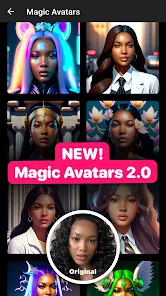
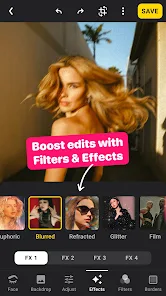
Lensa, made by Prisma Labs, is one of those photo editing apps that tries to be a bit of everything. It hit the App Store and Google Play big time a while back, mainly because its AI art generator went viral. People use it for retouching selfies, swapping backgrounds, and creating those stylized avatars that took over social media. When you first open it after a fresh install, the interface feels pretty polished. It throws a ton of options at you right away, which can be a little overwhelming. The free download gets you basic editing, but the real draw is the AI stuff, which usually needs some sort of in-app purchase or a subscription to unlock. The first impression is "wow, this is slick", but also "hmm, how much is this going to cost me?"
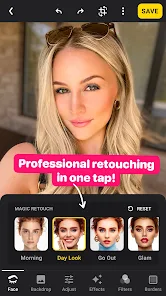
Getting into the actual work, Lensa walks you through a quick tutorial that shows you the basics. For a typical edit, you import a photo from your camera roll. The slider-based controls for brightness, contrast, and saturation feel familiar, but the app really shines with its "Portrait" mode, which lets you smooth skin or make your eyes pop with a single tap. The AI art feature is a whole different beast. You upload a bunch of selfies, wait a few minutes, and then the app spits out a gallery of generated portraits in different styles. The process is smooth, but that waiting time can kill the flow if you're just trying to quickly edit a photo for a text. A practical tip is to stick with the free tools first; the AI stuff is cool, but the basic retouch works just as well for day-to-day use.
After spending a solid few weeks with Lensa, I get why people like it. The AI avatar generator is genuinely impressive and sets it apart from your average tool like Snapseed or even the built-in iPhone editing. If you're into making your profile pictures look professional or just messing around with surreal portraits for fun, this is your app. But for someone who just needs to crop a picture or fix the lighting before posting a story, the paid features feel unnecessary. The subscription model is a bit heavy-handed, and I found myself uninstalling it after the free stuff ran its course, only to come back later when a new AI filter dropped. It is a fun toy, but not a daily driver for most users.
features
- ✨ The app's standout feature is easily the AI art generator, which turns your selfies into custom avatars in various artistic styles. Compared to Picsart, which offers similar AI features, Lensa's results are often more consistent and polished, especially with human faces.
- 🎨 The skin smoothing and portrait fix tools are genuinely good for beginners. They work with a single brush swipe, and the results look natural without the "wax face" effect you sometimes get. VSCO's similar tools take more manual tweaking to get to the same level.
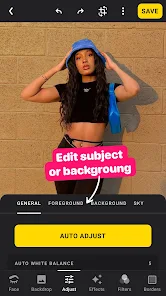
- 📱 The interface is modern and intuitive once you get past the initial feature overload. Unlike Adobe Lightroom, which feels professional but cluttered, Lensa keeps the most popular editing controls right on the home screen for quick edits.
- 🚀 The speed of processing for basic edits like crop and rotate is instant, and the AI background remover works fast even on older phones. It handles this better than many free alternatives that bog down on lower-end hardware.
pros
- 👍 Its biggest win is the lack of a watermark on free edits. Many competitors, like YouCam Perfect, slap a logo on every export unless you pay. Lensa keeps it clean, which is a huge plus for casual users.
- 👍 The AI art styles are regularly updated. Prisma Labs keeps the library fresh with monthly additions, unlike some rivals that get stale quickly. You always have a new reason to open the app.
- 👍 The in-app tutorials are short and actually helpful. They show you the exact steps for a desired effect, making it easy to copy instead of guessing through menus. Thats a better learning curve than most photo apps offer.
cons
- 👎 The subscription pricing feels steep for what you get. A single AI avatar pack costs more than a monthly subscription to a full-featured app like Canva or Adobe Express, which offers much more functionality.
- 👎 The auto-enhance feature is too aggressive. It often oversharpens skin and boosts saturation too high. You end up having to dial it back manually, which defeats the purpose of a one-tap fix compared to Snapseed's more subtle balance.
- 👎 Ads pop up consistently. Even though the free tier has no watermark, you get full-screen video ads after each edit. It interrupts the flow in a way that Picsart handles more discreetly with smaller banners.
- 👎 The export quality is capped for free users. You cannot save images in full resolution unless you pay. This is the same trick used by many apps, but it feels limiting when you want to use the edited photo as a wallpaper or print it.
Recommended Apps
![]()
16Personalities
16Personalities4
![]()
Zodiac Palm Reader: MagicWay
Reatility Media4.6
![]()
Moblo - 3D furniture modeling
MYTIforge4.1![]()
Magnifier Plus with Flashlight
Digitalchemy, LLC4.6![]()
QR Code Scanner
QR Code Scanner & Barcode Reader4.7![]()
FalFal: Astrology, Tarot, Love
FalFal Team4.8![]()
Christmas Photo Frames
PhotoFramesApps4.6![]()
AI Video Art Creator - Livensa
FERASET4.5![]()
Horoscope of Birth
Denimaks4.4![]()
Make Me Bald Prank
AppTornado2.5![]()
Kling AI: AI Image&Video Maker
Lohas Games Pte. Ltd.4.4![]()
Japan Timetable & Route Search
NAVITIME JAPAN CO., LTD.4.3![]()
Prank Call & Funny Video
TeH Software0![]()
Parallax 3D Live Wallpapers
TarrySoft4.3![]()
AI Chatbot - Nova
ScaleUp4.7















Disclaimer
1.AppInfoLibrary does not represent any developer, nor is it the developer of any App or game.
2.AppInfoLibrary provide custom reviews of Apps written by our own reviewers, and detailed information of these Apps, such as developer contacts, ratings and screenshots.
3.All trademarks, registered trademarks, product names and company names or logos appearing on the site are the property of their respective owners.
4. AppInfoLibrary abides by the federal Digital Millennium Copyright Act (DMCA) by responding to notices of alleged infringement that complies with the DMCA and other applicable laws.
5.If you are the owner or copyright representative and want to delete your information, please contact us info@appinfolibrary.com.
6.All the information on this website is strictly observed all the terms and conditions of Google Ads Advertising policies and Google Unwanted Software policy .














