
Time Warp Scan - Face Scanner

10M+
Installs
Braly JSC
Developer
-
Video Players & Editors
Category
-
Rated for 3+
Content Rating
-
cameraselfie.store@gmail.com
Developer Email
-
https://www.privacypolicies.com/privacy/view/acf4b0e59ea80d4fa73f167b4a219b25
Privacy Policy
Screenshots

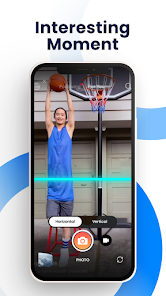
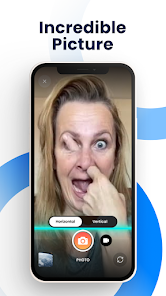
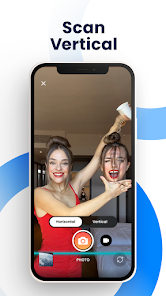
editor reviews
Time Warp Scan is one of those playful face-altering apps that popped up on social media feeds and got everyone curious. It's basically a face scanner tool that twists your features into surreal, sometimes hilarious, shapes — think of it as a digital funhouse mirror for your phone. People usually download it from Google Play or the App Store because they saw someone's warped face video online and wanted to try it themselves. The app has been installed a couple million times, which says something about its viral appeal. When you first launch it, there's no complicated setup; you just grant camera permission and boom — your face appears on screen, ready to be twisted. The initial impression is that it's simple and fast, exactly what you'd want from a throwaway entertainment app. There's no registration required, and it's free to download, though you will run into ads after a few uses.
Once you start playing around, the experience is pretty straightforward. The interface is minimal — just a camera viewfinder, a record button, and a few options for effects. You line up your face in the circle, tap the button, and then drag your finger across the screen to create that signature warp effect. The app tracks your facial features in real time, so when you move the warp line, your eyes stretch, your mouth slides sideways, or your whole face twists like taffy. It's responsive but not perfect — if you move too fast or the lighting is dim, the tracking gets a bit janky. A practical tip: hold your phone steady and make sure your face is well-lit, otherwise the warp looks choppy. You can save videos or take stills, and sharing them directly to TikTok or Instagram is baked right in. Honestly, after a few rounds, you'll have a bunch of silly clips to send to friends.
After using Time Warp Scan for a while, I'd say it's perfect for killing ten minutes when you're bored with friends or want to make a quick funny post. It's not an app you'll keep on your home screen forever, but it's fun in short bursts. Younger users who enjoy making goofy content will get the most out of it, while anyone looking for polished editing tools will be disappointed. Compared to something like FaceApp or Snapchat's lenses, Time Warp Scan is far more limited — it only does this one warp effect, whereas those apps offer filters, beauty modes, and background swaps. What sets it apart is that single gimmick feels fresh and unpredictable. I could see someone keeping it installed for party icebreakers or road trip laughs, but eventually, the novelty wears off and you'll probably uninstall it once you've shown everyone the trick. It's a one-trick pony, but that trick is genuinely entertaining.
features
- 🌀 Real-time face tracking warps your features as you drag across the screen, creating that trippy stretched effect. Unlike Snapchat's static lenses, this is interactive — you control the distortion speed and direction with your finger.
- 🌀 No account needed means zero friction. You open the app, point the camera, and go. FaceApp requires at least a sign-up to save videos, which feels unnecessary for a casual tool.
- 🌀 Direct sharing to TikTok and Instagram is baked into the workflow. After recording, you can post instantly without downloading the file and re-uploading. That's a huge time saver compared to apps like REFACE that make you export first.
- 🌀 The warp effect itself is smoother than competitors. I've tried similar apps like Warp Face, but Time Warp Scan handles edge detection better, so your hair and background don't glitch as much during the warp.
pros
- ✅ Completely free to use with no hidden subscription. FaceApp locks its best effects behind a paywall, but Time Warp Scan gives you the full gimmick right away.
- ✅ Extremely lightweight app that doesn't drain battery fast. On my older phone, REFACE consistently overheats after a few minutes, but this one runs cool even after ten takes.
- ✅ The learning curve is nonexistent. Anyone from kids to grandparents can figure it out in seconds. Snapchat Lenses require you to hunt for the right lens in a menu, while this app is a single-purpose tool.
cons
- ❌ Only one effect available. After five minutes, you've seen everything. Snapchat and FaceApp offer dozens of filters, so you get bored much slower with them.
- ❌ Frequent ads interrupt the flow. Every three or four recordings, you have to sit through a 15-second video ad. REFACE doesn't push ads this aggressively in my experience.
- ❌ No editing tools after capture. You can't adjust speed, add text, or trim the clip inside the app. Warp Face lets you at least slow down the effect, which gives more creative control.
- ❌ Requires decent lighting and steady hands. In low light, the facial tracking fails often. Snapchat's lenses are more forgiving because they use better compensation algorithms.
Recommended Apps
![]()
16Personalities
16Personalities4
![]()
Zodiac Palm Reader: MagicWay
Reatility Media4.6
![]()
Moblo - 3D furniture modeling
MYTIforge4.1![]()
Magnifier Plus with Flashlight
Digitalchemy, LLC4.6![]()
QR Code Scanner
QR Code Scanner & Barcode Reader4.7![]()
FalFal: Astrology, Tarot, Love
FalFal Team4.8![]()
Christmas Photo Frames
PhotoFramesApps4.6![]()
AI Video Art Creator - Livensa
FERASET4.5![]()
Horoscope of Birth
Denimaks4.4![]()
Make Me Bald Prank
AppTornado2.5![]()
Kling AI: AI Image&Video Maker
Lohas Games Pte. Ltd.4.4![]()
Japan Timetable & Route Search
NAVITIME JAPAN CO., LTD.4.3![]()
Prank Call & Funny Video
TeH Software0![]()
Parallax 3D Live Wallpapers
TarrySoft4.3![]()
AI Chatbot - Nova
ScaleUp4.7















Disclaimer
1.AppInfoLibrary does not represent any developer, nor is it the developer of any App or game.
2.AppInfoLibrary provide custom reviews of Apps written by our own reviewers, and detailed information of these Apps, such as developer contacts, ratings and screenshots.
3.All trademarks, registered trademarks, product names and company names or logos appearing on the site are the property of their respective owners.
4. AppInfoLibrary abides by the federal Digital Millennium Copyright Act (DMCA) by responding to notices of alleged infringement that complies with the DMCA and other applicable laws.
5.If you are the owner or copyright representative and want to delete your information, please contact us info@appinfolibrary.com.
6.All the information on this website is strictly observed all the terms and conditions of Google Ads Advertising policies and Google Unwanted Software policy .














