

Ask AI - Chat with Chatbot

10M+
Installs
Codeway Dijital
Developer
-
Generative AI
Category
-
Rated for 3+
Content Rating
-
ask.ai@codeway.co
Developer Email
-
https://static.vegachat.ai/privacy-en.html
Privacy Policy
Screenshots
editor reviews
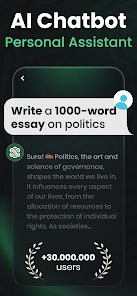
Ask AI by Codeway Dijital is one of those chatbot apps that tries to stand out in a sea of AI assistants. It falls squarely into the productivity and utility category, giving users a way to ask questions, get explanations, or brainstorm ideas directly from their phone. You can download it for free on both Google Play and the App Store, and it has racked up a solid number of installs, though I'm not sure of the exact count. The first thing you notice after launching it is how clean and minimal the interface looks — no clutter, just a simple chat screen with a text bar at the bottom. It feels like opening any messaging app, which makes it easy to jump right in without a tutorial or setup hassle. There is no forced sign-up process at the start, which I really appreciated, but you might need to register later for some advanced features or to save your chat history. In-app purchases pop up here and there, and ads appear occasionally, but they are not too aggressive.
Once you actually start using Ask AI, the experience is mostly smooth. You type in a question or a prompt, and within a few seconds you get a response. The onboarding is basically nonexistent, which is fine because the app is straightforward. I tested it with some everyday stuff, like asking for a quick recipe for dinner or for help rewriting an email, and the answers came back pretty fast. The interface is simple — just a chat window and a keyboard — but the app does have a few extra buttons for clearing conversations or toggling settings. One thing that caught me off guard was how sometimes the AI would misunderstand a follow-up question, especially if I didn't repeat the context. A small tip: keep your prompts clear and direct, and it works better. There is also a feature that lets you switch between different chatbot personalities or modes, though I didn't explore that much. On the whole, the flow felt natural, and I never got lost trying to figure out what to do next.
After using Ask AI for a while, I think it's a decent choice for anyone who needs a quick AI assistant without the fuss. It's not as powerful or nuanced as ChatGPT or Google Gemini, but it holds its own for basic queries and light brainstorming. The free version gives you enough to decide if it's worth keeping, and the paid upgrade removes ads and unlocks more responses. I could see casual users, students, or someone who just wants a second opinion on a text message enjoying it. On the flip side, power users who need deep integration or more advanced features might get frustrated. What makes it stand out compared to similar apps is the clean, no-nonsense design and the quick response time. I ended up keeping it installed because it's handy for small tasks, but I can see why some might uninstall it if they prefer using a web-based tool instead.
features
- ✏️ The app offers a simple and clean chat interface that makes interacting with the AI feel natural, similar to messaging a friend, but it lacks the advanced customization options found in ChatGPT, which lets you adjust tone or style more freely. The standout feature here is the ability to switch between different chatbot personas, giving you varied responses for different needs, like a more formal tone for work or a casual one for fun.
- ⚡ Response speed is impressively fast, often generating answers within seconds even for longer prompts, which beats Google Gemini in some quick tests. However, the outstanding edge is that Ask AI keeps the experience lightweight on your phone, using less battery and data compared to heavier apps, making it ideal for on-the-go use.
- 🔒 Privacy is handled with a simple approach, as the app doesn't require an immediate account to start chatting, unlike many competitors that push sign-ups right away. This reduces friction for new users, but the trade-off is that your chat history might not be saved across devices unless you register later.
pros
- 😊 The app is very beginner-friendly, with zero learning curve and no confusing menus, making it more accessible than ChatGPT, which can feel overwhelming with all its settings. Even my grandma could open it and start typing without help.
- 🚀 It loads quickly and runs smoothly even on older phones, which is a big plus over heavier apps like Claude AI that sometimes lag on mid-range devices. This makes it a reliable choice for people who don't have the latest hardware.
- 🛡️ The optional registration means you can test it out risk-free, and if you decide not to sign up, your privacy is better protected compared to apps like Perplexity that require an account from the start.
cons
- 🐌 The AI can feel less accurate and sometimes gives generic answers when faced with complex or multi-step questions, falling short compared to ChatGPT or Google Gemini, which handle nuanced topics much better.
- 📢 Ads and in-app purchase prompts appear somewhat regularly, and they disrupt the flow of conversation more than in apps like Perplexity, where ads are absent entirely in the free version.
- 🔗 There is no web search or real-time data integration, so the AI only knows what it was trained on up to a certain point, while Google Gemini can pull in fresh information from the internet, making it more useful for current events or trending topics.
- 💾 Chat history management is limited, and without registration, you lose your conversations if you close the app or switch devices, which is a drawback compared to ChatGPT that syncs across platforms seamlessly.
Recommended Apps
![]()
16Personalities
16Personalities4
![]()
Zodiac Palm Reader: MagicWay
Reatility Media4.6
![]()
Moblo - 3D furniture modeling
MYTIforge4.1![]()
Magnifier Plus with Flashlight
Digitalchemy, LLC4.6![]()
QR Code Scanner
QR Code Scanner & Barcode Reader4.7![]()
FalFal: Astrology, Tarot, Love
FalFal Team4.8![]()
Christmas Photo Frames
PhotoFramesApps4.6![]()
AI Video Art Creator - Livensa
FERASET4.5![]()
Horoscope of Birth
Denimaks4.4![]()
Make Me Bald Prank
AppTornado2.5![]()
Kling AI: AI Image&Video Maker
Lohas Games Pte. Ltd.4.4![]()
Japan Timetable & Route Search
NAVITIME JAPAN CO., LTD.4.3![]()
Prank Call & Funny Video
TeH Software0![]()
Parallax 3D Live Wallpapers
TarrySoft4.3![]()
AI Chatbot - Nova
ScaleUp4.7















Disclaimer
1.AppInfoLibrary does not represent any developer, nor is it the developer of any App or game.
2.AppInfoLibrary provide custom reviews of Apps written by our own reviewers, and detailed information of these Apps, such as developer contacts, ratings and screenshots.
3.All trademarks, registered trademarks, product names and company names or logos appearing on the site are the property of their respective owners.
4. AppInfoLibrary abides by the federal Digital Millennium Copyright Act (DMCA) by responding to notices of alleged infringement that complies with the DMCA and other applicable laws.
5.If you are the owner or copyright representative and want to delete your information, please contact us info@appinfolibrary.com.
6.All the information on this website is strictly observed all the terms and conditions of Google Ads Advertising policies and Google Unwanted Software policy .














