

Filters for pictures - FaceArt

10M+
Installs
VysionApps
Developer
-
Entertainment
Category
-
Rated for 3+
Content Rating
-
vysionapps@gmail.com
Developer Email
-
https://www.iubenda.com/privacy-policy/7831612
Privacy Policy
Screenshots

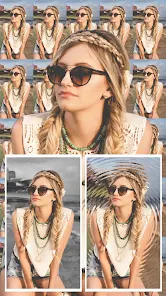
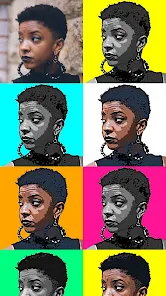
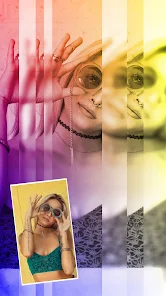
editor reviews
FaceArt is a photo editing app focused primarily on face retouching and applying artistic filters, especially those that can alter your facial features or add stylized effects like cartoon or painting looks. It sits squarely in the beauty and portrait enhancement genre, a space usually dominated by bigger names like Facetune or YouCam Perfect. A lot of people go looking for something that can smooth skin or reshape a jawline without the hefty subscription fees or confusing menus. The first time you launch FaceArt, it feels clean and to the point. You are greeted with a simple prompt to pick a photo from your gallery, so there is no awkward tutorial or forced sign-up staring at you. That immediate sense of usability stands out, because you are not being sold anything right off the bat. The app itself is free to download and seems to pull in a solid number of installs, though the exact count is not plastered everywhere. You will see some in-app purchases to unlock the better filters or remove watermarks, but the basic suite of tools is accessible without paying a cent.
Going through the app day to day, the actual hands-on experience is fairly straightforward. You select a photo, and the editing screen pops up with a bottom toolbar that separates tools into categories like reshape, smooth, and filters. The first step for most people is probably hitting the smooth button to even out skin texture, and the slider works quickly without that weird lag you sometimes get on free editors. The face reshape tool is the main draw here, letting you pinch to make a face slimmer or push features around, and it works on actual facial detection rather than just blurring the whole area. The filter section has a bunch of artistic looks, some that turn your selfie into what looks like a pencil drawing or a pop art poster. A small practical tip is to use the undo button often, because if you overdo the smoothing, faces can start looking like wax figures. The app also has a batch of background blur options, but they are hit or miss depending on how complicated the photo background is.
After using FaceArt for a week or two, I think it finds a decent middle ground. It is not as powerful as Facetune for extremely detailed editing, but it is also not as bloated as some apps that try to do video editing and stickers on top of filters. People who just want to clean up a selfie for social media or try a fun artistic filter without a big learning curve will probably keep it installed. On the flip side, if you are a heavy editor who wants precise control over lighting or color grading, you will hit the wall fast. The app stands out because it focuses strictly on face editing and does not throw a bunch of irrelevant tools at you. It feels lighter and quicker than something like AirBrush, but it lacks the polish and output quality that AirBrush delivers consistently. Honestly, I kept it on my phone for quick touch-ups, but I would not pay for the premium version. It serves its purpose without being life-changing.
features
- 🎨 The AI-powered filters go beyond basic color adjustments. You can turn a regular portrait into a comic book character or an oil painting, and the detection actually follows your face contours instead of just pasting a texture over the whole image. Other apps like Facetune have filters, but they tend to feel more generic, whereas FaceArt's focus on artistic transformation feels more playful and less corporate.
- 🎨 The manual reshape tools are surprisingly responsive. You can widen eyes, shorten your nose, or define your cheekbones with a simple drag gesture. The facial recognition locks onto key points quickly, so you are not fighting the app to keep the edit in one place. YouCam Perfect offers similar reshaping, but it often shifts the background around your face, which looks unnatural, while FaceArt keeps the background mostly intact.
- 🎨 One standout feature is the ability to apply changes with adjustable intensity sliders. A lot of free apps just give you a toggle or a single strength, but here you can dial in exactly how much smoothing or reshaping you want. This prevents that over-processed look that plagues many users on Instagram. It is a small detail, but it makes a big difference for natural results.
pros
- 👍 The user interface is clean and intuitive. Unlike AirBrush, which buries tools behind multiple menus, FaceArt puts the main editing categories right on the home screen. You can start editing in seconds without hunting for a feature.
- 👍 It handles lower-resolution photos well. Facetune often highlights every pixel of a grainy image, making edits look worse, but FaceArt applies a subtle smoothing base that masks rough spots without blurring everything to mush.
- 👍 There are no aggressive ads popping up mid-edit. Many free editors like BeautyPlus shove video ads in your face after every save, but FaceArt keeps them limited to banners, so your workflow is not constantly interrupted.
cons
- 👎 The rendering resolution is capped pretty low unless you pay. You get a noticeably compressed output image with visible artifacts around edited areas, whereas even the free version of Facetune gives you cleaner exports.
- 👎 Facial detection can fail on side profiles or faces with glasses. YouCam Perfect handles angled faces much better, and you have to manually reposition your FaceArt edits if it misidentifies the face shape.
- 👎 Customer support is basically non-existent. I had an issue with a filter crashing the app, and there was no email or chat option. You are on your own, which is a risk compared to more established apps that have active support teams.
- 👎 The watermark on exports is placed right over the face area unless you pay. It feels aggressive compared to other free apps that just put a small logo in the corner, which makes the free version feel less usable for actual sharing.
Recommended Apps
![]()
16Personalities
16Personalities4
![]()
Zodiac Palm Reader: MagicWay
Reatility Media4.6
![]()
Moblo - 3D furniture modeling
MYTIforge4.1![]()
Magnifier Plus with Flashlight
Digitalchemy, LLC4.6![]()
QR Code Scanner
QR Code Scanner & Barcode Reader4.7![]()
FalFal: Astrology, Tarot, Love
FalFal Team4.8![]()
Christmas Photo Frames
PhotoFramesApps4.6![]()
AI Video Art Creator - Livensa
FERASET4.5![]()
Horoscope of Birth
Denimaks4.4![]()
Make Me Bald Prank
AppTornado2.5![]()
Kling AI: AI Image&Video Maker
Lohas Games Pte. Ltd.4.4![]()
Japan Timetable & Route Search
NAVITIME JAPAN CO., LTD.4.3![]()
Prank Call & Funny Video
TeH Software0![]()
Parallax 3D Live Wallpapers
TarrySoft4.3![]()
AI Chatbot - Nova
ScaleUp4.7















Disclaimer
1.AppInfoLibrary does not represent any developer, nor is it the developer of any App or game.
2.AppInfoLibrary provide custom reviews of Apps written by our own reviewers, and detailed information of these Apps, such as developer contacts, ratings and screenshots.
3.All trademarks, registered trademarks, product names and company names or logos appearing on the site are the property of their respective owners.
4. AppInfoLibrary abides by the federal Digital Millennium Copyright Act (DMCA) by responding to notices of alleged infringement that complies with the DMCA and other applicable laws.
5.If you are the owner or copyright representative and want to delete your information, please contact us info@appinfolibrary.com.
6.All the information on this website is strictly observed all the terms and conditions of Google Ads Advertising policies and Google Unwanted Software policy .














