

Planner 5D: Home Design, Decor

10M+
Installs
Planner 5D
Developer
-
Lifestyle
Category
-
Everyone
Content Rating
-
support@planner5d.com
Developer Email
-
https://planner5d.com/pages/privacy/
Privacy Policy
Screenshots




editor reviews
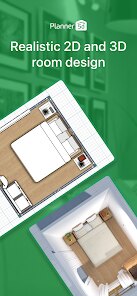
I remember stumbling across Planner 5D when I was trying to figure out if my new sofa would even fit in my living room. It's a home design and interior decoration app that lets you create 2D and 3D floor plans, decorate rooms with real furniture brands, and walk through your creations in virtual reality. It sits firmly in the home improvement and design category, right next to tools like Houzz or SketchUp. I downloaded it from Google Play, and it had millions of installs, so I figured it must be doing something right. The first impression after launching it was a bit of a mixed bag. On one hand, the interface looks clean and modern, and the promise of designing an entire home from scratch on my phone was pretty exciting. On the other hand, it immediately bombards you with in-app purchase offers for subscription plans and premium furniture packs before you've even drawn a single wall. So my initial excitement was quickly tempered by the feeling that this free app was really just a very polished advertisement for itself.
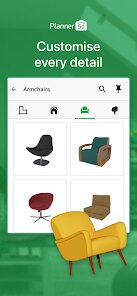
Getting my hands dirty was actually smoother than I expected. The onboarding walks you through the basics of drawing a floor plan, which I did by tracing my living room's rough outline using my finger on the screen. It felt surprisingly intuitive after a few minutes of tapping and dragging. You can choose to design from scratch with a blank canvas, import a photo of an existing floor plan, or use a built-in template if you're just messing around. The main actions are all centered on the bottom toolbar: drawing walls, adding doors and windows, then switching to 3D mode to start furnishing. The 3D mode is where the app shines. You can walk through your virtual room, change the camera angle with a swipe, and swap out furniture from a huge catalog. One tip I picked up was to use the “auto-furnish” feature for empty rooms if you just want to see a full look quickly. But some moments were frustrating, like when I tried to align a wall precisely and the snapping mechanism didn't quite work, leaving a tiny gap that I had to zoom way in to fix. It's a blend of “wow, this is cool” and “wait, why won't this line up?”
After spending a few evenings with it, I feel like Planner 5D is a fantastic tool for someone who wants a visual concept more than a set of architect-approved blueprints. It's perfect for hobby decorators, renters planning a room layout, or anyone who gets a kick out of playing virtual dollhouse for adults. But if you need ultra-precise measurements or full building code compliance, you'll be better off with professional software like AutoCAD or even MagicPlan for more exact scale. What makes Planner 5D stand out is how fast you can go from an idea to a walkable 3D room, especially compared to the clunky interfaces of older design apps. Still, why someone might keep it installed is the same reason they might uninstall it. You have to be willing to either pay for the premium features or accept the constant nudges to unlock more. I ended up deleting it after I finished my layout, but I'd definitely download it again if I moved to a new apartment. It's a fun toy, but not a full replacement for a professional consultation.
features
- 💡 Snap-to-grid accuracy is above average. Compared to something like HomeByMe, Planner 5D's grid snapping feels more refined. You can rotate furniture at finer angles, place it within 1 cm of a wall, and the object indicator changes color to confirm alignment. It's a small thing, but it saves you from endless zooming to check if that lamp is actually on the table or floating an inch away.
- 💡 Real brand furniture with direct purchase links. While Houzz lets you browse products, Planner 5D actually embeds items from stores like IKEA and Crate & Barrel into your design. You can see how a specific Ektorp sofa would look in your room, and there's a “buy now” button that jumps to the real product page. It's not perfect—sometimes the color is off in the render—but it beats guessing dimensions from a website.
- 💡 Huge template library for lazy or busy people. Instead of starting with an empty rectangle, you can pick from dozens of pre-made apartment, house, or office layouts. They range from studio flats to suburban homes. This is a massive time-saver if you're just trying to redecorate a kitchen, because you can load a template, delete the rooms you don't need, and start placing counters immediately. MagicPlan doesn't offer this level of pre-built content at all.
pros
- 📍 The 3D rendering engine is genuinely fast. Even on my three-year-old phone, switching from 2D floor plan to 3D walkthrough took maybe two seconds. Other apps like Roomstyler lag noticeably and sometimes crash when you add too many objects. Planner 5D handles dozens of chairs, rugs, and plants without stuttering.
- 📍 Excellent multi-platform sync. I can start a design on my tablet, pick it up on my phone during a commute, then export the final image from my laptop browser. The cloud saves are seamless, which is rare in this genre. Houzz's app doesn't even let you edit the same project across devices without manual file transfers.
- 📍 Good selection of exterior elements too. Most home design apps focus purely on interiors, but Planner 5D includes fences, driveways, trees, and swimming pools. You can create a full house and garden in one project. The only other app that does this well is Live Home 3D, but that one costs more upfront.
cons
- 🔴 Aggressive monetization kills the free experience. Every time you select a premium furniture pack, a pop-up asks you to subscribe. But the most annoying part is that even some basic wall textures require payment. In comparison, MagicPlan's free version lets you measure and export without any wall material paywalls.
- 🔴 No live collaboration or shareable edit links. If you're working with a partner or an interior designer, you can only share static images or export files. There's no way for two people to edit the same project simultaneously. SketchUp Free, by contrast, allows team sharing through Trimble Connect.
- 🔴 Furniture scaling and resolution inconsistencies. When you drag a sofa from the catalog, it sometimes comes in at a slightly wrong scale—like a twin bed looking like a king. You have to manually adjust dimensions, but the resizing doesn't always keep the aspect ratio, so a chair can become distorted. Houzz's AR feature avoids this by using real-world measurements from manufacturers.
Recommended Apps
![]()
16Personalities
16Personalities4
![]()
Zodiac Palm Reader: MagicWay
Reatility Media4.6
![]()
Moblo - 3D furniture modeling
MYTIforge4.1![]()
Magnifier Plus with Flashlight
Digitalchemy, LLC4.6![]()
QR Code Scanner
QR Code Scanner & Barcode Reader4.7![]()
FalFal: Astrology, Tarot, Love
FalFal Team4.8![]()
Christmas Photo Frames
PhotoFramesApps4.6![]()
AI Video Art Creator - Livensa
FERASET4.5![]()
Horoscope of Birth
Denimaks4.4![]()
Make Me Bald Prank
AppTornado2.5![]()
Kling AI: AI Image&Video Maker
Lohas Games Pte. Ltd.4.4![]()
Japan Timetable & Route Search
NAVITIME JAPAN CO., LTD.4.3![]()
Prank Call & Funny Video
TeH Software0![]()
Parallax 3D Live Wallpapers
TarrySoft4.3![]()
AI Chatbot - Nova
ScaleUp4.7















Disclaimer
1.AppInfoLibrary does not represent any developer, nor is it the developer of any App or game.
2.AppInfoLibrary provide custom reviews of Apps written by our own reviewers, and detailed information of these Apps, such as developer contacts, ratings and screenshots.
3.All trademarks, registered trademarks, product names and company names or logos appearing on the site are the property of their respective owners.
4. AppInfoLibrary abides by the federal Digital Millennium Copyright Act (DMCA) by responding to notices of alleged infringement that complies with the DMCA and other applicable laws.
5.If you are the owner or copyright representative and want to delete your information, please contact us info@appinfolibrary.com.
6.All the information on this website is strictly observed all the terms and conditions of Google Ads Advertising policies and Google Unwanted Software policy .














