

Instasquare Photo Editor: Neon

50M+
Installs
Lyrebird Studio
Developer
-
Video Players & Editors
Category
-
Rated for 3+
Content Rating
-
lyrebirdstudio@gmail.com
Developer Email
-
https://lyrebirdstudio.net/privacy_policy.htm
Privacy Policy
Screenshots
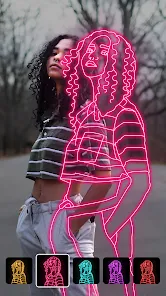

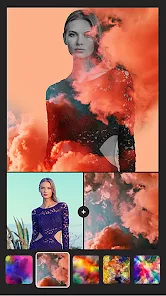
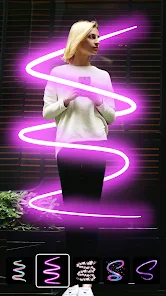
editor reviews
I've been messing around with Instasquare Photo Editor: Neon, made by Lyrebird Studio, and honestly, it's one of those photo editing apps you find when you're just browsing on the Google Play Store. It's squarely in the neon and glitch art filter category, so if you're into that flashy, cyberpunk look for your photos, this is your playground. The first time I downloaded and installed it, I got a pretty straightforward sign-up screen, but the good news is you can skip most of it and just jump in. It's free to install with the usual in-app purchases and the occasional ad, but nothing too pushy. Right after launching it, I saw a bunch of colorful templates and effects plastered across the screen, which gave me that “okay, this is for making my boring shots look like a music video poster” vibe.
Actually using it felt pretty smooth overall. When you open the app, you pick a photo from your gallery, and then you're hit with a row of neon filters, light leaks, and distortion effects. The interface is clean but busy, with sliders for intensity and color tweaks all over the place. I started by applying a violet neon glow to a picture of my cat, and it turned out surprisingly cool, except it took me a minute to figure out how to adjust the glow radius because the icon was tiny. A common workflow for me was selecting the “neon stroke” effect, drawing over the subject, and then fine-tuning with the opacity slider. One neat trick I found: double-tapping an effect resets it, which saved me from starting over when I overdid the glitch. There were a few moments where the app slowed down after applying multiple layers, but nothing that made me rage-quit.
After using it for a while, I think this app shines for anyone who wants quick, stylized edits without opening up something heavy like Photoshop Express. People into vaporwave aesthetics or Instagram story flairs would probably keep it installed because the results are pretty unique. On the flip side, if you just want to adjust brightness or crop your photos, you'd be better off with Snapseed, since this app's strength is its goofy neon effects, not basic fixes. What really makes it different from similar apps like Glitché or Neon Filter is that it bundles a lot of these specific effects into one free package, but the trade-off is that you get pop-up ads after saving an image. I could see myself uninstalling it once the novelty wears off, but for now, it's fun for jazzing up boring shots.
features
- 🎨 The main draw here is the huge library of neon presets and light leaks. Unlike VSCO, which focuses on moody film looks, Instasquare throws in glowing lines, rainbow gradients, and trippy overlays that instantly make any photo look like a 80s sci-fi poster. The “neon stroke” tool lets you literally draw glowing lines on your image, which VSCO totally lacks.
- ⚡ The glitch and distortion effects are pretty wild. You can apply pixel sorting, chromatic aberration, and wave distortions that warp your photo. Compared to Glitché, which charges for similar effects, Instasquare offers a bunch for free, though the quality isn't as refined. Still, for quick meme edits, it's golden.
- 📐 The text and sticker overlay system is decent. You get tons of neon-themed fonts and geometric shapes. PicsArt might have more variety, but here everything is curated to fit the neon vibe, so you don't have to hunt for matching elements.
pros
- 💡 The app is completely free to start, while similar apps like Neon Filter Lite bury advanced effects behind a paywall. You can play with most neon presets without spending a dime, which is rare for this niche.
- ⚙️ The undo and reset buttons are placed very intuitively. In Glitché, sometimes you have to long-press or find a hidden menu, but here it's right there, which saves a lot of frustration when experimenting.
- ✂️ The “glow mask” feature, which lets you highlight specific parts of the photo, works surprisingly well and doesn't require manual lasso tools like in Photoshop. It's a simple brush-based system that feels responsive.
cons
- 📺 Ads pop up after every save, which gets annoying fast. Snapseed and VSCO don't do that for basic edits. It interrupts the flow when you're batch editing.
- 🐢 The app crashes more often than expected, especially after adding three or more layers. Glitché is smoother in performance, even if it costs money. Losing an edit mid-work is a deal-breaker for some.
- 📱 The interface is cluttered with icons that don't have labels, so you have to guess what some do. VSCO's cleaner UI is way more beginner-friendly. I accidentally applied a random distortion twice before figuring out the icon.
Recommended Apps
![]()
16Personalities
16Personalities4
![]()
Zodiac Palm Reader: MagicWay
Reatility Media4.6
![]()
Moblo - 3D furniture modeling
MYTIforge4.1![]()
Magnifier Plus with Flashlight
Digitalchemy, LLC4.6![]()
QR Code Scanner
QR Code Scanner & Barcode Reader4.7![]()
FalFal: Astrology, Tarot, Love
FalFal Team4.8![]()
Christmas Photo Frames
PhotoFramesApps4.6![]()
AI Video Art Creator - Livensa
FERASET4.5![]()
Horoscope of Birth
Denimaks4.4![]()
Make Me Bald Prank
AppTornado2.5![]()
Kling AI: AI Image&Video Maker
Lohas Games Pte. Ltd.4.4![]()
Japan Timetable & Route Search
NAVITIME JAPAN CO., LTD.4.3![]()
Prank Call & Funny Video
TeH Software0![]()
Parallax 3D Live Wallpapers
TarrySoft4.3![]()
AI Chatbot - Nova
ScaleUp4.7















Disclaimer
1.AppInfoLibrary does not represent any developer, nor is it the developer of any App or game.
2.AppInfoLibrary provide custom reviews of Apps written by our own reviewers, and detailed information of these Apps, such as developer contacts, ratings and screenshots.
3.All trademarks, registered trademarks, product names and company names or logos appearing on the site are the property of their respective owners.
4. AppInfoLibrary abides by the federal Digital Millennium Copyright Act (DMCA) by responding to notices of alleged infringement that complies with the DMCA and other applicable laws.
5.If you are the owner or copyright representative and want to delete your information, please contact us info@appinfolibrary.com.
6.All the information on this website is strictly observed all the terms and conditions of Google Ads Advertising policies and Google Unwanted Software policy .














