

Photo Collage Editor

10M+
Installs
MeiHillMan
Developer
-
Video Players & Editors
Category
-
Rated for 3+
Content Rating
-
meihillman0831@gmail.com
Developer Email
-
http://privacypolicy-meihillman.blogspot.com
Privacy Policy
Screenshots
editor reviews
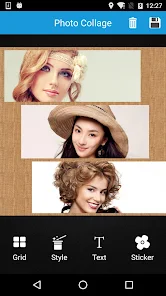
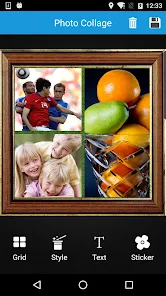
Photo Collage Editor, from the developer MeiHillMan, is a mobile app designed for combining multiple photos into a single frame. It falls under the broader category of photo editing and collage-making tools. Users can pick images from their gallery, arrange them into preset layouts, and add stickers, text, or filters. The app is available on Google Play, and based on the install count, it seems to have a steady but not massive user base. It's free to download, though it does include ads and offers in-app purchases for premium content. When you first open it, the interface looks clean and straightforward. The layout is grid-based, and the home screen immediately presents a collage builder. The first impression is that it's not overwhelming, which is nice. There's no forced registration, so you can start using it right away. That alone makes it feel less like a chore and more like a tool you actually want to open.
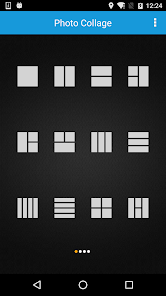
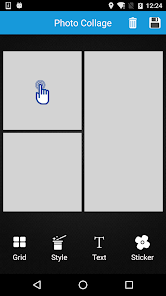
Once you start using the app, the experience is mostly smooth. After tapping "Create Collage," you select photos from your gallery. The app supports anywhere from two to nine photos in a single collage. The templates are sorted by the number of images, which helps speed up the process. The interface is intuitive: you just tap on a cell in the template to swap out the photo. You can pinch to zoom or drag to reposition each image inside its frame. The filter and sticker options are decent, though not as extensive as some competing apps. One small tip I found useful is that you can long-press on a photo to replace it without going back to the gallery selection screen. The app handles orientation changes well, which is handy when you're editing on the go. The only moment of friction comes when you try to save a high-resolution image. It prompts a short ad first, which is a bit annoying but understandable for a free tool.
After using Photo Collage Editor for a while, I think it's a solid choice for casual users who need quick, decent collages without fuss. It's great for posting social media updates or making simple memory boards. But if you're someone who needs precise control over layout or high-end filters, you might find it limiting. Compared to apps like PicsArt or Canva, this one feels more basic. It doesn't offer the same level of creative freedom or editing depth. What makes it stand out, though, is its simplicity. You don't get distracted by too many options. I'd keep it installed for those moments when I need a fast collage. But if I wanted more advanced editing, I'd probably uninstall it. It's a decent tool, but it doesn't replace the bigger players in the photo editing space.
features
- 🟢 The app excels at quick collage creation. You pick your photos, select a layout, and the app instantly arranges them. Unlike PicsArt, which has a more complex interface, this one gets you from zero to a finished collage in under 30 seconds. The templates are clean and modern, so you don't need to spend time adjusting margins or spacing.
- 🟢 The drag-and-drop behavior is surprisingly fluid. You can easily swap images between frames by holding and dragging them. This is something that apps like PhotoGrid don't always handle well. The app keeps the aspect ratio of each photo correct during the swap.
- 🟢 Background customization is a standout feature. You can change the background color, add patterns, or use a blur effect from the images themselves. This gives you more creative control than the basic white or black backgrounds offered by many similar free apps.
- 🟢 The app includes a built-in photo editor for each individual image before adding it to the collage. This is not common in basic collage apps. You can crop, rotate, and apply filters to a single photo without leaving the collage builder. It's a small but useful touch.
pros
- ⭐ The app is completely free to download and use for basic collages. While PicsArt heavily pushes its premium subscription for removing watermarks, this app only shows occasional ads. You can create and save collages without a watermark, which is a big plus for casual users.
- ⭐ The layout variety is generous. There are over 100 different templates, including shapes like hearts and stars. Canva offers more, but Canva is much heavier and more complex. This app keeps it simple but still offers enough choices.
- ⭐ The saving process is straightforward. You can save directly to your gallery in high quality without needing to share through the app first. Some apps like Pic Collage force you into a sharing screen. Here, you just tap save and you're done.
cons
- ⚠️ The ad frequency is higher than I'd like. Every time you save a high-resolution image, you get a full-screen video ad. In contrast, apps like PhotoGrid only show banner ads during editing. The interruptions can break your workflow.
- ⚠️ The text editing options are limited. You can add text, but you can't freely move it anywhere on the collage. It snaps to preset positions. Canva and PicsArt allow full control over text placement and rotation. This feels restrictive.
- ⚠️ There is no cloud backup or sync feature. If you uninstall the app, you lose any unsaved edits. Apps like Canva save your projects online. This is a gap for users who work across multiple devices or want to revisit drafts.
- ⚠️ The filter selection is basic. You get about 20 filters, most of which look similar. There's no way to adjust the intensity of a filter. Apps like Snapseed offer granular control over filters. Here, it's either on or off.
Recommended Apps
![]()
16Personalities
16Personalities4
![]()
Zodiac Palm Reader: MagicWay
Reatility Media4.6
![]()
Moblo - 3D furniture modeling
MYTIforge4.1![]()
Magnifier Plus with Flashlight
Digitalchemy, LLC4.6![]()
QR Code Scanner
QR Code Scanner & Barcode Reader4.7![]()
FalFal: Astrology, Tarot, Love
FalFal Team4.8![]()
Christmas Photo Frames
PhotoFramesApps4.6![]()
AI Video Art Creator - Livensa
FERASET4.5![]()
Horoscope of Birth
Denimaks4.4![]()
Make Me Bald Prank
AppTornado2.5![]()
Kling AI: AI Image&Video Maker
Lohas Games Pte. Ltd.4.4![]()
Japan Timetable & Route Search
NAVITIME JAPAN CO., LTD.4.3![]()
Prank Call & Funny Video
TeH Software0![]()
Parallax 3D Live Wallpapers
TarrySoft4.3![]()
AI Chatbot - Nova
ScaleUp4.7















Disclaimer
1.AppInfoLibrary does not represent any developer, nor is it the developer of any App or game.
2.AppInfoLibrary provide custom reviews of Apps written by our own reviewers, and detailed information of these Apps, such as developer contacts, ratings and screenshots.
3.All trademarks, registered trademarks, product names and company names or logos appearing on the site are the property of their respective owners.
4. AppInfoLibrary abides by the federal Digital Millennium Copyright Act (DMCA) by responding to notices of alleged infringement that complies with the DMCA and other applicable laws.
5.If you are the owner or copyright representative and want to delete your information, please contact us info@appinfolibrary.com.
6.All the information on this website is strictly observed all the terms and conditions of Google Ads Advertising policies and Google Unwanted Software policy .














