
Nebula: Horoscope & Astrology

5M+
Installs
OBRIO
Developer
-
Lifestyle
Category
-
Everyone
Content Rating
-
support.nebula@gen.tech
Developer Email
-
https://asknebula.com/app/privacy
Privacy Policy
Screenshots
editor reviews
Nebula is a lifestyle app focused on astrology and daily horoscopes, sitting somewhere between a casual entertainment tool and a more serious self-discovery companion. It's meant for people who check their zodiac sign out of habit but also want the occasional deeper cosmic insight. I downloaded it from Google Play out of pure boredom one evening, and the install count suggests it's not some obscure side project—it's definitely got a user base. The app is free to download, though I quickly noticed it nudges you toward a subscription after the initial setup. Opening it for the first time felt smooth; the design is dark, modern, and full of subtle animations that make browsing your birth chart feel less like reading a textbook and more like flipping through a personalized digital diary. No mandatory registration popped up right away, which was a relief, but the in-app purchase prompts for a premium version start appearing pretty fast.
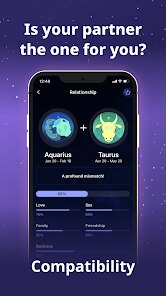
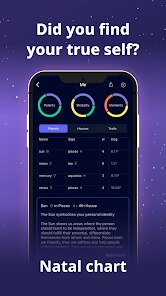
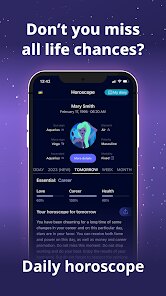
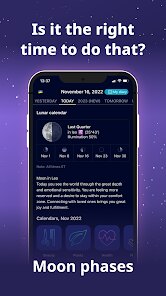
Once I started poking around, the interface felt intuitive enough for a casual user. You land on a daily horoscope tab, which breaks down your day by love, career, and health, and there's a simple swipe gesture to switch between signs. The onboarding walked me through adding my birth date, time, and location—though skipping the exact time still works if you don't know it, just with less detail in the natal chart. The main actions are straightforward: read the daily forecast, check compatibility with friends or partners, or explore your birth chart's planetary positions. I found the birth chart section a bit crowded at first, with overlapping lines and symbols that take a minute to parse, but tapping on individual elements reveals pop-up explanations that actually help. A small tip I picked up: the transit calendar is useful if you're curious about how current planetary movements affect your life, but you'll need to manually select your sign each time unless you set one as default in the profile settings. The smooth moments came from the app's visual feedback; when you scroll through compatibility scores, the color shifts and tiny star effects make even a casual glance feel rewarding. Confusing moments mostly happened when I tried to find past horoscopes—there's no clear archive, so you're stuck with today's forecast unless you upgrade.
After spending a few weeks with it, I think Nebula works best for astrology fans who enjoy a sleek, modern interface but don't need the deep technical dive that something like AstroMatrix offers. It's also fine for people who just want a quick daily read without clutter. However, if you're a serious astrology student or someone who needs detailed ephemeris data, the free version feels too locked down after a week, and the premium cost might not justify itself compared to more traditional apps like Co-Star, which offer community features. What sets Nebula apart is its visual polish—most horoscope apps look dated, but this one feels like a premium product from the moment you open it. I kept it installed because the daily notifications feel personal, not spammy, and the birth chart visuals are genuinely fun to share with friends. That said, I could see someone uninstalling it after the free trial ends if they're not willing to pay for deeper insights, especially since the basic daily horoscope is already available on countless free websites.
features
- 🌌 Daily horoscope breakdown by love, career, and health categories keeps things organized without overwhelming you, unlike Co-Star which often throws vague, cryptic sentences that feel forced.
- 🌌 Birth chart rendering with interactive planet explanations makes learning astrology less intimidating, while apps like Horoscope.com offer static charts that just show positions without context.
- 🌌 Compatibility scoring uses color gradients and visual feedback that make comparing signs feel playful, whereas The Pattern relies on text-heavy personality analysis that can get repetitive.
- 🌌 Push notifications are customizable by interest area and send at user-defined times, which beats TimePassages' rigid notification schedule that can't be easily changed.
pros
- ✨ Interface design is miles ahead of competitors like AstroFuture or DailyHoroscope, with smooth animations, dark mode, and a clutter-free layout that doesn't feel like a 2010 web app.
- ✨ Onboarding process respects your time; you can skip birth time without losing access to daily forecasts, whereas The Pattern forces you to enter it before letting you see anything useful.
- ✨ Free daily content is consistent and readable—no random zodiac puns or irrelevant advice like you'd get from some web-based horoscope sites, which keeps it feeling genuine rather than clickbait.
cons
- ⚠️ Paywall hits fast; after a few days, transit details, advanced chart aspects, and past horoscopes vanish unless you subscribe, while Co-Star offers more free depth without constant upgrade nudges.
- ⚠️ No community or social features, which makes it feel isolated compared to The Pattern's ability to connect with others based on chart compatibility, a big miss for a social app user.
- ⚠️ Astrological accuracy can feel generic; on several days, the house-specific advice was too broad to be truly personal, unlike TimePassages which provides more detailed house placements even in its free tier.
- ⚠️ Limited customization options for chart display; you can't adjust the time zone or house system after initial setup without deleting your profile, a pain for users who travel frequently.
Recommended Apps
![]()
16Personalities
16Personalities4
![]()
Zodiac Palm Reader: MagicWay
Reatility Media4.6
![]()
Moblo - 3D furniture modeling
MYTIforge4.1![]()
Magnifier Plus with Flashlight
Digitalchemy, LLC4.6![]()
QR Code Scanner
QR Code Scanner & Barcode Reader4.7![]()
FalFal: Astrology, Tarot, Love
FalFal Team4.8![]()
Christmas Photo Frames
PhotoFramesApps4.6![]()
AI Video Art Creator - Livensa
FERASET4.5![]()
Horoscope of Birth
Denimaks4.4![]()
Make Me Bald Prank
AppTornado2.5![]()
Kling AI: AI Image&Video Maker
Lohas Games Pte. Ltd.4.4![]()
Japan Timetable & Route Search
NAVITIME JAPAN CO., LTD.4.3![]()
Prank Call & Funny Video
TeH Software0![]()
Parallax 3D Live Wallpapers
TarrySoft4.3![]()
AI Chatbot - Nova
ScaleUp4.7















Disclaimer
1.AppInfoLibrary does not represent any developer, nor is it the developer of any App or game.
2.AppInfoLibrary provide custom reviews of Apps written by our own reviewers, and detailed information of these Apps, such as developer contacts, ratings and screenshots.
3.All trademarks, registered trademarks, product names and company names or logos appearing on the site are the property of their respective owners.
4. AppInfoLibrary abides by the federal Digital Millennium Copyright Act (DMCA) by responding to notices of alleged infringement that complies with the DMCA and other applicable laws.
5.If you are the owner or copyright representative and want to delete your information, please contact us info@appinfolibrary.com.
6.All the information on this website is strictly observed all the terms and conditions of Google Ads Advertising policies and Google Unwanted Software policy .














