

Step Tracker - Pedometer

10M+
Installs
Leap Fitness Group
Developer
-
Health & Fitness
Category
-
Rated for 3+
Content Rating
-
support@leap.app
Developer Email
-
https://leap.app/privacypolicy.html?pkg=steptracker.healthandfitness.walkingtracker.pedometer
Privacy Policy
Screenshots
editor reviews
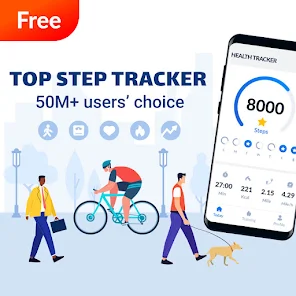
Step Tracker - Pedometer is a straightforward health and fitness app designed primarily for counting steps, distance, and calories burned throughout the day. It falls into the category of pedometer and activity tracking apps, which have become increasingly common on both Google Play and the App Store. A person might check this out if they want a simple way to monitor their daily movement without shelling out extra cash for a smartwatch or a premium subscription. Once you download and install it, the first impression is that it feels fairly clean and uncluttered—no aggressive sign-up forms or ads bombarding you right away. You are prompted to enter just a few basic details like your height and weight for more accurate tracking, and then the app immediately starts counting your steps in the background. It's free to download and works decently out of the box, though you can expect some ads after a while, which is pretty standard for this sort of free app. It also has in-app purchases if you want to remove ads or unlock extra features, but the core step-tracking function is completely usable without spending a cent.
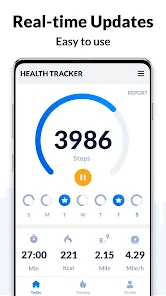
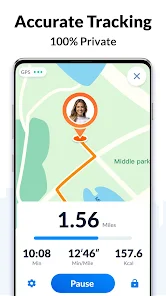
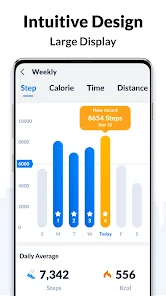
After using the app for a while, the experience is generally smooth, especially the first few days. The interface is simple: there is a large step counter on the main screen, a distance meter, and a calorie display. When you open the app, it shows your daily goal progress in a clear visual way, which makes it easy to check how active you have been so far. One of the most useful features is that it automatically syncs with your phone's built-in sensors, so you don't have to keep the app open or do anything special—just carry your phone as usual. There is also a history section where you can see your step counts from previous days and weeks, which is useful if you like tracking trends. A practical tip is to make sure the app stays active in your phone's battery optimization settings, otherwise the system might stop it from running properly. The app also includes walking routes on a map, which is a nice extra, but the route accuracy depends heavily on your phone's GPS quality. Occasionally, the step counts may seem slightly off compared to a dedicated fitness tracker, but for everyday use, it gives a reasonable estimate.
After using it for a longer period, I believe this app works best for people who just want a lightweight way to keep tabs on their daily activity without investing in hardware or getting tangled in complicated features. It's perfect for casual users, people who walk a lot for commuting or work, or anyone curious about their general movement patterns. On the other hand, serious fitness enthusiasts or runners might find it too basic since it lacks features like heart rate monitoring, pace analysis, or live coaching. Comparing it to an app like Google Fit, Step Tracker feels more focused and less bloated, but Google Fit offers deeper integration with other health services. What makes this app stand out is its low friction—you set it up in less than a minute, and then it just runs silently. Some users might keep it installed as a daily companion, while others might uninstall it if they find step counting alone not motivational enough after a few weeks. Overall, it does exactly what it promises without pretending to be more than a simple step tracker.
features
- 🚶 Accurate step detection in battery-saving mode: The app uses your phone's built-in sensors intelligently, so you don't have to keep the screen on or the app running. It counts steps even when the phone is locked in your pocket, which is crucial for a pedometer. Compared to Pacer, which can sometimes use a lot of battery if you enable GPS tracking too often, Step Tracker handles battery saving much better out of the box, making it more suitable for all-day use.
- 📊 Clean and straightforward daily goal interface: There is a simple goal ring that fills up as you walk, showing percentage progress, steps taken, distance walked, and calories burned right on the home screen. You can adjust your step goal from as low as 1,000 to over 30,000 steps, which allows for personalized targets. This is simpler to read than Google Fit's scattered data tiles, where you often have to scroll to see everything at once.
- 🗺️ Automatic walking route recording: The app can show the path you walked on a map if GPS is enabled. This is useful for users who want to see where they have been on a walk without having to manually start a workout session. In contrast, apps like Pedometer++ require you to manually start a tracking session if you want a route, so Step Tracker's automatic recording gives it a slight edge in convenience for casual tracking.
- 🏆 Weekly summary and achievements: It compiles your steps into weekly reports and gives you virtual badges when you hit milestones like 50,000 steps in a week or a streak of 7 days. This adds a light gamification element without being pushy. Pacer does this too, but Step Tracker's badges feel less like a marketing scheme and more like genuine small rewards, which keeps casual users motivated.
pros
- 🔋 Very low battery consumption compared to Pacer: The app is optimized to run in the background without draining the phone's battery rapidly, making it possible to track steps all day without worrying about charging halfway through.
- 🎯 Minimal setup required compared to Google Fit: You don't need to sign in with an account or grant extensive permissions to start tracking, which removes a major friction point for people who just want to install and go.
- 📱 Lightweight app size compared to Runkeeper: The install size is quite small, so it doesn't take up much storage space on cheaper phones or devices with limited storage, while still offering reliable step counting.
cons
- ⚠️ Inconsistent step accuracy compared to a dedicated Fitbit: The app sometimes overcounts steps when you are driving or using a treadmill, since it relies entirely on phone sensors that cannot distinguish between different movement types as accurately as a wrist-worn device.
- 🚫 No heart rate or sleep tracking compared to Google Fit: For users who want a holistic health view, this app is too limited because it only records steps and walking distance, leaving out metrics like resting heart rate or sleep patterns that competitor apps include.
- 📲 Relies heavily on phone position compared to Pedometer++: Step counting can be inaccurate if the phone is carried in a bag rather than a pocket, because sensor placement relative to the body matters more for pedometer accuracy than users typically realize.
Recommended Apps
![]()
16Personalities
16Personalities4
![]()
Zodiac Palm Reader: MagicWay
Reatility Media4.6
![]()
Moblo - 3D furniture modeling
MYTIforge4.1![]()
Magnifier Plus with Flashlight
Digitalchemy, LLC4.6![]()
QR Code Scanner
QR Code Scanner & Barcode Reader4.7![]()
FalFal: Astrology, Tarot, Love
FalFal Team4.8![]()
Christmas Photo Frames
PhotoFramesApps4.6![]()
AI Video Art Creator - Livensa
FERASET4.5![]()
Horoscope of Birth
Denimaks4.4![]()
Make Me Bald Prank
AppTornado2.5![]()
Kling AI: AI Image&Video Maker
Lohas Games Pte. Ltd.4.4![]()
Japan Timetable & Route Search
NAVITIME JAPAN CO., LTD.4.3![]()
Prank Call & Funny Video
TeH Software0![]()
Parallax 3D Live Wallpapers
TarrySoft4.3![]()
AI Chatbot - Nova
ScaleUp4.7















Disclaimer
1.AppInfoLibrary does not represent any developer, nor is it the developer of any App or game.
2.AppInfoLibrary provide custom reviews of Apps written by our own reviewers, and detailed information of these Apps, such as developer contacts, ratings and screenshots.
3.All trademarks, registered trademarks, product names and company names or logos appearing on the site are the property of their respective owners.
4. AppInfoLibrary abides by the federal Digital Millennium Copyright Act (DMCA) by responding to notices of alleged infringement that complies with the DMCA and other applicable laws.
5.If you are the owner or copyright representative and want to delete your information, please contact us info@appinfolibrary.com.
6.All the information on this website is strictly observed all the terms and conditions of Google Ads Advertising policies and Google Unwanted Software policy .














