
Pic Stitch: Collage Maker

5M+
Installs
Maple Media
Developer
-
Video Players & Editors
Category
-
Rated for 12+
Content Rating
-
contact@maplemedia.io
Developer Email
-
https://maplemedia.io/privacy/
Privacy Policy
Screenshots


editor reviews
Pic Stitch is a collage and photo editing app you can grab from both Google Play and the App Store. It is one of those handy tools that let you combine multiple images into a single frame, with lots of grid layouts and customization options. A lot of people, myself included, end up downloading it when they need to create a quick Instagram post or a fun memory card. The first impression after launching it is pretty straightforward: you see a clean layout with a big plus button to start making a collage, and there are no confusing menus. It feels like a tool meant for fast results, not for playing around with complicated settings.
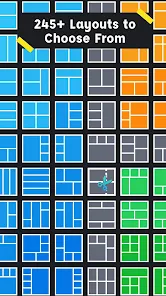
Once you start using Pic Stitch, the real experience kicks in. After tapping the plus button, you pick photos from your gallery, and then you choose a layout from dozens of options. Grids, freestyle shapes, even layouts that mix photos with text areas—there is a lot to pick from. The app does not force you through a tutorial, so you just jump right in. You can adjust the border width, change the background color, and even swap images by dragging them. It felt smooth for basic use, but sometimes the app lagged a tiny bit when I tried to edit a collage with five or six high-resolution pictures. A practical tip I picked up is to apply filters or adjust individual photos before placing them into the collage, because editing a single image inside Pic Stitch is limited compared to editing the whole collage.
After spending a few days with Pic Stitch, I can say it works really well for someone who just wants a fast collage without thinking too much. It is a good fit for casual users, social media enthusiasts, or parents making quick scrapbook collages. But if you are someone who wants advanced photo editing like masking layers or blending modes, you will find it lacking. What sets it apart from apps like Pic Collage or Canva is that Pic Stitch keeps things simpler and more focused on just collages, without trying to be a full design suite. I can see myself keeping it installed for those moments when I need to throw together a photo grid in under a minute. But honestly, I would probably uninstall it if I found a free alternative that offers the same customization without ads popping up occasionally.
features
- 📐 Grid Layout Variety: Pic Stitch offers over 300 grid layouts, which beats the layout selection in many other collage apps like PicCollage. You can pick from classic squares to freestyle shapes, and even adjust each cell size individually. That kind of flexibility is rare in lightweight collage tools.
- ✏️ Custom Border Control: You can change the border width, color, and even apply rounded corners to each photo cell. Unlike some apps where you are stuck with a fixed white margin, Pic Stitch lets you make the border invisible or thick and colored, which helps match the collage style to your photo theme.
- 🖼️ Background and Canvas Options: The app provides a solid collection of background patterns and solid colors. You can also set a custom background from your own photo library. This is something apps like Adobe Spark Post do too, but Pic Stitch keeps it simpler and faster to apply.
pros
- 🎯 Quick and Simple Workflow: You can create a decent collage in under 30 seconds. The interface is not cluttered with unnecessary buttons, so it is great for people who just want results fast. In contrast, apps like Canva take longer because they push you into a broader design environment.
- 🎨 No Signup Required: You can use all core features without creating an account. Unlike many free apps that force you to register or link a social account, Pic Stitch lets you start editing right after download. That is a big plus for privacy-conscious users.
- 🔄 Photo Swap by Drag and Drop: Rearranging images is as easy as dragging a photo to a different cell. This feels natural and intuitive, while some other collage apps make you delete and re-add photos to change their positions.
cons
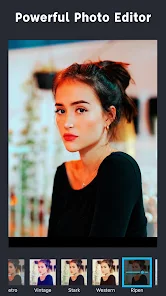
- 🚫 Limited Photo Editing Tools: You cannot adjust brightness, contrast, or apply filters to individual photos inside the collage editor. Apps like PicsArt let you edit each image separately before combining them, but Pic Stitch forces you to edit outside the app first.
- 📺 Frequent Ads: The free version shows an ad after almost every save or export. Compared to Canva's ad-free free tier, this can feel annoying if you are making multiple collages in one session.
- 🔒 Export Quality Limit: The free version limits export resolution to medium quality. If you want high-resolution collages, you need to pay for the pro version. Apps like PhotoGrid offer higher export quality without pushing a paid upgrade so aggressively.
Recommended Apps
![]()
16Personalities
16Personalities4
![]()
Zodiac Palm Reader: MagicWay
Reatility Media4.6
![]()
Moblo - 3D furniture modeling
MYTIforge4.1![]()
Magnifier Plus with Flashlight
Digitalchemy, LLC4.6![]()
QR Code Scanner
QR Code Scanner & Barcode Reader4.7![]()
FalFal: Astrology, Tarot, Love
FalFal Team4.8![]()
Christmas Photo Frames
PhotoFramesApps4.6![]()
AI Video Art Creator - Livensa
FERASET4.5![]()
Horoscope of Birth
Denimaks4.4![]()
Make Me Bald Prank
AppTornado2.5![]()
Kling AI: AI Image&Video Maker
Lohas Games Pte. Ltd.4.4![]()
Japan Timetable & Route Search
NAVITIME JAPAN CO., LTD.4.3![]()
Prank Call & Funny Video
TeH Software0![]()
Parallax 3D Live Wallpapers
TarrySoft4.3![]()
AI Chatbot - Nova
ScaleUp4.7















Disclaimer
1.AppInfoLibrary does not represent any developer, nor is it the developer of any App or game.
2.AppInfoLibrary provide custom reviews of Apps written by our own reviewers, and detailed information of these Apps, such as developer contacts, ratings and screenshots.
3.All trademarks, registered trademarks, product names and company names or logos appearing on the site are the property of their respective owners.
4. AppInfoLibrary abides by the federal Digital Millennium Copyright Act (DMCA) by responding to notices of alleged infringement that complies with the DMCA and other applicable laws.
5.If you are the owner or copyright representative and want to delete your information, please contact us info@appinfolibrary.com.
6.All the information on this website is strictly observed all the terms and conditions of Google Ads Advertising policies and Google Unwanted Software policy .














