
Adobe Photoshop Mix - Cut-out,

10M+
Installs
Adobe
Developer
-
Video Players & Editors
Category
-
Rated for 3+
Content Rating
-
PSMix-Android@adobe.com
Developer Email
-
https://www.adobe.com/privacy/policy.html
Privacy Policy
Screenshots
editor reviews
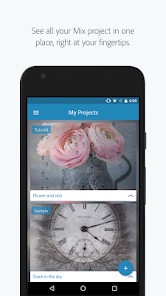
Adobe Photoshop Mix is a photo editing mobile app that focuses on compositing and cut-out work. It belongs to the image manipulation genre, sitting somewhere between a full desktop editor and a basic filter app. Users mainly grab it to isolate subjects from their backgrounds, blend multiple images together, or adjust lighting and color on the go. I first noticed it on Google Play with a fairly solid install count, and it's free to download, though there are in-app purchases for additional content. You don't need an Adobe ID to get started, which was a nice surprise. The first launch felt clean and minimal, with a tutorial that popped up briefly but didn't feel pushy. I appreciated that it didn't shove ads in my face right away, unlike some other free editing tools I've tried.
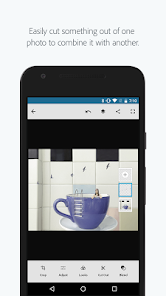
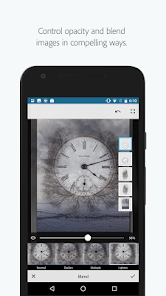
After using it for a few days, the interface grew on me. The onboarding walkthrough shows you the basics of masking and layering, but it's quick enough that you're not stuck reading instructions for ten minutes. The main screen lets you import a photo from your gallery or start with a blank canvas. I found the cut-out tool to be pretty responsive; you just brush over the area you want to keep, and the app does a decent job of detecting edges. There were moments where it struggled with fine details like hair, but that's common even in desktop apps. A common usage step is to import a background image, then layer your cut-out subject on top, adjust opacity or blending modes, and save. The app feels smooth overall, though I did notice a slight lag when working with high-resolution images on an older phone. One small tip: using the refine edge tool after a rough cut saves a lot of time.
From a personal standpoint, I'd recommend this app to people who need quick compositing on the go without booting up a laptop. It's not going to replace Adobe Photoshop on desktop, but for casual users or social media creators, it's more than enough. What sets it apart from apps like PicsArt is the integration with Adobe Creative Cloud, so you can start a project on your phone and finish it on your computer. That said, someone who just wants simple filters or stickers might find it overkill. I've kept it installed because it's useful for last-minute edits, but I can see why someone might uninstall it if they rarely do cut-outs. Compared to TouchRetouch or Snapseed, it's more specialized, which is both its strength and its limitation.
features
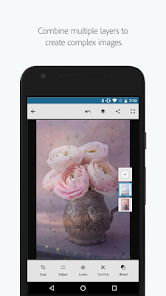
- 😊 Photoshop Mix gives you a proper layer system, similar to what you'd find in Photoshop Express but with more control. You can stack multiple images, adjust blending modes, and rearrange layers, which is rare in mobile editors. Most apps like PicsArt only offer basic stacking without real blending control.
- 😊 The edge detection on the cut-out tool is surprisingly accurate for a free app. It uses Adobe's Sensei AI to figure out where the subject ends and the background starts. In my tests, it handled solid backgrounds nearly perfectly and only stumbled on very detailed edges like fur or lace, which even Photoshop on desktop struggles with.
- 😊 The Creative Cloud sync means you can start a cut-out on your phone, save it as a PSD, and open it on your laptop later. This workflow is a lifesaver if you're traveling or away from your computer. Other mobile editors like Snapseed don't offer this kind of cross-device integration at all.
pros
- 👍 The interface feels more polished and less cluttered than PicsArt. You get a clean workspace without random stickers or ads competing for your attention. It's designed for focused editing, not casual browsing.
- 👍 The brush tools are smoother and more responsive than what I've seen in TouchRetouch. You can zoom in to fine-tune edges without the app lagging, and the undo button actually works instantly without crashing the app.
- 👍 Non-destructive editing is a big win here. You can always go back and tweak your cut-out or adjustments without redoing everything from scratch. Most mobile editors make permanent changes, which is frustrating when you make a mistake.
cons
- 👎 The app has a limited selection of filters and effects compared to Snapseed. If you want to add a dramatic look or vintage vibe, you'll need to switch to another app. Photoshop Mix focuses on compositing, not styling.
- 👎 Free users run into a paywall after a short trial period for advanced features like the healing brush or content-aware fill. PicsArt gives more for free, even if it bombards you with ads.
- 👎 High-resolution images can cause performance dips on older devices. The app chugs when you're working with multiple layers at full resolution, which makes it less reliable if you're on a budget phone.
Recommended Apps
![]()
16Personalities
16Personalities4
![]()
Zodiac Palm Reader: MagicWay
Reatility Media4.6
![]()
Moblo - 3D furniture modeling
MYTIforge4.1![]()
Magnifier Plus with Flashlight
Digitalchemy, LLC4.6![]()
QR Code Scanner
QR Code Scanner & Barcode Reader4.7![]()
FalFal: Astrology, Tarot, Love
FalFal Team4.8![]()
Christmas Photo Frames
PhotoFramesApps4.6![]()
AI Video Art Creator - Livensa
FERASET4.5![]()
Horoscope of Birth
Denimaks4.4![]()
Make Me Bald Prank
AppTornado2.5![]()
Kling AI: AI Image&Video Maker
Lohas Games Pte. Ltd.4.4![]()
Japan Timetable & Route Search
NAVITIME JAPAN CO., LTD.4.3![]()
Prank Call & Funny Video
TeH Software0![]()
Parallax 3D Live Wallpapers
TarrySoft4.3![]()
AI Chatbot - Nova
ScaleUp4.7















Disclaimer
1.AppInfoLibrary does not represent any developer, nor is it the developer of any App or game.
2.AppInfoLibrary provide custom reviews of Apps written by our own reviewers, and detailed information of these Apps, such as developer contacts, ratings and screenshots.
3.All trademarks, registered trademarks, product names and company names or logos appearing on the site are the property of their respective owners.
4. AppInfoLibrary abides by the federal Digital Millennium Copyright Act (DMCA) by responding to notices of alleged infringement that complies with the DMCA and other applicable laws.
5.If you are the owner or copyright representative and want to delete your information, please contact us info@appinfolibrary.com.
6.All the information on this website is strictly observed all the terms and conditions of Google Ads Advertising policies and Google Unwanted Software policy .














