

Face Dance: AI Photo Animator

10M+
Installs
Codeway Dijital
Developer
-
Video Players & Editors
Category
-
Rated for 16+
Content Rating
-
facedance@codeway.co
Developer Email
-
https://storage.googleapis.com/static-assets.facedance.app/legal/facedance-privacy.html
Privacy Policy
Screenshots
editor reviews
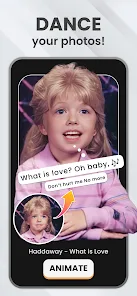
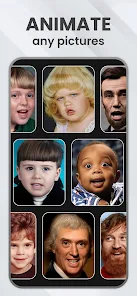
Face Dance: AI Photo Animator, from the same developer behind popular apps like Picsart and Hypic, is basically a mobile tool that brings still photos to life. You take any portrait or selfie, and it animates the face to sing, dance, or make expressions following a chosen template. It's available on both Google Play and the App Store, with over 10 million downloads and a free download with in-app purchases and occasional ads. After installing and launching the app, the first thing that hits you is how simple it is—no complex tutorials, just a big button to select a photo and a gallery of pre-made animations. The app name, Face Dance, sets your expectation right away, and my first impression was that it felt more like a playful toy than a serious editing suite, which is actually its charm for casual users.
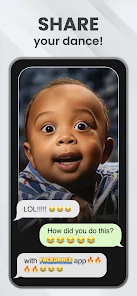
Using Face Dance is surprisingly straightforward, though there are some rough edges. Once you upload a face (a clear, front-facing shot works best), you browse a library of animations—each has a short preview showing a character singing or dancing to a specific song or beat. You pick one, and the app processes the animation in about 10-20 seconds, depending on your device. The interface is clean with a bottom navigation bar: home, templates, and settings. During processing, you might notice some glitchy mouth movements if the face isn't perfectly aligned, but the app gives you the option to adjust the face points manually, which helps. A practical tip: use a photo with good lighting and no extreme angles for the best results. After the animation is done, you can save it to your gallery or share it directly to social media. It's fun, but the ad placements can feel a bit intrusive after every few exports.
After using Face Dance for a few weeks, I think it's a decent option for quick, casual fun, but it's not for everyone. If you enjoy sending silly videos to friends or creating meme-like content for social media, you'll love it. But if you're looking for precise animation controls or photorealistic results, you'd be better off with something like Reface or a full animation software. What sets Face Dance apart is its sheer simplicity and the variety of dance and singing templates—it's less about accuracy and more about entertainment. That said, the limited free content and the paywalled premium templates made me consider uninstalling it after the novelty faded. It could also benefit from better face tracking for side profiles or group shots. Overall, it's a silly, lightweight app that serves its niche well for short bursts of creativity.
features
- 🎵 Face Dance focuses on pre-made animation templates that sync faces to specific songs and dance moves, while Reface leans more toward face-swapping into existing video clips without built-in music coordination. This makes Face Dance more creative and ready-to-share for social media users.
- 🎵 One standout feature is the ability to manually adjust 100+ facial points on the uploaded photo, which is rare in similar apps like Animaker or Avatarify that rely entirely on automatic detection. This ensures better alignment for tricky angles or glasses.
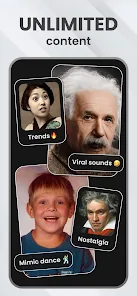
- 🎵 The app offers a growing library of 50+ templates updated weekly, featuring different genres like pop, hip-hop, and dance challenges. In contrast, many competitors like Wombo AI only have a static set of animations, so Face Dance feels fresher over time.
- 🎵 Face Dance lets you preview how the animation will look before processing—something apps like Motion Ninja don't offer. This saves time and reduces frustration when experimenting with different photos.
pros
- ✅ Face Dance is extremely beginner-friendly—just pick a photo and a template, and it handles everything automatically, unlike Morphin which requires manual keyframe editing. This lowers the barrier for non-editors.
- ✅ The animations are exported in high definition without heavy compression, unlike Reface which often produces lower-resolution outputs. This makes your videos look sharper on platforms like TikTok or Instagram.
- ✅ Face Dance processes animations quickly within seconds on modern devices, while similar tools like Avatarify can take over a minute. This speed is a big plus for impatient users who want instant results.
- ✅ The app includes a simple clip editor after animation, letting you trim or loop the video without switching to another tool—extra convenience that apps like Wombo AI lack entirely.
cons
- ❌ Face Dance's face tracking struggles with side profiles, group photos, or faces with heavy accessories like hats or glasses, while Reface handles these much better due to its robust AI. This can ruin the experience for users with non-standard shots.
- ❌ The free version shows full-screen ads after every export, which feels more intrusive than what you get in Morphin's lighter ad placement. It disrupts the flow when you're creating multiple clips in a row.
- ❌ Premium templates are paywalled behind a subscription, unlike Animaker which offers more free options. This limits creativity unless you're willing to pay for the full library.
- ❌ Face Dance lacks batch processing or background customization, features available in Avatarify that let you change the background behind the animated face. This feels like a missed opportunity for customization.
Recommended Apps
![]()
16Personalities
16Personalities4
![]()
Zodiac Palm Reader: MagicWay
Reatility Media4.6
![]()
Moblo - 3D furniture modeling
MYTIforge4.1![]()
Magnifier Plus with Flashlight
Digitalchemy, LLC4.6![]()
QR Code Scanner
QR Code Scanner & Barcode Reader4.7![]()
FalFal: Astrology, Tarot, Love
FalFal Team4.8![]()
Christmas Photo Frames
PhotoFramesApps4.6![]()
AI Video Art Creator - Livensa
FERASET4.5![]()
Horoscope of Birth
Denimaks4.4![]()
Make Me Bald Prank
AppTornado2.5![]()
Kling AI: AI Image&Video Maker
Lohas Games Pte. Ltd.4.4![]()
Japan Timetable & Route Search
NAVITIME JAPAN CO., LTD.4.3![]()
Prank Call & Funny Video
TeH Software0![]()
Parallax 3D Live Wallpapers
TarrySoft4.3![]()
AI Chatbot - Nova
ScaleUp4.7















Disclaimer
1.AppInfoLibrary does not represent any developer, nor is it the developer of any App or game.
2.AppInfoLibrary provide custom reviews of Apps written by our own reviewers, and detailed information of these Apps, such as developer contacts, ratings and screenshots.
3.All trademarks, registered trademarks, product names and company names or logos appearing on the site are the property of their respective owners.
4. AppInfoLibrary abides by the federal Digital Millennium Copyright Act (DMCA) by responding to notices of alleged infringement that complies with the DMCA and other applicable laws.
5.If you are the owner or copyright representative and want to delete your information, please contact us info@appinfolibrary.com.
6.All the information on this website is strictly observed all the terms and conditions of Google Ads Advertising policies and Google Unwanted Software policy .














