
Square InPic - Photo Editor &

50M+
Installs
Studio 8 Apps
Developer
-
Video Players & Editors
Category
-
Rated for 3+
Content Rating
-
studio8apps@gmail.com
Developer Email
-
http://www.studio8apps.com/privacy-policy/
Privacy Policy
Screenshots
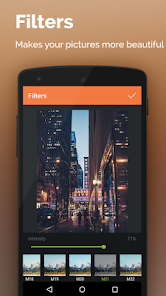
editor reviews
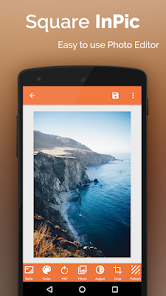
Square InPic is a photo editing app, specifically designed for cropping and resizing images into a square format, which is super handy for social media platforms that favor square posts like Instagram. You'd download it from Google Play or the App Store, and it's free—last time I checked, it had around 10 million installs on Google Play. After launching it, the first thing you notice is how simple it looks: a clean layout with a big “Select Photo” button. No registration required, which I really appreciate because sometimes you just want to edit a picture quickly without signing up. There's ads, but they're not too aggressive, and there's a paid version to remove them.
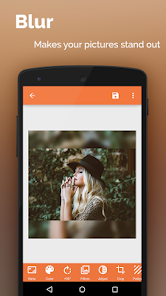
When you start using it, the experience is straightforward. You pick a photo from your gallery, and the app immediately shows you a square cropping area. You can drag the edges or move the image around to get the perfect composition. The main actions are cropping, adding a background color, or selecting a blur effect for the sides. I found the blur background option a bit tricky at first because the intensity adjustment isn't super intuitive—there's no slider, just a preset toggle. But once you get the hang of it, the app flows nicely. You just adjust, tap “Save,” and it's done. A small tip: the app automatically saves to your gallery, but you can also share directly from within the app.
After using it for a while, Square InPic feels like a tool for specific, repetitive tasks. It's great if you're a casual Instagram user who needs to quickly crop photos without dealing with complex editors like Adobe Lightroom. But if you need more advanced edits like filters or text overlays, you'd need another app. What sets it apart is its laser focus on square cropping with background options—something apps like Snapseed handle as part of a larger suite, but not as simply. I kept it installed for quick jobs, but I can see someone uninstalling it if they use Instagram's own cropping tool instead. Overall it's decent for what it does.
features
- 😊 Square Cropping: The core feature is cropping images into a perfect square, which is straightforward and fast compared to Canva where you need to manually set dimensions or dig into templates.
- 😊 Background Effects: You can add solid colors, a blur of the image, or a gradient behind the cropped square, giving your square photos a polished look without needing Photoshop.
- 😊 Simple Interface: There's no learning curve—just select a photo, adjust the crop, choose a background style, and save. InPic keeps it clutter-free, unlike Snapseed which has many tools that can overwhelm new users.
- 😊 Batch Processing: The app lets you quickly crop multiple photos in a row without restarting the process, which is helpful when you have a bunch of Instagram photos to prepare.
pros
- 👍 Speed: Square InPic loads and saves photos faster than Canva, which can lag on older phones due to its heavier design features.
- 👍 Simplicity: The app excels at doing one thing well—cropping to square—while Snapseed offers more tools but requires multiple steps for the same result.
- 👍 Lightweight: At under 10 MB, it takes up minimal phone space compared to Adobe Lightroom (over 100 MB), making it ideal for users with limited storage.
- 👍 No Login: You don't need an account to use it, unlike PicsArt which pushes sign-ups and social features, saving time and privacy concerns.
cons
- 👎 Limited Features: Square InPic only does square cropping and basic backgrounds, while Snapseed offers full editing like exposure, color, and selective adjustments—so you'll need another app for anything else.
- 👎 No Custom Ratios: Unlike Canva where you can set specific dimensions for stories or posts, InPic only works with square format, which feels restrictive for multi-platform users.
- 👎 Quality Loss: I noticed slight compression in saved images compared to Adobe Lightroom, which maintains original quality better when exporting.
- 👎 Basic Blur Tool: The blur background effect has no adjustable intensity slider, unlike PicsArt where you can control blur strength precisely for a more natural look.
Recommended Apps
![]()
16Personalities
16Personalities4
![]()
Zodiac Palm Reader: MagicWay
Reatility Media4.6
![]()
Moblo - 3D furniture modeling
MYTIforge4.1![]()
Magnifier Plus with Flashlight
Digitalchemy, LLC4.6![]()
QR Code Scanner
QR Code Scanner & Barcode Reader4.7![]()
FalFal: Astrology, Tarot, Love
FalFal Team4.8![]()
Christmas Photo Frames
PhotoFramesApps4.6![]()
AI Video Art Creator - Livensa
FERASET4.5![]()
Horoscope of Birth
Denimaks4.4![]()
Make Me Bald Prank
AppTornado2.5![]()
Kling AI: AI Image&Video Maker
Lohas Games Pte. Ltd.4.4![]()
Japan Timetable & Route Search
NAVITIME JAPAN CO., LTD.4.3![]()
Prank Call & Funny Video
TeH Software0![]()
Parallax 3D Live Wallpapers
TarrySoft4.3![]()
AI Chatbot - Nova
ScaleUp4.7















Disclaimer
1.AppInfoLibrary does not represent any developer, nor is it the developer of any App or game.
2.AppInfoLibrary provide custom reviews of Apps written by our own reviewers, and detailed information of these Apps, such as developer contacts, ratings and screenshots.
3.All trademarks, registered trademarks, product names and company names or logos appearing on the site are the property of their respective owners.
4. AppInfoLibrary abides by the federal Digital Millennium Copyright Act (DMCA) by responding to notices of alleged infringement that complies with the DMCA and other applicable laws.
5.If you are the owner or copyright representative and want to delete your information, please contact us info@appinfolibrary.com.
6.All the information on this website is strictly observed all the terms and conditions of Google Ads Advertising policies and Google Unwanted Software policy .














