
LINE Camera - Photo editor

100M+
Installs
LINE (LY Corporation)
Developer
-
Video Players & Editors
Category
-
Rated for 3+
Content Rating
-
linecamera@snowcorp.com
Developer Email
-
https://terms.snow.me/linecamera/privacy
Privacy Policy
Screenshots



editor reviews
I first downloaded LINE Camera after seeing a friend use those cute sticker packs in her Instagram stories. It's basically a photo editing app from the same team behind the LINE messaging app, and it's been around for years now. When you open it for the first time, the interface is bright and playful, which honestly matches the vibe of the app. You can install it for free from Google Play or the App Store, and it has over 100 million downloads on Android, which tells you something about its popularity. There's no forced registration, so you can jump right into editing, though some stickers and filters are locked behind in-app purchases. The first impression is that this app is designed for fun, quick edits rather than serious photo retouching.
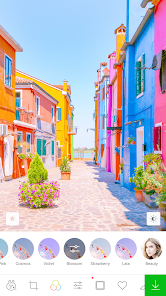
Once you start using it, the layout feels pretty straightforward at first. You pick a photo from your gallery, and then a row of editing tools pops up at the bottom. The collage maker is where I spent most of my time, because you can pick a layout and then adjust each frame individually. The sticker collection is massive, with tons of LINE's own character stickers like Brown and Cony. But here's the thing - the sheer number of stickers and filters can actually slow you down. You'll find yourself scrolling through dozens of categories just to find a specific sticker. On the bright side, the beauty tool works surprisingly well for quick skin smoothing and face slimming, which I found handy for selfies. One small tip: you can save your favorite stickers into a custom set, which saves time later.
After using it for a few weeks, I think LINE Camera is great if you're into kawaii aesthetics or just want to spice up your photos without learning complex editing. It's not for someone looking for precise color grading or professional-level controls - apps like Snapseed or Lightroom are way better for that. What keeps it on my phone is the social sharing aspect; the app has preset formats for Instagram stories and LINE posts, so you can edit and share in one go. But honestly, the ads can be annoying, especially when they pop up right as you're trying to save a photo. I could see casual users keeping it installed for occasional sticker fun, while more serious editors might uninstall it after a week.
features
- 😺 Sticker library - LINE Camera has thousands of stickers, including exclusive LINE character stickers. VSCO doesn't offer anything close to this, so if you love cute decorations, LINE wins hands down.
- 😺 Collage maker - The built-in collage tool is super flexible, letting you mix freeform layouts and grids. Canva also has collages, but LINE's feels more playful and less corporate.
- 😺 Beauty tool - One-tap skin smoothing and face slimming that actually looks natural. You'd need separate apps like Facetune to get similar results, but here it's included for free.
- 😺 Social sharing - Direct export to LINE, Instagram, and Facebook with preset story sizes. Most editors make you crop manually, but LINE pre-sizes everything for you.
pros
- ✨ Massive sticker collection - No other app even comes close. PicsArt has stickers, but mostly generic ones. LINE's are all original and themed around their popular characters.
- ✨ Beginner-friendly - The interface is way simpler than Snapseed or Lightroom. You don't need tutorials to figure out where things are.
- ✨ Free basic tools - You get filters, frames, fonts, and collage options without paying. Many apps lock those behind a subscription these days.
- ✨ Quick sharing - The social templates save time. You don't have to resize anything for different platforms.
cons
- ⚠️ Too many ads - Free version shows ads constantly. Snapseed is completely free with zero ads, which feels much cleaner.
- ⚠️ Cluttered interface - With so many stickers and filters, finding what you need takes longer. PicsArt has a similar problem, but at least it organizes better.
- ⚠️ Limited advanced editing - No curves, no layer support, no selective adjustments. Lightroom or Afterlight are better if you need real control.
- ⚠️ In-app purchases add up - While the app is free, many good sticker packs cost money. Over time, it can get pricey compared to apps like YouCam Perfect that bundle more for free.
Recommended Apps
![]()
16Personalities
16Personalities4
![]()
Zodiac Palm Reader: MagicWay
Reatility Media4.6
![]()
Moblo - 3D furniture modeling
MYTIforge4.1![]()
Magnifier Plus with Flashlight
Digitalchemy, LLC4.6![]()
QR Code Scanner
QR Code Scanner & Barcode Reader4.7![]()
FalFal: Astrology, Tarot, Love
FalFal Team4.8![]()
Christmas Photo Frames
PhotoFramesApps4.6![]()
AI Video Art Creator - Livensa
FERASET4.5![]()
Horoscope of Birth
Denimaks4.4![]()
Make Me Bald Prank
AppTornado2.5![]()
Kling AI: AI Image&Video Maker
Lohas Games Pte. Ltd.4.4![]()
Japan Timetable & Route Search
NAVITIME JAPAN CO., LTD.4.3![]()
Prank Call & Funny Video
TeH Software0![]()
Parallax 3D Live Wallpapers
TarrySoft4.3![]()
AI Chatbot - Nova
ScaleUp4.7















Disclaimer
1.AppInfoLibrary does not represent any developer, nor is it the developer of any App or game.
2.AppInfoLibrary provide custom reviews of Apps written by our own reviewers, and detailed information of these Apps, such as developer contacts, ratings and screenshots.
3.All trademarks, registered trademarks, product names and company names or logos appearing on the site are the property of their respective owners.
4. AppInfoLibrary abides by the federal Digital Millennium Copyright Act (DMCA) by responding to notices of alleged infringement that complies with the DMCA and other applicable laws.
5.If you are the owner or copyright representative and want to delete your information, please contact us info@appinfolibrary.com.
6.All the information on this website is strictly observed all the terms and conditions of Google Ads Advertising policies and Google Unwanted Software policy .














