
Pencil Sketch

50M+
Installs
Dumpling Sandwich Software Inc.
Developer
-
Video Players & Editors
Category
-
Rated for 3+
Content Rating
-
support@dumplingsandwich.com
Developer Email
-
https://dumplingsandwich.com/privacy-policy
Privacy Policy
Screenshots

editor reviews
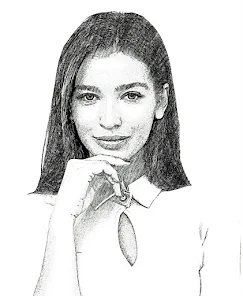
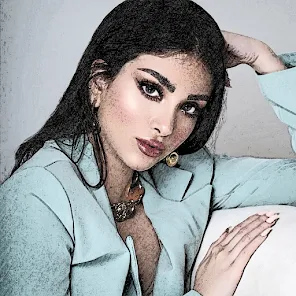
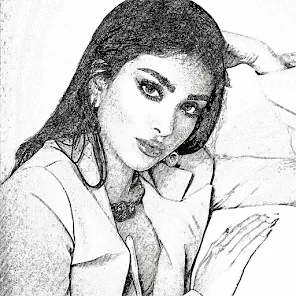
Pencil Sketch is a photo editing app that turns your regular pictures into hand-drawn style artworks. It's the kind of tool you download when you want to make your Instagram feed look a bit more artistic without needing actual drawing skills. On the Google Play Store, it's been installed over 10 million times and is free to download, though there are in-app purchases and occasional ads. The first time you open it, the interface feels straightforward—there's a big button to import a photo from your gallery right upfront. It doesn't bombard you with tutorials, which I actually appreciate. You just pick a picture and instantly see a preview of what the sketch effect would look like.
Once you start using it, you notice how simple the workflow is. After importing a photo, you're taken to a screen with a few slider controls and preset styles. You can adjust the pencil darkness, line thickness, and even add a paper texture background to make it look more authentic. The app runs smoothly on most mid-range phones, and the generation process is almost instant. There's no waiting for a progress bar to crawl. I found myself experimenting with different photos—portraits, landscapes, even some food shots—and each one gave a different feel. One small tip: if your original photo has strong contrast, the sketch effect looks sharper. It's not a tool for detailed manual drawing, but for quick, stylized outputs, it does the job.
After using it for a while, I think it works best for casual users who want a fast way to make their photos look like pencil art without learning complex software. It's not for serious digital artists who need layer control or brush customization. Compared to apps like Prisma or PicsArt, Pencil Sketch feels more focused and less cluttered, but it also lacks versatility. You won't find filters, stickers, or text tools here. What keeps it on my phone is that it handles one thing decently—sketching. What might make me uninstall it is the limited range of effects if I get bored of the same pencil look. It's a niche tool, but for that niche, it works fine.
features
- 🎨 One-tap sketch conversion: Pencil Sketch lets you apply multiple sketch effects with a single tap, unlike apps like Adobe Photoshop Sketch which require manual brushing and layer management. This makes it ideal for quick artistic outputs.
- 🎨 Realistic pencil and paper textures: The app includes options for canvas grain and pencil thickness sliders, giving images a natural hand-drawn feel. Apps like Sketch Guru offer similar effects but often lack the fine-tuning on paper texture.
- 🎨 Instant preview and batch? No! But it updates previews in real-time as you adjust sliders. That's faster than most similar tools where you need to render each effect separately.
pros
- 👍 Simple and fast: No onboarding hurdles or confusing menus. You can open a photo and get a sketch in under ten seconds. It's actually faster than Prisma or Snapchat's art filters for this specific style.
- 👍 Lightweight app size: Takes up less than 30MB on Android, which is nice for phones with limited storage. By contrast, PicsArt is bloated with features and hogs over 100MB.
- 👍 Offline support: Most effects work without internet. That's a big plus over many trendy art filter apps that rely on cloud processing.
cons
- 👎 Limited effect variety: You only get pencil sketch styles, no watercolor or charcoal options. Sketchbook Pro and even free apps like PicsArt offer more diverse drawing tools and effects.
- 👎 Persistent ads: The free version shows ads between each saved image, which can get annoying fast. Competing apps like Sketch Me! have fewer interruptions.
- 👎 Resolution cap on exported sketches: The output resolution seems capped unless you pay. For users who want high-res prints, this is a letdown compared to Adobe Capture's clear export options.
Recommended Apps
![]()
16Personalities
16Personalities4
![]()
Zodiac Palm Reader: MagicWay
Reatility Media4.6
![]()
Moblo - 3D furniture modeling
MYTIforge4.1![]()
Magnifier Plus with Flashlight
Digitalchemy, LLC4.6![]()
QR Code Scanner
QR Code Scanner & Barcode Reader4.7![]()
FalFal: Astrology, Tarot, Love
FalFal Team4.8![]()
Christmas Photo Frames
PhotoFramesApps4.6![]()
AI Video Art Creator - Livensa
FERASET4.5![]()
Horoscope of Birth
Denimaks4.4![]()
Make Me Bald Prank
AppTornado2.5![]()
Kling AI: AI Image&Video Maker
Lohas Games Pte. Ltd.4.4![]()
Japan Timetable & Route Search
NAVITIME JAPAN CO., LTD.4.3![]()
Prank Call & Funny Video
TeH Software0![]()
Parallax 3D Live Wallpapers
TarrySoft4.3![]()
AI Chatbot - Nova
ScaleUp4.7















Disclaimer
1.AppInfoLibrary does not represent any developer, nor is it the developer of any App or game.
2.AppInfoLibrary provide custom reviews of Apps written by our own reviewers, and detailed information of these Apps, such as developer contacts, ratings and screenshots.
3.All trademarks, registered trademarks, product names and company names or logos appearing on the site are the property of their respective owners.
4. AppInfoLibrary abides by the federal Digital Millennium Copyright Act (DMCA) by responding to notices of alleged infringement that complies with the DMCA and other applicable laws.
5.If you are the owner or copyright representative and want to delete your information, please contact us info@appinfolibrary.com.
6.All the information on this website is strictly observed all the terms and conditions of Google Ads Advertising policies and Google Unwanted Software policy .














