
ToonMe - cartoons from photos

50M+
Installs
Linerock Investments LTD
Developer
-
Video Players & Editors
Category
-
Rated for 3+
Content Rating
-
support@pho.to
Developer Email
-
https://pho.to/privacy
Privacy Policy
Screenshots

editor reviews
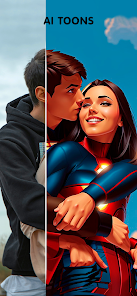
ToonMe is a photo-editing app that turns your regular selfies and portraits into cartoon-style illustrations. It's one of those “AI filter” apps that have popped up everywhere on the App Store and Google Play, and honestly, the first time you open it, the interface feels a bit like a playground. You download it for free—there's no forced registration right away—and you're hit with a few glossy examples of what the app can do. For a casual user like me, that immediate visual payoff is the hook. I think most people install this just to see how goofy or cool their face looks as a cartoon character, and the app doesn't waste time getting to that moment.
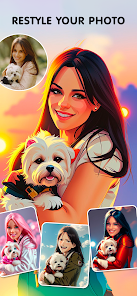
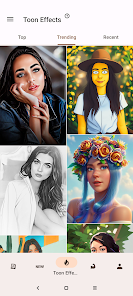
Once you actually start using ToonMe, the process is straightforward. You upload a photo from your gallery or snap one directly within the app, and within a few seconds, the AI spits out a cartoon version of it. The interface is clean—buttons are big, and there's a “styles” section where you can choose between different cartoon looks, like comic book, Disney-ish, or a more sketchy style. One thing that tripped me up at first was that the free version only gives you a few style options, and some of the better ones are locked behind a paywall or require watching an ad. That's a bit of a letdown, but for a quick laugh, the free styles are enough. I also noticed that the app sometimes struggles with group photos or faces at weird angles—it's really tuned for single, front-facing portraits.
After using ToonMe for a week, I'd say it's a fun tool for social media profile pics or just to surprise friends with a silly cartoon version of themselves. It's not something I'd use every day, but it's a good “party trick” app. Compared to similar apps like FaceApp or Voila, ToonMe feels more focused on cartoon art rather than realistic edits or aging filters. The standout difference is that the results actually look like hand-drawn illustrations sometimes, which has a unique charm. However, the heavy emphasis on ads and in-app purchases makes it feel a bit pushy after a while. I can see someone keeping it installed for occasional laughs, but if you're looking for a versatile photo editor, this isn't it. It's a one-trick pony, but that one trick is pretty entertaining.
features
- 🎨 Style variety: ToonMe offers over a dozen cartoon filters, from comic book shading to oil painting textures. In comparison, Prisma focuses more on artistic paint filters, while ToonMe gives you a more playful, toony outcome that feels less serious and more fun.
- ⚡ Speed of processing: The AI takes only 3–5 seconds to output a cartoon version of your photo. Similar apps like MomentCam often need more time and sometimes crash, but ToonMe's speed makes the whole experience feel smoother and less frustrating.
- 🖼️ Output quality: The cartoon faces preserve emotional expressions well—like big smiles or raised eyebrows—which is a clever touch. Apps like Cartoonify often flatten emotions, making faces look generic. ToonMe actually keeps some of the original mood alive.
- 📦 Batch editing is missing: ToonMe can only process one image at a time, unlike some pricier desktop tools. But for mobile use, the single-image focus keeps the app lightweight and snappy, good for quick edits on the go.
pros
- 👍 Fun factor is high: ToonMe turns even a boring selfie into something worth sharing. Other apps like Facetune are more about realistic retouching, but ToonMe's strength is simply making people laugh with wacky cartoon outcomes.
- 👍 No account needed: You can start using it right away without creating a profile. Many competitors like Picsart force signup early, which stops casual users from exploring.
- 👍Good for beginners: The interface is so simple that even someone not good with tech can use it. Apps like Adobe Photoshop Mix have better features but a steep learning curve, while ToonMe is pick-up-and-play.
- 👍 Upscaling option included: The app lets you export images at a higher resolution for better social media sharing. Most free cartoonizer apps, like Cartoon Photo Editor, only give low-res results unless you pay.
cons
- 👎 Heavy paywall: Many of the best filters are locked behind a subscription or one-time purchase. Apps like FaceApp have a similar issue, but ToonMe feels more restrictive because even basic style changes cost money.
- 👎 Ads are intrusive: Between edits, a pop-up ad often interrupts the flow. Even compared to YouCam Perfect, which also has ads, ToonMe's frequency is noticeably higher and annoying after a while.
- 👎 Limited on group photos: If you upload a picture with multiple faces, the app only processes one face and sometimes messes up the rest. Competitors like Remini handle group photos better with their AI enhancements.
- 👎 No manual editing tools: You can't fine-tune the cartoon results—no sliders for intensity or selective edits. PicsArt offers a lot more control over filters, making ToonMe feel basic for anyone who likes tweaking.
Recommended Apps
![]()
16Personalities
16Personalities4
![]()
Zodiac Palm Reader: MagicWay
Reatility Media4.6
![]()
Moblo - 3D furniture modeling
MYTIforge4.1![]()
Magnifier Plus with Flashlight
Digitalchemy, LLC4.6![]()
QR Code Scanner
QR Code Scanner & Barcode Reader4.7![]()
FalFal: Astrology, Tarot, Love
FalFal Team4.8![]()
Christmas Photo Frames
PhotoFramesApps4.6![]()
AI Video Art Creator - Livensa
FERASET4.5![]()
Horoscope of Birth
Denimaks4.4![]()
Make Me Bald Prank
AppTornado2.5![]()
Kling AI: AI Image&Video Maker
Lohas Games Pte. Ltd.4.4![]()
Japan Timetable & Route Search
NAVITIME JAPAN CO., LTD.4.3![]()
Prank Call & Funny Video
TeH Software0![]()
Parallax 3D Live Wallpapers
TarrySoft4.3![]()
AI Chatbot - Nova
ScaleUp4.7















Disclaimer
1.AppInfoLibrary does not represent any developer, nor is it the developer of any App or game.
2.AppInfoLibrary provide custom reviews of Apps written by our own reviewers, and detailed information of these Apps, such as developer contacts, ratings and screenshots.
3.All trademarks, registered trademarks, product names and company names or logos appearing on the site are the property of their respective owners.
4. AppInfoLibrary abides by the federal Digital Millennium Copyright Act (DMCA) by responding to notices of alleged infringement that complies with the DMCA and other applicable laws.
5.If you are the owner or copyright representative and want to delete your information, please contact us info@appinfolibrary.com.
6.All the information on this website is strictly observed all the terms and conditions of Google Ads Advertising policies and Google Unwanted Software policy .














