
Prisma Art Effect Photo Editor

50M+
Installs
Prisma Labs, Inc.
Developer
-
Video Players & Editors
Category
-
Rated for 3+
Content Rating
-
contact@prisma-ai.com
Developer Email
-
http://prisma-ai.com/privacy.html
Privacy Policy
Screenshots
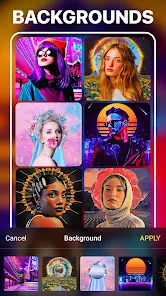
editor reviews
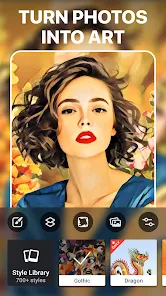
Prisma Art Effect Photo Editor, from Prisma Labs, Inc., sits in that crowded space of photo filter apps on both Google Play and the App Store. It's the kind of app you download when you're bored with the same old Instagram filters and want your snapshots to look like they jumped out of an art gallery. The main hook is turning your regular photos into paintings that mimic famous artists like Van Gogh or Picasso, using neural networks instead of just slapping a generic color overlay on things. When you first launch it, the interface feels clean and modern, but also a bit sparse, which can be either refreshing or slightly confusing depending on what you're used to. There's a free download option, though you'll quickly bump into premium filters and features that require a subscription or one-time purchase, and yes, there are ads that pop up every now and then to remind you of that fact.
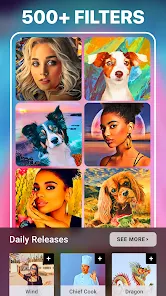
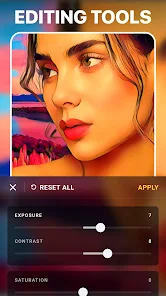
Getting into the actual usage, the process is pretty straightforward once you figure out where everything lives. You snap a photo or pick one from your library, and then the app processes it through its style library, which is organized into categories like Modern Art, Sketches, and even some trippy surrealism stuff. The first few times, the conversion speed feels impressive, especially if you're on a newer phone, because the AI does its magic locally most of the time. But after a while, you notice that not every filter works well with every image. A portrait might look incredible with one style and then turn into a muddy mess with another. The editing tools beyond the filters, like basic adjustments for brightness or contrast, are there but feel secondary, almost like an afterthought. A practical tip I picked up: stick to high-contrast photos with clear subjects, because those give the most dramatic and clean results.
After using Prisma for a few weeks on and off, I have mixed feelings about keeping it installed. It's genuinely fun for the first couple of days, especially if you're into digital art or need something different for social media posts. But the novelty wears off faster than I expected because the library of free styles is actually quite limited, and the subscription price feels steep for what you get. Compared to apps like Picsart or even the free filters in Snapseed, Prisma offers something unique in terms of artistic transformation, but it sacrifices versatility and everyday practicality. I can see someone who posts art-heavy content or loves experimental photography really enjoying this app. For someone like me who just wants quick, decent edits without paying monthly, it's more of a occasional toy than a daily tool. I'll probably keep it around for those rare moments when I want a photo to look like a Monet painting, but I doubt it'll stay on my home screen for long.
features
- 🧠 The standout feature here is the AI-powered style transfer that actually understands brushstrokes and color palettes from real paintings. Unlike Prisma, apps like VSCO or Lightroom only offer preset filters that adjust contrast or saturation, but they never truly reinterpret your image into a painting. With Prisma, a photo of a city street can genuinely look like an oil painting or a watercolor sketch, and the neural network adapts to the content rather than just masking it.
- 🧠 Another thing that sets it apart is the real-time preview when you select a filter. Most editing apps make you apply a style and then wait for processing to see the result, but Prisma shows a live preview before you commit, which saves a lot of trial and error. It's a small touch, but after using apps like Afterlight or Pixlr, this feels like a huge time-saver when you're unsure which filter fits the mood.
- 🧠 The app also lets you adjust the intensity of each filter with a simple slider, so you can blend the original photo's details with the artistic effect. This is something many competitors overlook, where they apply a filter and that's it, take it or leave it. For example, in Picsart's art filters, you often end up with a heavily distorted image, but here you can dial it back to keep the face recognizable while still getting that artistic vibe.
pros
- 🌟 The main strength is how unique the output looks compared to standard photo editors. While Snapseed and Adobe Lightroom focus on correcting lighting and sharpness, Prisma makes your photos look like they belong in a gallery. If you're tired of the same old clean edits, this app gives you a creative twist that's hard to replicate elsewhere.
- 🌟 Another plus is the offline processing for many filters. Unlike apps like Facetune or even Instagram, which sometimes need a solid internet connection to process effects, Prisma does most of the heavy lifting on your device. This means you can edit photos on a plane or in a spotty connection area without frustration, and it also feels faster overall.
- 🌟 The interface is minimal and easy to navigate, which is a strength if you just want to jump in and edit without digging through menus. Apps like Picsart can feel cluttered with stickers, text tools, and collage options, but Prisma keeps it focused on the art effects, which is perfect for users who don't want distractions.
cons
- ⚠️ The biggest weakness is the steep subscription cost for unlocking all styles and removing ads. Compared to apps like Snapseed, which is completely free with no ads or paywalls, Prisma feels expensive for what is essentially a niche filter app. You get a few free styles, but the really interesting ones are locked behind a monthly or yearly fee that many casual users won't find worth it.
- ⚠️ There's also a lack of basic editing tools like cropping, straightening, or detailed color adjustments. If you want to tweak exposure or heal blemishes, you'll have to jump to another app first. Picsart or even the free version of Photoshop Express offer a more complete editing suite, so Prisma feels incomplete as a standalone editor unless you only care about the art effects.
- ⚠️ The ad placement can be annoying, especially when you're in the middle of editing. A full-screen ad pops up right when you're about to export a photo, which disrupts the flow. Other free apps like Lightroom show ads more subtly or not as frequently, so this is a clear downside for users who prefer an uninterrupted experience.
Recommended Apps
![]()
16Personalities
16Personalities4
![]()
Zodiac Palm Reader: MagicWay
Reatility Media4.6
![]()
Moblo - 3D furniture modeling
MYTIforge4.1![]()
Magnifier Plus with Flashlight
Digitalchemy, LLC4.6![]()
QR Code Scanner
QR Code Scanner & Barcode Reader4.7![]()
FalFal: Astrology, Tarot, Love
FalFal Team4.8![]()
Christmas Photo Frames
PhotoFramesApps4.6![]()
AI Video Art Creator - Livensa
FERASET4.5![]()
Horoscope of Birth
Denimaks4.4![]()
Make Me Bald Prank
AppTornado2.5![]()
Kling AI: AI Image&Video Maker
Lohas Games Pte. Ltd.4.4![]()
Japan Timetable & Route Search
NAVITIME JAPAN CO., LTD.4.3![]()
Prank Call & Funny Video
TeH Software0![]()
Parallax 3D Live Wallpapers
TarrySoft4.3![]()
AI Chatbot - Nova
ScaleUp4.7















Disclaimer
1.AppInfoLibrary does not represent any developer, nor is it the developer of any App or game.
2.AppInfoLibrary provide custom reviews of Apps written by our own reviewers, and detailed information of these Apps, such as developer contacts, ratings and screenshots.
3.All trademarks, registered trademarks, product names and company names or logos appearing on the site are the property of their respective owners.
4. AppInfoLibrary abides by the federal Digital Millennium Copyright Act (DMCA) by responding to notices of alleged infringement that complies with the DMCA and other applicable laws.
5.If you are the owner or copyright representative and want to delete your information, please contact us info@appinfolibrary.com.
6.All the information on this website is strictly observed all the terms and conditions of Google Ads Advertising policies and Google Unwanted Software policy .














