

PhotoRoom AI Photo Editor

50M+
Installs
PhotoRoom Background Editor App
Developer
-
Video Players & Editors
Category
-
Rated for 3+
Content Rating
-
help@photoroom.com
Developer Email
-
https://photoroom.com/legal/privacy
Privacy Policy
Screenshots

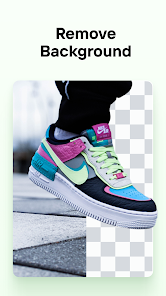


editor reviews
PhotoRoom is a photo editing app specifically built for removing backgrounds and creating professional-looking product shots. Instead of fussing with complicated software, you can just snap a picture and let the AI handle the hard parts. Most people grab it from Google Play or the App Store because they need clean images for selling stuff online, building a portfolio, or even just making fun social media posts. The first time you open it, the interface feels surprisingly simple. There is no forced sign-up immediately, which is nice, and you are basically dropped right into the editing screen. You can start cutting out backgrounds from your camera roll in seconds. The free version works fine for basic tasks, but you will run into watermarks and limited export options unless you pay for premium. In-app purchases unlock higher resolution exports and more templates. Ads pop up sometimes, but they do not ruin the flow completely.
Once you start actually editing, the experience is pretty smooth. The AI detects people, objects, and even pets almost instantly when you upload a photo. After the background is removed, you can replace it with a solid color, a gradient, or one of their pre-made templates. I found the retouch tool surprisingly useful for fixing small blemishes or reflections on products. The workflow feels natural, tap an image, let the AI work, then adjust the crop or shadow if needed. One small tip, you can save custom backgrounds you use often so you do not have to pick them every time. The main actions are clearly labeled, so you never really get lost. However, some advanced masking tools require a bit of trial and error to get perfect edges on complex objects like hair or fur. It is not a dealbreaker, but you notice it after a few edits.
After using PhotoRoom for a couple of weeks, I think it is best suited for small business owners, resellers, or anyone posting products on marketplaces. If you just want a quick tool to make your selfies look cleaner, Snapseed or even the default gallery editor might do the job. What sets PhotoRoom apart is how focused it is on commercial-style editing. The AI is genuinely fast, and the template library saves a ton of time if you are consistent with your brand colors. But the subscription price feels steep for casual users. I kept it installed because I list items online regularly, but if you only need background removal once a month, the free version with a watermark is annoying enough that you might look elsewhere. It is a solid app with a clear purpose, just not for everyone.
features
- ✨ Background removal happens in real time with no waiting around. Unlike Adobe Express, which sometimes takes a few seconds to process, PhotoRoom cuts out backgrounds nearly instantly. The AI detects edges better than most competitors, especially on objects like bottles or shoes.
- ✨ The retouch tool is built into the same workflow. You do not have to jump between separate apps to fix a scratch or a dust spot. Remove.bg requires exporting to another editor for that step, which adds friction.
- ✨ Batch editing is available if you upgrade. You can apply the same background style to multiple photos at once. Canva has this too, but it is buried behind multiple menus. PhotoRoom keeps it simple and fast.
pros
- ✅ Speed is the biggest win. The AI processes images noticeably faster than Remove.bg or Adobe Express. It feels snappy even on older phones.
- ✅ Template variety is solid. There are hundreds of pre-made backgrounds and lighting effects. Canva offers more design options overall, but PhotoRoom focuses on product photography, which feels more curated.
- ✅ No watermark on exported images if you use the free version carefully. Unlike other apps that slap a logo on everything, PhotoRoom only adds a watermark when you use premium templates, not on basic edits.
cons
- ❌ The subscription price is higher than similar apps like Background Eraser. For casual use, USD 10 per month feels like a lot just to remove backgrounds without watermarks.
- ❌ Edge detection struggles with fine details like hair or fur. Remove.bg handles these situations slightly better without needing manual touch-ups.
- ❌ Offline functionality is limited. If you do not have internet, some features stop working. Snapseed works fully offline, which is more reliable when traveling.
Recommended Apps
![]()
16Personalities
16Personalities4
![]()
Zodiac Palm Reader: MagicWay
Reatility Media4.6
![]()
Moblo - 3D furniture modeling
MYTIforge4.1![]()
Magnifier Plus with Flashlight
Digitalchemy, LLC4.6![]()
QR Code Scanner
QR Code Scanner & Barcode Reader4.7![]()
FalFal: Astrology, Tarot, Love
FalFal Team4.8![]()
Christmas Photo Frames
PhotoFramesApps4.6![]()
AI Video Art Creator - Livensa
FERASET4.5![]()
Horoscope of Birth
Denimaks4.4![]()
Make Me Bald Prank
AppTornado2.5![]()
Kling AI: AI Image&Video Maker
Lohas Games Pte. Ltd.4.4![]()
Japan Timetable & Route Search
NAVITIME JAPAN CO., LTD.4.3![]()
Prank Call & Funny Video
TeH Software0![]()
Parallax 3D Live Wallpapers
TarrySoft4.3![]()
AI Chatbot - Nova
ScaleUp4.7















Disclaimer
1.AppInfoLibrary does not represent any developer, nor is it the developer of any App or game.
2.AppInfoLibrary provide custom reviews of Apps written by our own reviewers, and detailed information of these Apps, such as developer contacts, ratings and screenshots.
3.All trademarks, registered trademarks, product names and company names or logos appearing on the site are the property of their respective owners.
4. AppInfoLibrary abides by the federal Digital Millennium Copyright Act (DMCA) by responding to notices of alleged infringement that complies with the DMCA and other applicable laws.
5.If you are the owner or copyright representative and want to delete your information, please contact us info@appinfolibrary.com.
6.All the information on this website is strictly observed all the terms and conditions of Google Ads Advertising policies and Google Unwanted Software policy .














