
PhotoDirector: AI Photo Editor

50M+
Installs
Cyberlink Corp
Developer
-
Video Players & Editors
Category
-
Rated for 3+
Content Rating
-
PhotoDirector_Android@cyberlink.com
Developer Email
-
https://www.cyberlink.com/prog/ap/app-privacy-redirect.jsp?
Privacy Policy
Screenshots


editor reviews
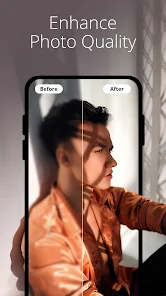
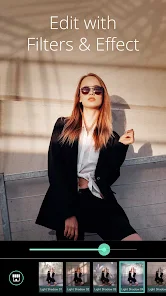
You know those moments when you snap a picture and it just doesn't capture what you saw? That's exactly the itch PhotoDirector tries to scratch. It's a full-featured photo editing app from Cyberlink Corp, sitting comfortably in the “photography” section of both Google Play and App Store, and it's been downloaded over a hundred million times. You can grab it for free, though you'll quickly notice it nudges you toward a subscription for the juicier tools. The first time I launched it, I was honestly a bit overwhelmed — the landing screen throws a lot at you: AI effects, templates, layers, a timeline for video. It's not a one-trick pony. But for a casual user like me, that first glance felt more like walking into a professional studio than a simple filter app, which was both exciting and a little intimidating.
After the initial surprise, actually using PhotoDirector turned out to be a pretty smooth ride. The onboarding doesn't force you into a tutorial, which I appreciated — I just imported a photo of my dog from my camera roll and started poking around. The interface is clean, with a bottom toolbar that lets you jump between “Tools,” “AI” features, and “Layers.” The basic editing panel, like tweaking exposure or cropping, is straightforward and responsive. What really caught my attention was the AI sky replacement tool. You pick a sky template, and it swaps out the drab gray behind your subject in seconds, no need for careful masking. On the flip side, I found learning the layer system a bit tricky. It's not as intuitive as something like PicsArt, and I accidentally merged layers I didn't mean to. A simple tip: tap the “i” icon on any tool for a short explanation — it saves you from guessing.
After spending a few weeks with it, I have mixed feelings. PhotoDirector is a beast for anyone who wants polished results quickly, especially with its AI portrait tools and background removal. It's genuinely better than let's say Adobe Lightroom for automated edits, because Lightroom doesn't have those fun, one-tap effects. But here's the thing: it's not great for quick, casual touch-ups. The app feels heavy, and the free version throws too many ads in your face after every save. I kept it installed because I love the content-aware removal and sky swaps, but I can see a regular person deleting it if they just need a quick brightness boost and don't want to navigate promotions. It's a tool for someone who wants to play artist, not just fix red-eye.
features
- 🌌 The AI sky replacement is hands-down the standout, letting you swap boring skies for dramatic sunsets or starry nights with a single tap, something Adobe Lightroom lacks unless you manually overlay and mask clouds.
- 🎨 You get a full layer-based editing system, similar to what you'd find in Photoshop Express, but much easier to access on a phone, so you can add text, stickers, or double exposures without needing a tablet.
- 🖼️ The content-aware remove tool is shockingly effective — just brush over an unwanted person or power line, and it fills the gap intelligently, beating both Snapseed and PicsArt in accuracy because it rarely leaves smudges behind.
- 🐾 There's a dedicated AI portrait and pet adjustment module that detects faces and fur separately, letting you smooth skin or enhance eye color without ruining the subject's natural look, which is more precise than competing apps like YouCam Perfect.
pros
- 🔧 Batch editing is a huge time-saver: you can apply the same set of adjustments to entire albums at once, a feature that most mobile editors like Remini or Facetune completely ignore, so it's perfect for event photos.
- 🎥 Unlike typical still-image editors, PhotoDirector includes a video editing timeline with the same AI tools, meaning you don't have to jump to something like CapCut just to fix a clip's lighting or remove an object frame by frame.
cons
- 🚫 The free version is ad-heavy; a 5-second pop-up appears after practically every export, which feels invasive compared to the relatively quiet ad experience in Snapseed or the ad-free environment of Lightroom Mobile.
- 💸 Many of the best features, like sky replacement and layer editing, are locked behind a monthly subscription, and the price is steep compared to the one-time purchase you can make for apps like TouchRetouch or Focos.
- 📉 Performance can lag on older devices; exporting images with multiple layers takes noticeably longer than a similar operation in PicsArt, and the app sometimes crashes if you have more than five photos open in the stack.
Recommended Apps
![]()
16Personalities
16Personalities4
![]()
Zodiac Palm Reader: MagicWay
Reatility Media4.6
![]()
Moblo - 3D furniture modeling
MYTIforge4.1![]()
Magnifier Plus with Flashlight
Digitalchemy, LLC4.6![]()
QR Code Scanner
QR Code Scanner & Barcode Reader4.7![]()
FalFal: Astrology, Tarot, Love
FalFal Team4.8![]()
Christmas Photo Frames
PhotoFramesApps4.6![]()
AI Video Art Creator - Livensa
FERASET4.5![]()
Horoscope of Birth
Denimaks4.4![]()
Make Me Bald Prank
AppTornado2.5![]()
Kling AI: AI Image&Video Maker
Lohas Games Pte. Ltd.4.4![]()
Japan Timetable & Route Search
NAVITIME JAPAN CO., LTD.4.3![]()
Prank Call & Funny Video
TeH Software0![]()
Parallax 3D Live Wallpapers
TarrySoft4.3![]()
AI Chatbot - Nova
ScaleUp4.7















Disclaimer
1.AppInfoLibrary does not represent any developer, nor is it the developer of any App or game.
2.AppInfoLibrary provide custom reviews of Apps written by our own reviewers, and detailed information of these Apps, such as developer contacts, ratings and screenshots.
3.All trademarks, registered trademarks, product names and company names or logos appearing on the site are the property of their respective owners.
4. AppInfoLibrary abides by the federal Digital Millennium Copyright Act (DMCA) by responding to notices of alleged infringement that complies with the DMCA and other applicable laws.
5.If you are the owner or copyright representative and want to delete your information, please contact us info@appinfolibrary.com.
6.All the information on this website is strictly observed all the terms and conditions of Google Ads Advertising policies and Google Unwanted Software policy .














