

ToonApp: Cartoon Photo Editor

50M+
Installs
Lyrebird Studio
Developer
-
Video Players & Editors
Category
-
Rated for 3+
Content Rating
-
lyrebirdstudio@gmail.com
Developer Email
-
https://lyrebirdstudio.net/privacy_policy.htm
Privacy Policy
Screenshots
editor reviews
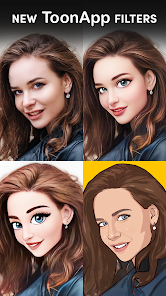
ToonApp is one of those trendy cartoon filter apps that's been making the rounds on social media lately. It's developed by Lyrebird Studio and lives squarely in the photo editing and entertainment category. Basically, you snap a selfie or grab any photo from your gallery, and the app transforms it into a cartoon or anime-style illustration. A lot of people download it because they see their favorite influencers or friends posting these cute cartoon avatars on Instagram or TikTok and want to try it themselves. After installing it from Google Play or the App Store — both of which show millions of downloads — the first launch is pretty straightforward. You're greeted with a clean interface that immediately offers a few style options and a big upload button. There's no forced registration right away, which honestly made a good first impression. It does have in-app purchases and ads, but the ads weren't too aggressive during the first few minutes.
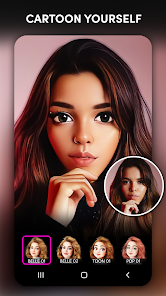
When you actually start using it, the process is surprisingly simple. You choose a photo, pick a style like “cartoon,” “comic,” or “anime,” and hit transform. The app processes the image in about ten to fifteen seconds. I found the cartoon style to be the most consistent, while the anime one sometimes made faces look a bit off, especially if the lighting in your photo wasn't great. The interface is laid out cleanly, with the main action buttons right at the bottom. There's also a small editing suite where you can tweak brightness, contrast, and add some basic text or stickers after the transformation. One tip: if you want the best results, use a well-lit front-facing photo with your face clearly visible. Dark or blurry images tend to produce muddy cartoons. The onboarding was minimal — a few quick tooltips that disappeared after one swipe — so you're not wasting time clicking through tutorial screens.
After using ToonApp for a couple of weeks, I think it's a decent tool if you're looking to make quick, shareable profile pictures or just want to have some fun with friends. The cartoon results are genuinely better than what I've seen from some other apps like Cartoonify or Prisma, especially in terms of keeping facial features recognizable. But the free version can feel a bit limiting once you've used up your daily transformations — there's a soft cap before the app nudges you toward the premium subscription. I could see someone who regularly posts content on social media getting enough value from the paid version to keep it installed. On the other hand, if you just want to try it once or twice, the free tier is totally fine, and you can easily delete it afterward. Compared to something like PicsArt, ToonApp is way more focused, which is both a strength and a weakness depending on what you need.
features
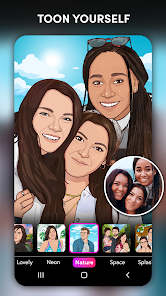
- 🎨 One-click cartoon transformation with multiple style presets — you literally choose a photo, pick “cartoon,” “anime,” or “comic,” and get a result in under fifteen seconds. Competitors like FaceApp make you manually tweak filters, while ToonApp just does the whole thing automatically.
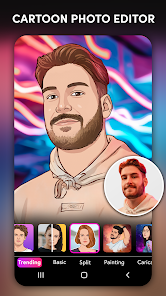
- 🖼️ A built-in editing suite after the cartoon filter is applied — you can adjust brightness, contrast, saturation, add stickers, and type text right on the transformed image. Prisma doesn't offer post-processing that's this tight with its cartoon styles.
- 💾 High-resolution output saving without compression — most free cartoon apps reduce quality to save server costs, but ToonApp's free version still lets you download at a decent resolution for sharing on social media.
- 📱 No account or sign-up required to start using the main features. Many similar apps like Cartoon Lens force you to log in before even previewing a filter, which is a major friction point that ToonApp avoids well.
pros
- 📷 Much faster transformation processing than Cartoonify or AnimeCamera — ToonApp finishes in 10–15 seconds, while those apps often take over a minute or crash on larger images.
- 👤 Better facial recognition and edge detection — especially with the cartoon style, it keeps your expression and skin tone natural, unlike Meitu or YouCam Perfect which sometimes make faces look wax-like.
- 💡 Cleaner ad placement — ads appear as small banners or optional reward-based popups for extra transformations, not full-screen interruptions that block your editing, which happens constantly in CartoonFace.
cons
- 💸 Daily usage cap on the free version — you can only transform around 5–7 photos before the app asks you to wait or upgrade, which feels stingy compared to PicsArt's similar filter that gives unlimited free tries.
- 🎬 Limited animation output — ToonApp only produces still images, not animated avatars or short videos like Avatarify or Bitmoji offer, so if you want a moving cartoon head, this app won't cut it.
- 🌐 No cloud sync or cross-device access — once you delete the app or switch phones, your edited cartoons are gone unless you manually back them up. Competitors like Snapchat's Bitmoji tie everything to your account.
Recommended Apps
![]()
16Personalities
16Personalities4
![]()
Zodiac Palm Reader: MagicWay
Reatility Media4.6
![]()
Moblo - 3D furniture modeling
MYTIforge4.1![]()
Magnifier Plus with Flashlight
Digitalchemy, LLC4.6![]()
QR Code Scanner
QR Code Scanner & Barcode Reader4.7![]()
FalFal: Astrology, Tarot, Love
FalFal Team4.8![]()
Christmas Photo Frames
PhotoFramesApps4.6![]()
AI Video Art Creator - Livensa
FERASET4.5![]()
Horoscope of Birth
Denimaks4.4![]()
Make Me Bald Prank
AppTornado2.5![]()
Kling AI: AI Image&Video Maker
Lohas Games Pte. Ltd.4.4![]()
Japan Timetable & Route Search
NAVITIME JAPAN CO., LTD.4.3![]()
Prank Call & Funny Video
TeH Software0![]()
Parallax 3D Live Wallpapers
TarrySoft4.3![]()
AI Chatbot - Nova
ScaleUp4.7















Disclaimer
1.AppInfoLibrary does not represent any developer, nor is it the developer of any App or game.
2.AppInfoLibrary provide custom reviews of Apps written by our own reviewers, and detailed information of these Apps, such as developer contacts, ratings and screenshots.
3.All trademarks, registered trademarks, product names and company names or logos appearing on the site are the property of their respective owners.
4. AppInfoLibrary abides by the federal Digital Millennium Copyright Act (DMCA) by responding to notices of alleged infringement that complies with the DMCA and other applicable laws.
5.If you are the owner or copyright representative and want to delete your information, please contact us info@appinfolibrary.com.
6.All the information on this website is strictly observed all the terms and conditions of Google Ads Advertising policies and Google Unwanted Software policy .














