
Photoshop Express Photo Editor

100M+
Installs
Adobe
Developer
-
Video Players & Editors
Category
-
Rated for 3+
Content Rating
-
PSX-Feedback-Android@adobe.com
Developer Email
-
http://www.adobe.com/privacy/policy.html
Privacy Policy
Screenshots
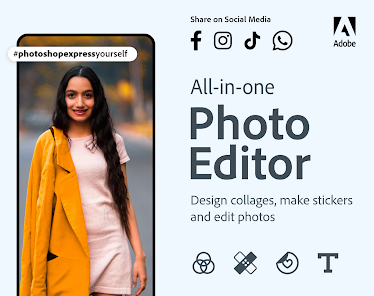
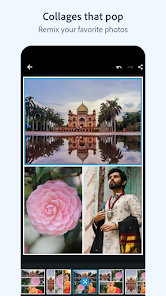
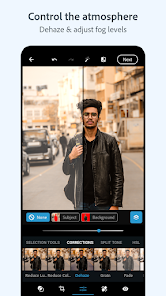
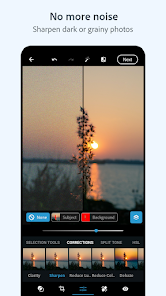
editor reviews
So, Photoshop Express Photo Editor is basically Adobe's attempt to bring some of that desktop magic to your phone. It's a free photo editing app you can grab on Google Play or the App Store, and it's been downloaded hundreds of millions of times, which tells you a lot about its reach. You don't need an Adobe subscription to download and use the core editing tools, which is great, but there are in-app purchases for premium features and filters if you want them. Right after you install and launch it, the first impression is clean and professional, with a simple layout that gets you straight to picking a photo from your gallery. There's no confusing setup, no account nag screen right away, just a straightforward interface that feels solid and polished. It immediately feels like a serious tool, not a toy.
Once you actually start editing a photo, the experience is mostly smooth and straightforward. The main editing screen puts sliders for basics like exposure, contrast, and clarity right at your fingertips, and you can see changes instantly. If you want to do more, there's a whole row of options like crop, rotate, straighten, and healing brush tucked away in a clean toolbar. The healing brush works surprisingly well for removing small objects or blemishes, though it can be a bit slow on older phones. One small tip: the "auto-fix" button is actually pretty good and often gives you a solid starting point that you can then tweak. Navigating between different editing tools is quick, and you can always undo mistakes without losing your progress. The app never feels cluttered, but sometimes I wish the preview image was a bit larger instead of being squeezed into a corner.
After using it for a while, I think this app is perfect for someone who wants more control than your average social media filter but doesn't want to dive into something heavy like Lightroom Mobile. It's not trying to be a full desktop replacement, and that's fine. What makes it different from apps like Snapseed or VSCO is the deep integration with Adobe's ecosystem, so if you also use Photoshop on your computer, you can start edits on your phone and finish them elsewhere. That's a nice touch. However, the free version is limited by how much you can do without paying, and some really useful tools like noise reduction or selective edits are locked behind a premium paywall. Compared to Snapseed which is completely free, this feels a bit tight. I'd probably keep it installed because it's reliable and quick for basic touch-ups, but I can see someone uninstalling it if they don't want to pay for the good stuff.
features
- 🤖 One standout is the auto-fix feature. It analyzes your photo and adjusts exposure, color, and contrast in one tap. Most apps have this, but Adobe's version is smarter and rarely gives you weird results. It's a great starting point before you fine-tune manually.
- 🤖 The healing brush is another highlight. It removes unwanted objects or spots from your photos, something Snapseed does too, but Photoshop Express handles it more cleanly without leaving obvious blurry patches. Works well on portraits and simple backgrounds.
- 🤖 Adobe's ecosystem support is a big deal. You can save your edited photos directly to Creative Cloud, so they sync across your devices. If you also use Photoshop on a computer, you can start here and finish there. Most competitors like VSCO don't offer this kind of seamless transfer.
- 🤖 There's a decent selection of text overlays and borders built in. It doesn't feel as gimmicky as some other apps, and the fonts are clean. This is handy for quick social media graphics without opening a separate design app like Canva.
pros
- ✅ The interface is clean and uncluttered. Unlike Snapseed which can feel overwhelming with its tool list, Photoshop Express keeps everything visible and easy to find. It feels more like a professional tool than a toy.
- ✅ It handles RAW files pretty well. Not many free mobile editors do this. If you shoot in RAW on your phone or camera, this app lets you tweak those files without needing to buy Lightroom.
- ✅ The app is very stable and rarely crashes. I've used it for years on different phones, and it's always worked reliably. Some cheaper alternatives like PicsArt can be buggy or full of ads, but this one stays smooth.
cons
- ❌ Too many features are locked behind a subscription. Selective adjustments like brush edits, and more advanced filters, require payment. Snapseed gives you all that for free, which makes Photoshop Express feel somewhat stingy in comparison.
- ❌ The export options are limited. You cannot save in different file formats like TIFF or PNG easily, and the compression on JPEGs is noticeable sometimes. VSCO gives you more control over export quality.
- ❌ There's no curve tool for fine-tuning brightness and contrast. For serious editors, this is a big missing piece. Even Snapseed has basic curves, so Adobe's omission here is strange.
- ❌ The app asks you to sign into an Adobe account occasionally, even if you're just using free features. It's not a huge deal, but it's annoying compared to apps like FaceTune that just work immediately.
Recommended Apps
![]()
16Personalities
16Personalities4
![]()
Zodiac Palm Reader: MagicWay
Reatility Media4.6
![]()
Moblo - 3D furniture modeling
MYTIforge4.1![]()
Magnifier Plus with Flashlight
Digitalchemy, LLC4.6![]()
QR Code Scanner
QR Code Scanner & Barcode Reader4.7![]()
FalFal: Astrology, Tarot, Love
FalFal Team4.8![]()
Christmas Photo Frames
PhotoFramesApps4.6![]()
AI Video Art Creator - Livensa
FERASET4.5![]()
Horoscope of Birth
Denimaks4.4![]()
Make Me Bald Prank
AppTornado2.5![]()
Kling AI: AI Image&Video Maker
Lohas Games Pte. Ltd.4.4![]()
Japan Timetable & Route Search
NAVITIME JAPAN CO., LTD.4.3![]()
Prank Call & Funny Video
TeH Software0![]()
Parallax 3D Live Wallpapers
TarrySoft4.3![]()
AI Chatbot - Nova
ScaleUp4.7















Disclaimer
1.AppInfoLibrary does not represent any developer, nor is it the developer of any App or game.
2.AppInfoLibrary provide custom reviews of Apps written by our own reviewers, and detailed information of these Apps, such as developer contacts, ratings and screenshots.
3.All trademarks, registered trademarks, product names and company names or logos appearing on the site are the property of their respective owners.
4. AppInfoLibrary abides by the federal Digital Millennium Copyright Act (DMCA) by responding to notices of alleged infringement that complies with the DMCA and other applicable laws.
5.If you are the owner or copyright representative and want to delete your information, please contact us info@appinfolibrary.com.
6.All the information on this website is strictly observed all the terms and conditions of Google Ads Advertising policies and Google Unwanted Software policy .














