

Emoji Home: Make Messages Fun

5M+
Installs
Emoji Home
Developer
-
Productivity
Category
-
Rated for 12+
Content Rating
-
emojihomeapp@gmail.com
Developer Email
-
https://myhomeapps.com/legal/privacy.html
Privacy Policy
Screenshots


editor reviews
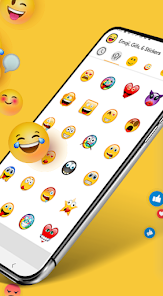
Emoji Home: Make Messages Fun is, as the name suggests, a keyboard and sticker app built entirely around emoji. It's the kind of tool you grab when you're tired of the standard emoji set on your phone and want something a bit more expressive or whimsical to drop into chats. After downloading it from the Play Store or App Store—it's free to install with optional in-app purchases—the first thing that hits you is the sheer visual density. The interface is bursting with color, and it feels less like a utility and more like a toy you're meant to play with. You don't get a tutorial; you just land on a page of sticker packs and custom emoji designs, which can be a little overwhelming at first, but it also makes you want to tap around and see what's there.
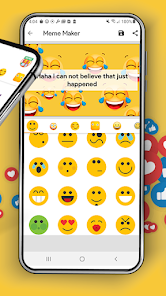
Actually using the app is pretty straightforward once you get past the initial shock of options. You pick a sticker pack or a set of emoji, and you can preview how they'll look in a message thread. The keyboard integrates with your phone's default keyboard, so you switch over to it like any other third-party keyboard. The onboarding is minimal—there's no guided walkthrough—so you end up learning by trial and error. I found the custom emoji editor fun but a bit fiddly on a small screen; it's easier to just use the pre-made packs. A small tip: if you swipe left on the main menu, you can find themed collections faster without scrolling through everything. The app runs smoothly, but sometimes the keyboard takes a second longer to load than I'd like, which breaks the flow of a fast conversation.
After using it for a week, I think it's a solid choice for someone who sends a lot of casual, fun messages and wants to stand out. If you're the person who loves seasonal stickers or making every reply feel like a greeting card, this app is for you. But if you're after a minimalist keyboard or something that boosts your typing speed, this isn't it. Compared to apps like Bitmoji or Gboard's sticker integration, Emoji Home feels more niche—it's less about personal avatars and more about curating a huge library of existing, over-the-top emoji sets. What makes it different is the sheer quantity and the focus on emoji specifically, not GIFs or Bitmojis. I'd keep it installed for holidays or when I need a laugh, but I can see someone uninstalling it if they find it too cluttered or if the load times bother them.
features
- 👍 The custom emoji editor stands out. Apps like Bitmoji let you create a personal avatar, but Emoji Home lets you tweak individual emoji faces and accessories directly. You can add glasses, change the mouth, or swap the hat on a standard smiley, which gives you a level of granularity most keyboard apps don't offer. It's not as deep as a full avatar creator, but for quick customization, it's more flexible than Gboard's static sticker sets.
- 👍 The sheer volume of themed sticker packs is impressive. Unlike WhatsApp's limited built-in sticker store, Emoji Home has dozens of packs ranging from food puns to holiday motifs. You can download new ones daily without paying, and the variety makes it easy to find something specific for any conversation, whether it's a birthday wish or a sarcastic reply.
- 👍 The integration with your messaging apps is seamless once it's set up. It works with WhatsApp, Telegram, Instagram, and iMessage without glitching. Compared to some third-party keyboards that force you to copy and paste, Emoji Home inserts stickers directly, just like the default emoji picker, which makes it feel natural to use.
pros
- 🌟 The free content is generous. Many sticker apps lock everything behind a paywall, but Emoji Home gives you a solid set of packs for free. Apps like Sticker.ly make you watch ads for every download, but here you get a good rotation without constant interruptions.
- 🌟 The UI is more organized than competitors. Bitmoji's menu can feel cluttered with ads, and Gboard buries stickers under multiple taps. Emoji Home groups everything by theme and mood, so you can find a "funny" or "cute" set in two swipes.
- 🌟 The emoji quality is higher than average. The designs are crisp and colorful, not blurry or low-res like some free sticker apps on the Play Store. Even the cartoonish ones look clean when you send them.
cons
- 😞 The keyboard lags on older phones. On my secondary device, which is a few years old, the keyboard takes a noticeable second to appear after switching. Gboard and even Bitmoji load faster in comparison, which makes Emoji Home feel sluggish for quick replies.
- 😞 The custom editor is limited to faces only. You can't create full scene stickers or edit backgrounds like in Sticker Maker. If you want to make a sticker of your own pet or a specific object, you're out of luck with this app.
- 😞 The free packs are time-limited. Some sticker packs disappear after a few days if you don't "collect" them. Competing apps like Line's sticker store let you keep what you download forever, so this feels like a push to make you check the app daily.
Recommended Apps
![]()
16Personalities
16Personalities4
![]()
Zodiac Palm Reader: MagicWay
Reatility Media4.6
![]()
Moblo - 3D furniture modeling
MYTIforge4.1![]()
Magnifier Plus with Flashlight
Digitalchemy, LLC4.6![]()
QR Code Scanner
QR Code Scanner & Barcode Reader4.7![]()
FalFal: Astrology, Tarot, Love
FalFal Team4.8![]()
Christmas Photo Frames
PhotoFramesApps4.6![]()
AI Video Art Creator - Livensa
FERASET4.5![]()
Horoscope of Birth
Denimaks4.4![]()
Make Me Bald Prank
AppTornado2.5![]()
Kling AI: AI Image&Video Maker
Lohas Games Pte. Ltd.4.4![]()
Japan Timetable & Route Search
NAVITIME JAPAN CO., LTD.4.3![]()
Prank Call & Funny Video
TeH Software0![]()
Parallax 3D Live Wallpapers
TarrySoft4.3![]()
AI Chatbot - Nova
ScaleUp4.7















Disclaimer
1.AppInfoLibrary does not represent any developer, nor is it the developer of any App or game.
2.AppInfoLibrary provide custom reviews of Apps written by our own reviewers, and detailed information of these Apps, such as developer contacts, ratings and screenshots.
3.All trademarks, registered trademarks, product names and company names or logos appearing on the site are the property of their respective owners.
4. AppInfoLibrary abides by the federal Digital Millennium Copyright Act (DMCA) by responding to notices of alleged infringement that complies with the DMCA and other applicable laws.
5.If you are the owner or copyright representative and want to delete your information, please contact us info@appinfolibrary.com.
6.All the information on this website is strictly observed all the terms and conditions of Google Ads Advertising policies and Google Unwanted Software policy .














