

Photo Collage Maker

50M+
Installs
Scoompa
Developer
-
Video Players & Editors
Category
-
Rated for 3+
Content Rating
-
contact+cm@scoompa.com
Developer Email
-
http://goo.gl/q5z4fP
Privacy Policy
Screenshots
editor reviews
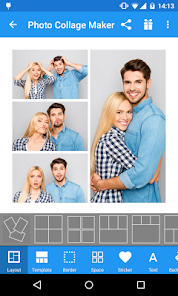
Photo Collage Maker from Scoompa is one of those apps you grab when you want to throw a bunch of photos into a single frame without opening a full editing suite. It's basically a collage tool, sitting neatly in the photo and video category on Google Play and the App Store. You mainly use it to stitch together images for social media posts, memory grids, or simple photo cards. I downloaded it after seeing it had over 10 million installs, which made me think it must be doing something right. The app is free to download, though you do run into ads and some collage templates are locked behind in-app purchases. When you first open it, the layout feels pretty clean—nothing too flashy, just a straightforward grid where you pick your layout and start adding pictures.
The hands-on experience is mostly smooth, but there are a few moments where you pause and go, “Hmm.” Once you choose a layout, the app pulls photos from your gallery, and you drag them into place. You can adjust each photo by pinching to zoom or rotating, which is nice. The onboarding is pretty minimal—there's no tutorial, just a blank canvas and some buttons at the bottom. So you kind of learn as you go. Common usage steps involve selecting a background color, adjusting borders, adding stickers or text, and then hitting save. A small tip: if you want to avoid the ads that pop up after every save, you can turn off your internet connection temporarily before exporting. That trick saved me a ton of irritation. The interface is responsive, though sometimes the app lags when you try to add a sticker or filter from their premium packs, which feels a bit pushy.
After using it for a few weeks, I think it's a decent option if you need quick collages without fussing over layers or complex edits. People who enjoy scrapbooking-style layouts or regularly share photo dumps on Instagram might keep this around. But if you're someone who likes total control over spacing, effects, or high-resolution exports, you might feel limited. Compared to something like Canva or PicsArt, this app feels more niche—it sticks to collages and doesn't try to be an all-in-one editor. What makes it different is the sheer number of preset layouts (over 100), but the free ones still feel repetitive. I uninstalled it after a while because the constant pop-up ads and limited free templates made it less enjoyable than expected. Still, for quick, no-brainer collages, it gets the job done.
features
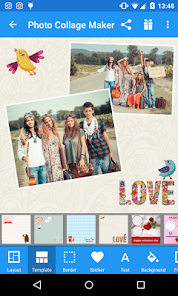
- 🧩 Scoompa's Photo Collage Maker offers over 100 preset layout templates, which is more than what you get in standard gallery apps like Google Photos. This makes it faster to arrange photos without manual positioning.
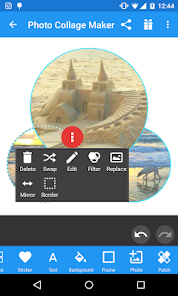
- 🧩 The app includes a “freeform” mode where you can move, rotate, and resize each photo independently, unlike in Layout from Instagram, which locks you into rigid grid styles. This gives you more creative freedom.
- 🧩 You get built-in sticker packs and text fonts that are ready to apply, so you can add captions or decorations without switching to another app. PicsArt has similar options, but Scoompa's interface is simpler and less cluttered for collage-only tasks.
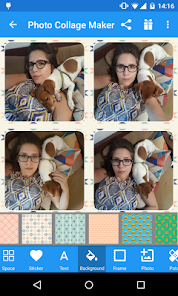
- 🧩 The “background color” and “border style” customization feels more detailed here than in similar tools like Photo Grid. You can change border width, pattern, and even add rounded corners for a polished look.
pros
- 👍 One major strength is the sheer variety of presets—over 100 layouts is rare for a free collage app. Apps like Canva have more design flexibility but force you into a subscription for most templates. Scoompa keeps a solid chunk usable without paying.
- 👍 The freeform editing option is a big plus. While apps like Layout from Instagram limit you to preset grids, here you can place photos anywhere on the canvas. That freedom feels closer to a desktop editor.
- 👍 The app supports high-resolution exports up to 4K, which is uncommon for free collage tools. PicsArt's free version often compresses images, but Scoompa maintains decent quality when you save without watermarks.
cons
- 👎 The biggest weakness is the overwhelming number of ads. After every export, a full-screen video ad plays, and you can't skip it early. Canva and Photo Grid show fewer interruptions in their free tiers.
- 👎 Many of the best templates and stickers are locked behind a premium subscription. You'll see a “pro” label on almost every attractive layout, which feels limiting compared to apps like MirrorLab that offer more free assets upfront.
- 👎 The app occasionally crashes when selecting photos from a large gallery, especially on older phones. Layout from Instagram handles gallery loading more smoothly without lag.
- 👎 There's no cloud sync or backup feature. If you uninstall and reinstall, all your custom projects vanish. Apps like Canva save everything to your account, so this feels like a missing convenience.
Recommended Apps
![]()
16Personalities
16Personalities4
![]()
Zodiac Palm Reader: MagicWay
Reatility Media4.6
![]()
Moblo - 3D furniture modeling
MYTIforge4.1![]()
Magnifier Plus with Flashlight
Digitalchemy, LLC4.6![]()
QR Code Scanner
QR Code Scanner & Barcode Reader4.7![]()
FalFal: Astrology, Tarot, Love
FalFal Team4.8![]()
Christmas Photo Frames
PhotoFramesApps4.6![]()
AI Video Art Creator - Livensa
FERASET4.5![]()
Horoscope of Birth
Denimaks4.4![]()
Make Me Bald Prank
AppTornado2.5![]()
Kling AI: AI Image&Video Maker
Lohas Games Pte. Ltd.4.4![]()
Japan Timetable & Route Search
NAVITIME JAPAN CO., LTD.4.3![]()
Prank Call & Funny Video
TeH Software0![]()
Parallax 3D Live Wallpapers
TarrySoft4.3![]()
AI Chatbot - Nova
ScaleUp4.7















Disclaimer
1.AppInfoLibrary does not represent any developer, nor is it the developer of any App or game.
2.AppInfoLibrary provide custom reviews of Apps written by our own reviewers, and detailed information of these Apps, such as developer contacts, ratings and screenshots.
3.All trademarks, registered trademarks, product names and company names or logos appearing on the site are the property of their respective owners.
4. AppInfoLibrary abides by the federal Digital Millennium Copyright Act (DMCA) by responding to notices of alleged infringement that complies with the DMCA and other applicable laws.
5.If you are the owner or copyright representative and want to delete your information, please contact us info@appinfolibrary.com.
6.All the information on this website is strictly observed all the terms and conditions of Google Ads Advertising policies and Google Unwanted Software policy .














