

Photo Collage Maker & Editor

100M+
Installs
Lyrebird Studio
Developer
-
Video Players & Editors
Category
-
Rated for 3+
Content Rating
-
lyrebirdstudio@gmail.com
Developer Email
-
http://lyrebirdstudio.net/privacy_policy.htm
Privacy Policy
Screenshots
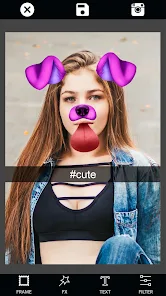
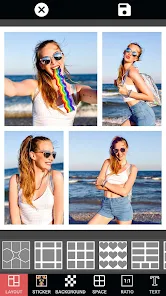
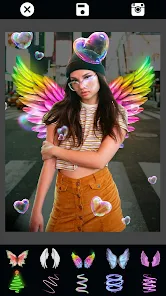
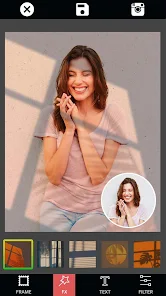
editor reviews
Photo Collage Maker & Editor by Lyrebird Studio is a straightforward collage app available on both Google Play and the App Store. It's really just for throwing together photos into grids, freeform layouts, or simple scrapbook-style pages. You'd download it if you want to make something like a quick birthday grid or a memory board without messing around in heavier tools. After launching it, the first impression is that it's clean but a bit crowded. The main screen throws lots of templates at you, which can feel overwhelming at first. It's free to download, though you run into ads and paywalls for certain stickers or backgrounds after a few uses. Registration isn't forced, which is nice if you just want to test it out.
Once you start using it, the hands-on experience is mostly smooth. After selecting your photos from the gallery, the app drops them into a chosen template. You can adjust borders, swap backgrounds, or drag photos around. That feeling of control is satisfying early on. But once you try to fine-tune something, like rotating a single image or matching text fonts across pages, the flow gets a bit sticky. Some buttons are smaller than they should be, and menu labels aren't always clear. A practical tip: always hit 'apply' before switching tabs, or you lose unsaved edits. The default export quality is decent but blurry for print unless you manually increase it to HD in settings.
After using it for a while, I'd say this app works best for occasional users who just need a quick collage for social media or family photos. If you're someone who edits photos professionally or expects layered precision, this will probably feel limiting. Compared to something like PicCollage, Lyrebird's app has more freeform layouts but a less intuitive text tool. I ended up keeping it installed because it's fast for casual projects, but I sometimes uninstall and reinstall it when storage gets tight. It's not a powerhouse, but it gets the job done without fussing over details.
features
- 🖼️ The collage layouts are the main draw here. You get a wide range of grid styles, from 2-photo minimalist to 9-photo jam-packed. Unlike Canva, which expects you to build from scratch, this app lets you pick a layout and drop in photos in seconds. That makes it faster for quick projects.
- 🎨 The background options are surprisingly good. You can change solid colors, gradients, and even blur effects behind photos. In PicsArt, you often have to search through layers to fix the background. Here, it's right on the editing panel from the start.
- 🖌️ Sticker and text integration is basic but functional. You can add captions, change fonts, and resize stickers without much effort. Compared to Adobe Express, which has endless sticker packs, Lyrebird keeps it simple. You won't spend time deciding; you just place and go.
pros
- 💡 Speed is a big plus. Unlike PicCollage which can lag when loading heavy albums, Lyrebird loads photos instantly. That makes it ideal for on-the-go edits.
- 💡 Freeform layouts set it apart. Many apps like Moldiv stick to strict grids. Here, you can actually move photos anywhere and overlap them like a real scrapbook.
- 💡 Straightforward saving options. You can export without a watermark by watching an ad, which feels fair compared to apps that force subscriptions.
cons
- ⚠️ The ads are intrusive. They pop up between almost every action, especially when saving. In Canva, ads are much more restrained unless you use free stock elements.
- ⚠️ Text editing lacks polish. You can't easily adjust kerning or line spacing, and font previews are tiny. PicCollage handles text much better with live previews.
- ⚠️ Export resolution feels limited. Even the HD option sometimes looks grainy when printed. Adobe Express produces crisper outputs for real posters.
Recommended Apps
![]()
16Personalities
16Personalities4
![]()
Zodiac Palm Reader: MagicWay
Reatility Media4.6
![]()
Moblo - 3D furniture modeling
MYTIforge4.1![]()
Magnifier Plus with Flashlight
Digitalchemy, LLC4.6![]()
QR Code Scanner
QR Code Scanner & Barcode Reader4.7![]()
FalFal: Astrology, Tarot, Love
FalFal Team4.8![]()
Christmas Photo Frames
PhotoFramesApps4.6![]()
AI Video Art Creator - Livensa
FERASET4.5![]()
Horoscope of Birth
Denimaks4.4![]()
Make Me Bald Prank
AppTornado2.5![]()
Kling AI: AI Image&Video Maker
Lohas Games Pte. Ltd.4.4![]()
Japan Timetable & Route Search
NAVITIME JAPAN CO., LTD.4.3![]()
Prank Call & Funny Video
TeH Software0![]()
Parallax 3D Live Wallpapers
TarrySoft4.3![]()
AI Chatbot - Nova
ScaleUp4.7















Disclaimer
1.AppInfoLibrary does not represent any developer, nor is it the developer of any App or game.
2.AppInfoLibrary provide custom reviews of Apps written by our own reviewers, and detailed information of these Apps, such as developer contacts, ratings and screenshots.
3.All trademarks, registered trademarks, product names and company names or logos appearing on the site are the property of their respective owners.
4. AppInfoLibrary abides by the federal Digital Millennium Copyright Act (DMCA) by responding to notices of alleged infringement that complies with the DMCA and other applicable laws.
5.If you are the owner or copyright representative and want to delete your information, please contact us info@appinfolibrary.com.
6.All the information on this website is strictly observed all the terms and conditions of Google Ads Advertising policies and Google Unwanted Software policy .














