

Skype for Business for Android

10M+
Installs
Microsoft Corporation
Developer
-
Business
Category
-
Rated for 3+
Content Rating
-
SFBAndroidApp@microsoft.com
Developer Email
-
https://go.microsoft.com/fwlink/?LinkId=510643
Privacy Policy
Screenshots
editor reviews
Skype for Business is Microsoft's enterprise-grade communication tool, designed primarily for corporate environments rather than casual chatting. It falls under the unified communications category, letting users handle instant messaging, voice calls, video conferences, and online meetings all in one place. A normal user would likely only download and install this app if their workplace or organization mandates it, as it integrates tightly with Office 365 and Exchange. After launching it for the first time, the initial impression is that it feels more like a stripped-down business portal than a social app. The Google Play page shows over 100 million installs, and it's free to download, but you need a work or school account to sign in. There are no in-app purchases or random ads, which is expected from a corporate tool, though the login process can feel a bit clunky if you're used to consumer apps that just require an email and password.
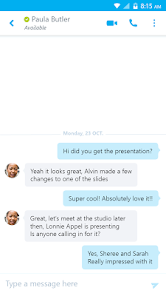
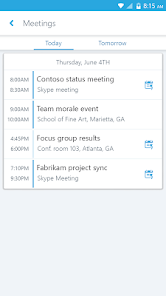
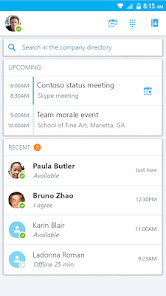
Once you're past the sign-in screen, the hands-on experience is straightforward but not exactly exciting. The interface follows a clean, utilitarian design with a navigation drawer that lists contacts, conversations, and meetings. The onboarding is minimal, so you're pretty much dropped into the main screen right away. In daily use, you'll likely tap on a contact to start a chat or join a scheduled meeting from the calendar view. One smooth moment is how calls transfer seamlessly between devices, like starting a call on your PC and moving it to your Android phone without dropping. That said, the app can feel sluggish on older devices, and sometimes notifications don't pop up reliably, which is frustrating when you're waiting for an important message. A practical tip is to keep the app open in the background, as it tends to sync faster that way. The search function for finding old messages works decently, but it's not as fast as something like Slack.
After using it for a while, my personal take is that this app does its job for work communication, but it's not something you'd keep installed for personal use. People who work in large organizations with Microsoft infrastructure will appreciate the deep integration with Outlook and SharePoint, making scheduling and file sharing effortless. On the flip side, if you're in a small startup or a team that uses Google Workspace, this app will feel unnecessary and rigid. Compared to Zoom for meetings or Teams for collaboration, Skype for Business feels older and less polished, especially since Microsoft has been phasing it out in favor of Teams. I'd keep it installed only if my company required it, otherwise I'd uninstall it quickly because the interface lacks the smoothness of modern apps. It's a reliable tool for basic needs, but it doesn't inspire loyalty.
features
- 💼 Seamless integration with Office 365 and Exchange, which makes scheduling meetings and sharing calendar availability a breeze compared to standalone apps like Zoom or Google Meet. You can launch a meeting directly from an email invitation, and the presence indicators show if colleagues are available, busy, or away in real time.
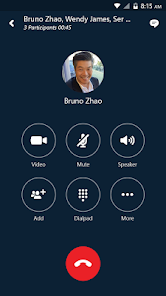
- 📞 Enterprise-grade call management features, including call transfer, forwarding, and the ability to have multiple participants in a single conference call. This beats apps like WhatsApp or Viber, which lack these professional options, and it supports quality-of-service settings for stable audio even on congested networks.
- 🔒 High security with end-to-end encryption for all communications and compliance with enterprise policies, such as data loss prevention and retention rules. Compared to free tools like Skype Consumer or FaceTime, this gives IT departments peace of mind, though it does come at the cost of a more restrictive user experience.
- 📱 Cross-platform device switching, letting you start a conversation on your desktop and continue it on your Android phone without any lag or lost messages. This level of continuity is rare in business apps, as even Microsoft Teams has slightly more friction when moving between devices.
pros
- 👍 The app is highly reliable for internal corporate communication, especially in companies already using Microsoft products, because it syncs with Active Directory and doesn't require separate user management. This is a big strength over Slack or Cisco Webex, which often need extra setup.
- 👍 It has a very low bandwidth usage compared to video-heavy apps like Zoom, making it a good choice for remote areas or slow internet connections. The audio compression is aggressive but stays clear enough for meetings.
- 👍 The federation feature lets you chat with people from other organizations easily, which is a step above Google Chat or WhatsApp Business, where cross-company communication often requires extra steps.
cons
- 👎 The user interface feels dated and clunky, especially when compared to modern competitors like Microsoft Teams or Slack. Navigation can be confusing, and the menu structure is not intuitive for new users.
- 👎 Notification reliability is a major issue on Android, as messages often arrive late or not at all when the app is in the background. This is a problem that apps like Telegram or even regular Skype handle much better.
- 👎 The app is being phased out by Microsoft in favor of Teams, which means users may face forced migration and a lack of future updates. This uncertainty makes it less attractive for long-term use compared to platforms like Zoom or Google Meet that are actively developed.
- 👎 Setting up the app for the first time is a pain, as it requires a complex login with a corporate email and server address, unlike apps like Signal or Discord that just need a phone number.
Recommended Apps
![]()
16Personalities
16Personalities4
![]()
Zodiac Palm Reader: MagicWay
Reatility Media4.6
![]()
Moblo - 3D furniture modeling
MYTIforge4.1![]()
Magnifier Plus with Flashlight
Digitalchemy, LLC4.6![]()
QR Code Scanner
QR Code Scanner & Barcode Reader4.7![]()
FalFal: Astrology, Tarot, Love
FalFal Team4.8![]()
Christmas Photo Frames
PhotoFramesApps4.6![]()
AI Video Art Creator - Livensa
FERASET4.5![]()
Horoscope of Birth
Denimaks4.4![]()
Make Me Bald Prank
AppTornado2.5![]()
Kling AI: AI Image&Video Maker
Lohas Games Pte. Ltd.4.4![]()
Japan Timetable & Route Search
NAVITIME JAPAN CO., LTD.4.3![]()
Prank Call & Funny Video
TeH Software0![]()
Parallax 3D Live Wallpapers
TarrySoft4.3![]()
AI Chatbot - Nova
ScaleUp4.7















Disclaimer
1.AppInfoLibrary does not represent any developer, nor is it the developer of any App or game.
2.AppInfoLibrary provide custom reviews of Apps written by our own reviewers, and detailed information of these Apps, such as developer contacts, ratings and screenshots.
3.All trademarks, registered trademarks, product names and company names or logos appearing on the site are the property of their respective owners.
4. AppInfoLibrary abides by the federal Digital Millennium Copyright Act (DMCA) by responding to notices of alleged infringement that complies with the DMCA and other applicable laws.
5.If you are the owner or copyright representative and want to delete your information, please contact us info@appinfolibrary.com.
6.All the information on this website is strictly observed all the terms and conditions of Google Ads Advertising policies and Google Unwanted Software policy .














