

Photo Editor Picsa: Collage

100M+
Installs
Lyrebird Studio
Developer
-
Video Players & Editors
Category
-
Rated for 3+
Content Rating
-
lyrebirdstudio@gmail.com
Developer Email
-
https://lyrebirdstudio.net/privacy_policy.htm
Privacy Policy
Screenshots
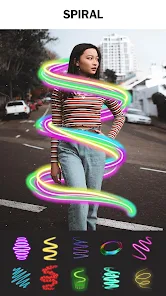
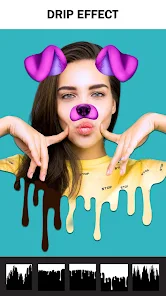

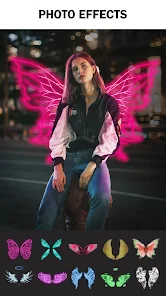
editor reviews
Photo Editor Picsa: Collage is a photo editing and collage-making app from Lyrebird Studio. It's the kind of tool you grab when you want to throw a few pictures together for social media or just mess around with filters without dealing with a massive learning curve. I downloaded it from Google Play, and it had a decent number of installs, so I figured it was worth a shot. After launching it for the first time, the first impression was pretty clean — a simple layout with clear options to edit a single photo or start a collage. There's no pushy registration or forced login, which is always a relief. It's free to download, though there are in-app purchases and the occasional ad, which feels standard for this type of app.
Once I started actually using it, the experience was mostly smooth. The interface isn't flashy, but everything is where you'd expect it to be. You pick your photos, choose a collage grid, and then you can tweak borders, backgrounds, and spacing. The editing tools are basic but functional — things like brightness, contrast, saturation, and a handful of filters. I found myself using the auto-enhance feature more than I thought I would because it saves time when I just want a quick fix. There were a few moments where I tapped something and it took a second to respond, but nothing too frustrating. A small tip: if you're making a collage, it's best to have your photos already cropped to the same aspect ratio, otherwise the app will force-fit them and things can look a bit off.
After spending some time with it, I'd say Photo Editor Picsa is a decent pick for casual users who need quick edits and simple collages without all the bells and whistles of something like PicsArt or Adobe Express. It's not going to replace a professional tool, but it also doesn't try to. The main reason I'd keep it installed is for those moments when I want to throw together a quick Instagram story or a birthday collage without opening something heavier. People who want precise control over masks, layers, or advanced retouching will probably uninstall it after a few tries. Compared to similar apps, it feels more straightforward and less cluttered, which is honestly its biggest strength.
features
- 🎨 The collage maker is the standout feature here. You get a wide variety of grid layouts, and you can adjust borders, corner radius, and background colors. It feels more flexible than the basic collage tool in Google Photos, which only offers preset grids with no customization.
- 📸 The one-tap auto-enhance tool actually works well for most lighting situations. It balances exposure and color in a way that looks natural, unlike PicsArt's auto-enhance which can sometimes oversaturate or blow out highlights. It's perfect for fixing dull shots before posting.
- ✂️ There's a background removal tool that does a decent job with clear subjects. It's not as precise as something like Remove.bg, but it gets the job done for social media use. The edge refinement is basic, so complex hair details can be hit or miss.
- 🖼️ The text and sticker library is surprisingly large for a free app. You can add captions with various fonts and overlay stickers that are updated regularly. Canva has more options, but Picsa keeps things simple without overwhelming you with choices.
pros
- 🌟 No account required. You can start editing immediately after download, unlike PicsArt which nags you to sign up. This makes it great for quick, throwaway edits.
- 🌟 The app uses your phone's storage directly instead of its own internal gallery. This means edits save instantly to your camera roll, and you don't have to export or wait, unlike some apps that force you through a save process.
- 🌟 Batch editing is possible for basic adjustments. You can apply the same filter or brightness setting to multiple photos at once, which saves a lot of time compared to doing them one by one in Snapseed.
cons
- ⚠️ The app has ads after saving or closing edits. They're not during the editing process itself, but they pop up at the worst moments, like right after you finish a collage. PicsArt has fewer ads in its free version, which is noticeably less intrusive.
- ⚠️ Some features, like advanced filters and premium grids, are locked behind a paywall. You get the basics for free, but the best stuff costs money. Canva offers more free assets without the same restrictions.
- ⚠️ The app tends to crop photos weirdly when applying certain filters, especially if the original resolution is high. You sometimes have to manually adjust the zoom, which defeats the purpose of a quick edit.
- ⚠️ Export quality can drop noticeably if you use too many features at once. The app seems to compress images more aggressively when you layer effects, which isn't ideal for printing or high-res sharing.
Recommended Apps
![]()
16Personalities
16Personalities4
![]()
Zodiac Palm Reader: MagicWay
Reatility Media4.6
![]()
Moblo - 3D furniture modeling
MYTIforge4.1![]()
Magnifier Plus with Flashlight
Digitalchemy, LLC4.6![]()
QR Code Scanner
QR Code Scanner & Barcode Reader4.7![]()
FalFal: Astrology, Tarot, Love
FalFal Team4.8![]()
Christmas Photo Frames
PhotoFramesApps4.6![]()
AI Video Art Creator - Livensa
FERASET4.5![]()
Horoscope of Birth
Denimaks4.4![]()
Make Me Bald Prank
AppTornado2.5![]()
Kling AI: AI Image&Video Maker
Lohas Games Pte. Ltd.4.4![]()
Japan Timetable & Route Search
NAVITIME JAPAN CO., LTD.4.3![]()
Prank Call & Funny Video
TeH Software0![]()
Parallax 3D Live Wallpapers
TarrySoft4.3![]()
AI Chatbot - Nova
ScaleUp4.7















Disclaimer
1.AppInfoLibrary does not represent any developer, nor is it the developer of any App or game.
2.AppInfoLibrary provide custom reviews of Apps written by our own reviewers, and detailed information of these Apps, such as developer contacts, ratings and screenshots.
3.All trademarks, registered trademarks, product names and company names or logos appearing on the site are the property of their respective owners.
4. AppInfoLibrary abides by the federal Digital Millennium Copyright Act (DMCA) by responding to notices of alleged infringement that complies with the DMCA and other applicable laws.
5.If you are the owner or copyright representative and want to delete your information, please contact us info@appinfolibrary.com.
6.All the information on this website is strictly observed all the terms and conditions of Google Ads Advertising policies and Google Unwanted Software policy .














