

FaceApp: Perfect Face Editor

500M+
Installs
FaceApp Technology Ltd
Developer
-
Video Players & Editors
Category
-
Rated for 3+
Content Rating
-
support.android@faceapp.com
Developer Email
-
http://www.faceapp.com/privacy
Privacy Policy
Screenshots


editor reviews
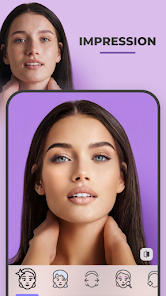
FaceApp is one of those photo editing tools that went viral a few years back, mainly because of its uncanny ability to age or de-age anyone's face with a single tap. It sits squarely in the AI-powered beauty and retouching category, and people mostly use it to transform selfies—adding smiles, changing hairstyles, adjusting makeup, or swapping genders. I first downloaded it from Google Play after seeing friends post hilarious “old me” pictures, and the install count was massive, suggesting I wasn't alone. The app is free to download, though you quickly bump into a subscription wall for the full suite of filters. When I launched it, the first impression was smooth: a clean interface with a big “Upload Selfie” button, no messy ads immediately cluttering the screen, which felt refreshing for a free app. Registration wasn't forced upfront, but some filters were locked, nudging you toward a premium tier. Overall, it felt polished and straightforward from the get-go.
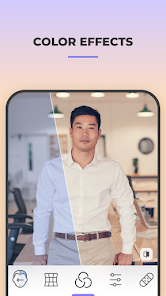
Using FaceApp day-to-day is surprisingly simple. The onboarding skips the tutorial nonsense—you just pick a photo from your gallery or snap one on the spot. Once your face is loaded, the main screen shows a row of effect categories like Age, Hair, and Stylist. Tapping “Age” instantly applies the old filter, and the result renders within seconds, which is impressive even on my mid-range phone. A common flow is adjusting the intensity slider—I found that dialing it back to 70% looks more natural than the default full effect. The interface is intuitive, but I did notice that switching between filters sometimes causes a brief lag, and the app occasionally asks you to wait through a short ad before unlocking a premium preview. One small tip: if you want to avoid watermarks, you either crop the final image or pay up, which feels a bit pushy. Still, for quick edits, the app handles well—just tap, tweak, and save.
After a few weeks of fiddling with FaceApp, my verdict is mixed. If you love playing with your appearance for fun or need a fast retouching tool for social media, you'll probably enjoy it—the aging filter alone is worth a few laughs. But if you're a serious photographer or someone who wants fine-grained control over every wrinkle and shadow, this app falls short—it's more of a toy than a pro tool. Compared to something like Adobe Photoshop Express or even the built-in edits on Instagram, FaceApp feels less flexible; it's great for gags but not for precise adjustments. I've kept it installed because it's handy for making memes or testing new looks, but I could see others uninstalling after the novelty wears off, especially since the subscription cost ($4.99 monthly) feels steep for occasional use. It's taps into a specific niche—instant, dramatic transformations—and does that well, but it won't replace a full editing suite.
features
- 🤯 The aging filter is still the star here. Tap once and you look 50 years older with realistic wrinkles and gray hair. It's not just funny—it's eerily accurate compared to similar tools like Remini, which struggle with consistency on older effects. FaceApp renders this in seconds without needing manual tweaking.
- 😊 The smile adjustment feature stands out because it actually looks natural. You can add a genuine grin to a neutral selfie without that creepy uncanny valley effect. Other editors like YouCam Perfect require more manual blending, but FaceApp does it with one slider pull.
- 👨 Hair and beard swaps are surprisingly detailed. You can try different styles—long, bald, or stubble—and they blend seamlessly with your skin tone and face shape. Competing apps like Perfect365 often leave obvious edges, but FaceApp handles lighting and texture better here.
- 🎭 The gender swap filter, while gimmicky, is smooth and realistic. Unlike older versions that looked cartoonish, the current model adjusts bone structure subtly, making the result believable enough to fool friends. Social media apps often lack this precision.
pros
- 👍 FaceApp processes photos incredibly fast, even on older phones. Where apps like Reface take 10 seconds to load a filter, FaceApp applies it in 2–3 seconds, which makes quick editing feel snappy.
- 👍 The AI handles multiple faces in one shot surprisingly well. If your group selfie includes three people, it can age or retouch each face individually without mixing them up. Snapseed fails at this entirely, needing manual masks.
- 👍 The free version offers enough filters (aging, smile, hair) to keep casual users entertained without paying. Remini locks almost everything behind a paywall, but FaceApp gives you a solid taste upfront.
- 👍 The app doesn't require a heavy login or profile setup. You can start editing instantly, which beats Adobe Photoshop Express's forced account creation.
cons
- 👎 The subscription model is aggressive. Free users face ads after every few edits, and premium features (like skin smoothing or background removal) are locked behind a $4.99/month fee. Meitu or YouCam offer similar tools for a one-time payment.
- 👎 Privacy concerns linger. FaceApp uploads photos to its servers for processing, which isn't clearly explained. If you're privacy-conscious, local-only editors like Snapseed feel safer since they don't send images to the cloud.
- 👎 The app lacks manual control. You can't adjust specific areas like eyes or teeth—it's all-or-nothing filters. For fine-tuning, editing apps like Perfect365 or even the free version of Lightroom give you much more precision.
- 👎 Output resolution is reduced in the free tier. Saved photos get a slight drop in quality, and watermarks appear unless you pay. PicCollage doesn't do this for basic edits, which feels less restrictive.
Recommended Apps
![]()
16Personalities
16Personalities4
![]()
Zodiac Palm Reader: MagicWay
Reatility Media4.6
![]()
Moblo - 3D furniture modeling
MYTIforge4.1![]()
Magnifier Plus with Flashlight
Digitalchemy, LLC4.6![]()
QR Code Scanner
QR Code Scanner & Barcode Reader4.7![]()
FalFal: Astrology, Tarot, Love
FalFal Team4.8![]()
Christmas Photo Frames
PhotoFramesApps4.6![]()
AI Video Art Creator - Livensa
FERASET4.5![]()
Horoscope of Birth
Denimaks4.4![]()
Make Me Bald Prank
AppTornado2.5![]()
Kling AI: AI Image&Video Maker
Lohas Games Pte. Ltd.4.4![]()
Japan Timetable & Route Search
NAVITIME JAPAN CO., LTD.4.3![]()
Prank Call & Funny Video
TeH Software0![]()
Parallax 3D Live Wallpapers
TarrySoft4.3![]()
AI Chatbot - Nova
ScaleUp4.7















Disclaimer
1.AppInfoLibrary does not represent any developer, nor is it the developer of any App or game.
2.AppInfoLibrary provide custom reviews of Apps written by our own reviewers, and detailed information of these Apps, such as developer contacts, ratings and screenshots.
3.All trademarks, registered trademarks, product names and company names or logos appearing on the site are the property of their respective owners.
4. AppInfoLibrary abides by the federal Digital Millennium Copyright Act (DMCA) by responding to notices of alleged infringement that complies with the DMCA and other applicable laws.
5.If you are the owner or copyright representative and want to delete your information, please contact us info@appinfolibrary.com.
6.All the information on this website is strictly observed all the terms and conditions of Google Ads Advertising policies and Google Unwanted Software policy .














