

Ticketmaster-Buy, Sell Tickets

10M+
Installs
Ticketmaster L.L.C.
Developer
-
Entertainment
Category
-
Rated for 3+
Content Rating
-
app@ticketmaster.com
Developer Email
-
https://www.ticketmaster.com/h/privacy.html
Privacy Policy
Screenshots
editor reviews
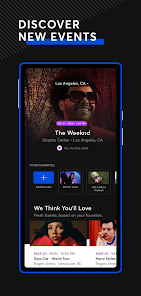
Ticketmaster is pretty much the go-to platform for buying and selling tickets to live events, from concerts and sports games to theater shows and festivals. You download the app from Google Play or the App Store, and honestly, the first thing you notice when you launch it is how much is going on. There's a constant stream of event suggestions, countdowns for upcoming sales, and featured shows. It's free to install, but you will need to create an account to actually buy or sell anything. The app has a huge install count and is used by millions, so you're definitely not alone in having it on your phone.
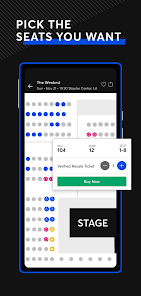
Once you start using it, the experience is a bit of a mixed bag. The search function works well enough – you can filter by city, date, or artist, and the results load quickly. Picking a seat is where it gets interesting; you can view the venue map and see available spots, but the interface sometimes feels cluttered with different ticket types and pricing tiers. After you add tickets to your cart, you go through the checkout process, and here's a little tip: have your payment info ready because the timer ticks down fast. I've had moments where the app felt smooth and snappy, and other times where it froze right at the payment screen. The notifications for upcoming on-sale dates are actually useful, but they can pile up quickly if you're following many events.
After using it for a while, I'd say this app is essential for anyone who regularly goes to big live events, but it's definitely not perfect. The biggest pain point for most people is the fees – they add up significantly during checkout, and that surprise can be frustrating. Compared to something like StubHub, Ticketmaster often gets the primary ticket allocation for major venues, so you have less choice if you want a specific show. I keep it installed for the convenience of having all my event details in one place, but I can see why someone might uninstall it after a particularly bad fee experience. It works best for people who are willing to pay a premium for the guarantee of a legitimate ticket.
features
- 🎫 Ticketmaster's main edge is its direct partnership with venues and promoters, which means it often gets the first batch of tickets for major events before any resale platforms have them. This is different from apps like Vivid Seats or SeatGeek, which rely more on secondary market listings from individuals.
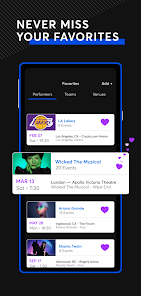
- 🔔 The "My Events" section is actually quite polished. Once you buy a ticket, the app automatically adds the event to your calendar, gives you venue-specific info, and sends reminders. It's a level of integration that third-party resellers like StubHub don't quite match as smoothly.
- 💰 The selling feature is straightforward – you can list your tickets directly from your account, and the app handles the transfer. The downside is you're locked into their fee structure, but for the convenience of selling instantly to a verified buyer, it's hard to beat.
pros
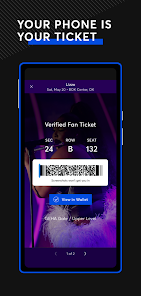
- ✅ One of the best things about Ticketmaster is the "Verified Fan" system, which helps block bots from buying up tickets before real fans get a chance. Other apps like SeatGeek don't have this level of anti-scalper control.
- ✅ The app's integration with Apple Wallet and Google Pay means you never have to print a thing. Your ticket is right there on your phone, and it updates in real time if anything changes. StubHub also does this, but Ticketmaster's transfers feel more seamless.
- ✅ The ability to see resale tickets alongside primary market options in the same view is convenient. You don't have to jump between different apps to compare prices for the same event.
cons
- ❌ The fees are the biggest drawback. Service fees, processing fees, and delivery fees can add 20-30% on top of the ticket price, which is noticeably higher than what you'd see on StubHub or SeatGeek for similar events.
- ❌ The app's customer support is notoriously slow. If you have an issue with a transfer or a canceled event, getting a refund can take weeks, whereas Gametime offers more immediate assistance for mobile-only buyers.
- ❌ The user interface can feel overwhelming, especially during a high-demand on-sale. The screen jumps around, and the queue system is confusing. Apps like TickPick have a cleaner, less cluttered experience for browsing.
Recommended Apps
![]()
16Personalities
16Personalities4
![]()
Zodiac Palm Reader: MagicWay
Reatility Media4.6
![]()
Moblo - 3D furniture modeling
MYTIforge4.1![]()
Magnifier Plus with Flashlight
Digitalchemy, LLC4.6![]()
QR Code Scanner
QR Code Scanner & Barcode Reader4.7![]()
FalFal: Astrology, Tarot, Love
FalFal Team4.8![]()
Christmas Photo Frames
PhotoFramesApps4.6![]()
AI Video Art Creator - Livensa
FERASET4.5![]()
Horoscope of Birth
Denimaks4.4![]()
Make Me Bald Prank
AppTornado2.5![]()
Kling AI: AI Image&Video Maker
Lohas Games Pte. Ltd.4.4![]()
Japan Timetable & Route Search
NAVITIME JAPAN CO., LTD.4.3![]()
Prank Call & Funny Video
TeH Software0![]()
Parallax 3D Live Wallpapers
TarrySoft4.3![]()
AI Chatbot - Nova
ScaleUp4.7















Disclaimer
1.AppInfoLibrary does not represent any developer, nor is it the developer of any App or game.
2.AppInfoLibrary provide custom reviews of Apps written by our own reviewers, and detailed information of these Apps, such as developer contacts, ratings and screenshots.
3.All trademarks, registered trademarks, product names and company names or logos appearing on the site are the property of their respective owners.
4. AppInfoLibrary abides by the federal Digital Millennium Copyright Act (DMCA) by responding to notices of alleged infringement that complies with the DMCA and other applicable laws.
5.If you are the owner or copyright representative and want to delete your information, please contact us info@appinfolibrary.com.
6.All the information on this website is strictly observed all the terms and conditions of Google Ads Advertising policies and Google Unwanted Software policy .














