

Picsart AI Photo Editor, Video

1B+
Installs
PicsArt, Inc.
Developer
-
Video Players & Editors
Category
-
Rated for 12+
Content Rating
-
support@picsart.com
Developer Email
-
https://picsart.com/privacy-policy
Privacy Policy
Screenshots

editor reviews
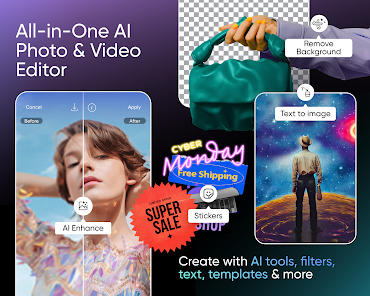
Picsart is basically a one-stop creative toolbox that lives on your phone, blending photo editing with video editing and even some AI tricks. It's not just a filter app; it feels more like a mobile version of what people used to do on a computer. The main draw is that you can jump in and start layering images, adding text, cutting out backgrounds, or applying effects without needing any serious skills. When you first launch it, there's a ton of stuff on the screen — templates, trending edits, AI tools — which can feel a bit overwhelming. There's a free download option on both Google Play and App Store, and while you don't need to register right away, you'll hit paywalls or watermarks pretty soon if you don't sign up for a subscription. The install count is huge, so it's clearly popular, but the first impression is that it wants to sell you the premium version before you've even tried anything.
Once you actually start using it, the interface is surprisingly responsive for how much it packs in. You pick a photo or video from your gallery, and then you're dropped into a timeline or editing screen. The tools are laid out along the bottom, and you swipe through categories like Effects, Cutout, Text, and Stickers. A common thing I do is remove a background from a selfie — the auto-cutout is decent but sometimes misses edges, so you have to manually clean it up with a brush. The layer system works like a lite Photoshop, letting you stack images and adjust opacity or blending modes. One practical tip: if you save a project, you can come back and tweak it later, which many mobile editors don't handle well. The AI tools, like the generative fill or style transfer, are fun but require a bit of patience because they take a few seconds to process and sometimes give weird results.
After spending a few weeks with it, I'd say Picsart is great if you like experimenting or making social media content regularly. It's way more flexible than apps like Snapseed for collages or multi-layer work, but it can feel bloated if you just want to slap a filter on a photo. The free version is frustrating with constant ads and watermarks, so unless you upgrade, you might get annoyed. It stands out because it bundles video editing and photo editing in one place, which Canva does too but with a heavier web focus. I keep it installed for quick meme-making or when I need to remove a background on the go, but I've uninstalled it before because it drains battery and takes a while to load. If you're someone who hates subscriptions, this might not stick around long on your phone.
features
- 📐 Layer-based editing that feels familiar if you've used desktop software — you can stack images, text, and shapes with separate blend modes and opacity controls. In contrast, Adobe Express limits layers unless you pay, so Picsart gives more creative freedom for free users.
- ✂️ The background removal tool is quick and decent for most photos, with a manual brush for touch-ups. Erase.bg might be faster, but Picsart integrates it directly into the editing flow, so you don't have to jump between apps.
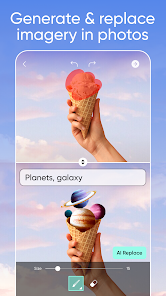
- 🤖 A suite of AI features like text-based image generation, AI enhance, and style transfer. While Canva offers similar AI tools, Picsart's feel less polished but more experimental, sometimes producing unexpected and unique results.
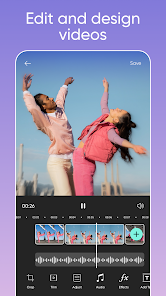
- 🎥 Video editing with timeline, transitions, and audio overlay — not as deep as CapCut, but good for short clips like Instagram Reels or TikTok updates without switching apps.
pros
- 🎨 Huge library of stickers, fonts, and templates updated regularly — beats PhotoDirector's selection by a mile.
- 🔄 Non-destructive editing lets you undo or tweak layers later, similar to how you work in Photoshop, unlike Snapseed's linear undo.
- 📱 Cross-platform sync if you create an account, so you can start on phone and finish on tablet — something Canva does better but Picsart still offers decently.
cons
- 💸 Aggressive subscription prompts and watermarks on free exports — nearly every save tries to push you to premium, which feels more pushy than in YouCam Perfect.
- ⚠️ Frequent bugs or crashes when working with high-res images or complex layers — more stable in Lightroom Mobile.
- 🔇 Overwhelming interface full of tabs, ads, and community feeds that distract from actual editing — simpler apps like Picsay Pro feel more focused.
- ⚡ Battery drain and heat generation during long sessions — not ideal for quick fixes when you're out and about.
Recommended Apps
![]()
16Personalities
16Personalities4
![]()
Zodiac Palm Reader: MagicWay
Reatility Media4.6
![]()
Moblo - 3D furniture modeling
MYTIforge4.1![]()
Magnifier Plus with Flashlight
Digitalchemy, LLC4.6![]()
QR Code Scanner
QR Code Scanner & Barcode Reader4.7![]()
FalFal: Astrology, Tarot, Love
FalFal Team4.8![]()
Christmas Photo Frames
PhotoFramesApps4.6![]()
AI Video Art Creator - Livensa
FERASET4.5![]()
Horoscope of Birth
Denimaks4.4![]()
Make Me Bald Prank
AppTornado2.5![]()
Kling AI: AI Image&Video Maker
Lohas Games Pte. Ltd.4.4![]()
Japan Timetable & Route Search
NAVITIME JAPAN CO., LTD.4.3![]()
Prank Call & Funny Video
TeH Software0![]()
Parallax 3D Live Wallpapers
TarrySoft4.3![]()
AI Chatbot - Nova
ScaleUp4.7















Disclaimer
1.AppInfoLibrary does not represent any developer, nor is it the developer of any App or game.
2.AppInfoLibrary provide custom reviews of Apps written by our own reviewers, and detailed information of these Apps, such as developer contacts, ratings and screenshots.
3.All trademarks, registered trademarks, product names and company names or logos appearing on the site are the property of their respective owners.
4. AppInfoLibrary abides by the federal Digital Millennium Copyright Act (DMCA) by responding to notices of alleged infringement that complies with the DMCA and other applicable laws.
5.If you are the owner or copyright representative and want to delete your information, please contact us info@appinfolibrary.com.
6.All the information on this website is strictly observed all the terms and conditions of Google Ads Advertising policies and Google Unwanted Software policy .














