
Google One

1B+
Installs
Google LLC
Developer
-
Productivity
Category
-
Everyone
Content Rating
-
apps-help@google.com
Developer Email
-
http://www.google.com/policies/privacy
Privacy Policy
Screenshots
editor reviews
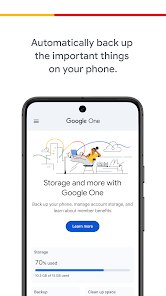
Google One is basically Google's all-in-one subscription service that bundles extra storage for Drive, Gmail, and Photos together into one paid plan. Rather than having to buy storage separately for each service, users get a single pool of space that all three apps share. For someone like me who constantly runs into those annoying "storage full" warnings from Google Photos or a cluttered Gmail inbox, downloading this app from Google Play felt like a natural fix. My first impression after launching it was surprisingly clean and straightforward — no flashy graphics or confusing dashboards, just a clear breakdown of how much storage I was using and what it was costing me. The app has been installed over 100 million times, and it's free to download, though the whole point is to get you to sign up for a paid tier starting at around $1.99 a month for 100GB.
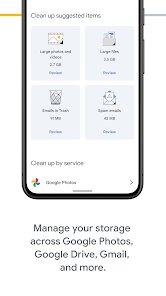
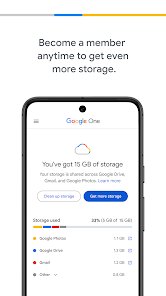
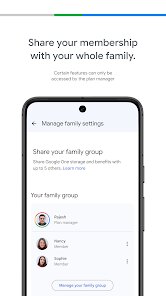
Once I logged in and started poking around, the actual hands-on experience matched that initial simplicity. The home screen shows a big colorful ring chart of your storage usage across Drive, Gmail, and Photos, which makes it dead easy to spot which service is eating up all the space. Tapping on any section gives you a closer look at specific large files or old emails you might want to clean out. I found the "storage saver" tips genuinely helpful — things like clearing spam or lowering photo backup quality never felt urgent before, but seeing them laid out in plain numbers motivated me to act. The onboarding process guides you through setting up automatic backups for your phone and choosing which Google services to include, all without bombarding you with pop-ups or aggressive upsells. One small thing I appreciated was the family sharing option — adding up to five family members means the cost splits nicely, and everyone gets their own private storage while we all tap into the same plan.
After using Google One for a few months, I think it's a solid pick for anyone who lives inside Google's ecosystem and keeps hitting storage limits. Casual users who only take a handful of photos or barely use Drive might not need it at all, especially since Google still offers 15GB free, which is enough for light use. What sets Google One apart from something like Apple's iCloud+ or Dropbox is how tightly it weaves into Gmail, Drive, and Photos — there's no juggling separate apps or extra logins, it's all handled inside the same family of tools. I've kept it installed mostly for the peace of mind of knowing my photos and files are backed up automatically, though I can see someone uninstalling if they decide to switch to a different cloud service or find the monthly fee harder to justify over time. The only real downside? If you're not heavily invested in Google's apps, there's less reason to stick with it.
features
- 📁 Storage pooling — Unlike Dropbox which keeps storage separate per account, Google One lets you share your plan with up to five family members, and each person still has their own private files, emails, and photos without mixing anything up.
- 🛡️ VPN access included — For plans above 2TB, Google One includes a built-in VPN service that works across Android and iOS, something neither iCloud+ nor Dropbox offers at similar price tiers without third-party add-ons.
- 📞 Live expert support — Premium-tier subscribers get direct access to Google's support team via chat or phone, which feels surprisingly responsive compared to the forum-based help you often get with other cloud storage providers.
- 🔍 Storage manager tools — The app gives you a neat breakdown of duplicate files, large attachments, and blurry photos you can safely delete, making it easier to reclaim space without manually sifting through everything.
pros
- 📦 Seamless ecosystem integration — Google One works natively with Gmail, Drive, and Photos, so you never need to manually move files or toggle permissions between apps. In contrast, Microsoft OneDrive feels more geared toward Office documents, while iCloud+ prioritizes Apple devices, leaving Google's service as the most universal option across Android, iOS, and web browsers.
- 📸 Google Photos included — The plan covers original-quality photo backups without degrading quality, which is a big win for heavy photo takers. Dropbox charges extra for similar photo backup features, making Google One a better value for visual content hoarders.
- 👪 Generous family sharing — Adding up to five family members with their own private storage is rare among competitors — iCloud+ limits family sharing to shared storage without private spaces, while Google One lets everyone keep their own files separate under one bill.
cons
- 💸 Storage tiers are inflexible — Unlike Dropbox where you can mix and match plans or add storage in smaller chunks, Google One only offers preset tiers (100GB, 200GB, 2TB, etc.), so you might end up paying for way more space than you actually need without a middle ground.
- 🔒 No end-to-end encryption — Google One doesn't offer zero-knowledge encryption, meaning Google theoretically has access to your files. Services like Sync.com or Tresorit provide stronger privacy features, which matters if you're storing sensitive work documents.
- 🖥️ Desktop app feels minimalist — Compared to Dropbox's desktop client that offers smart sync and selective folder mirroring, Google One's desktop experience is essentially a web interface, lacking offline-first workflows or proper file management from the file explorer.
- 📉 VPN quality is just average — The included VPN works fine for basic traffic masking, but it's slower than dedicated VPNs like NordVPN or Mullvad, and you lose access if you downgrade to a lower-tier plan, so it's more of a bonus than a reliable tool.
Recommended Apps
![]()
16Personalities
16Personalities4
![]()
Zodiac Palm Reader: MagicWay
Reatility Media4.6
![]()
Moblo - 3D furniture modeling
MYTIforge4.1![]()
Magnifier Plus with Flashlight
Digitalchemy, LLC4.6![]()
QR Code Scanner
QR Code Scanner & Barcode Reader4.7![]()
FalFal: Astrology, Tarot, Love
FalFal Team4.8![]()
Christmas Photo Frames
PhotoFramesApps4.6![]()
AI Video Art Creator - Livensa
FERASET4.5![]()
Horoscope of Birth
Denimaks4.4![]()
Make Me Bald Prank
AppTornado2.5![]()
Kling AI: AI Image&Video Maker
Lohas Games Pte. Ltd.4.4![]()
Japan Timetable & Route Search
NAVITIME JAPAN CO., LTD.4.3![]()
Prank Call & Funny Video
TeH Software0![]()
Parallax 3D Live Wallpapers
TarrySoft4.3![]()
AI Chatbot - Nova
ScaleUp4.7















Disclaimer
1.AppInfoLibrary does not represent any developer, nor is it the developer of any App or game.
2.AppInfoLibrary provide custom reviews of Apps written by our own reviewers, and detailed information of these Apps, such as developer contacts, ratings and screenshots.
3.All trademarks, registered trademarks, product names and company names or logos appearing on the site are the property of their respective owners.
4. AppInfoLibrary abides by the federal Digital Millennium Copyright Act (DMCA) by responding to notices of alleged infringement that complies with the DMCA and other applicable laws.
5.If you are the owner or copyright representative and want to delete your information, please contact us info@appinfolibrary.com.
6.All the information on this website is strictly observed all the terms and conditions of Google Ads Advertising policies and Google Unwanted Software policy .














