
Google Calendar

5,000,000,000+
Installs
Google LLC
Developer
-
Productivity
Category
-
Rated for 3+
Content Rating
-
apps-help@google.com
Developer Email
-
http://www.google.com/policies/privacy
Privacy Policy
Screenshots
editor reviews
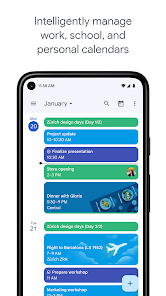
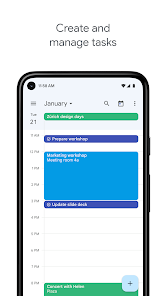
Google Calendar is a time-management application developed by Google LLC, designed to help users organize their schedules, events, and tasks. It belongs to the productivity and utility genre, and it syncs seamlessly across devices, making it a central hub for personal and professional planning. For a normal user, downloading and installing Google Calendar from the Google Play Store or App Store is a no-brainer; it's often pre-installed on Android devices, but if not, it's a free download with over 5 billion installs on Android alone. After launching the app, the first impression is a clean, minimalistic interface with a monthly grid view and a "+" button prominently placed for quick event creation. You don't need to register separately if you have a Google account, which most users already do, but you might encounter prompts to sync other calendars or enable notifications. The app offers optional in-app purchases for storage upgrades, but there are no intrusive ads, which is a huge plus for a free utility tool.
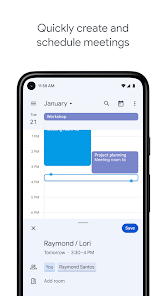
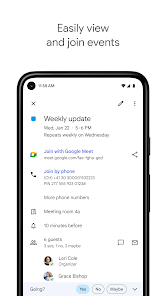
Once you start using Google Calendar, the experience is quite smooth and intuitive. The interface greets you with a monthly overview, and you can tap on any date to see details or swipe through weeks. Onboarding is minimal; you're basically thrown into your schedule, but the app provides a quick tutorial for new users on features like creating events or setting reminders. In daily use, creating an event is as simple as tapping the "+" button, filling in details like title, time, location, and even adding a Google Meet link for virtual meetings. A small practical tip: you can drag and drop events to reschedule them, which feels natural on a phone. One confusing moment for me was setting recurring events; the options are plentiful, but the interface could be clearer about custom repetitions. The app also automatically pulls events from Gmail, like flight reservations or restaurant bookings, which is genuinely useful, though it can clutter your calendar if not managed. Overall, navigating through the app feels logical for someone who's used any calendar app before.
After using Google Calendar for a while, I think it's a solid choice for anyone who wants a reliable, centralized schedule tool. It's perfect for busy professionals or students juggling school and work, as integration with Google Workspace apps like Meet and Keep is seamless. On the flip side, people who don't use Google services much might find it less appealing, as it loses its edge without the ecosystem. What sets it apart from apps like Apple Calendar or Outlook Calendar is its ability to automatically add events from emails without manual input, which is a huge timesaver. However, I've noticed it can be a bit heavy on notifications if you don't tweak the settings. Someone might keep it installed because it's essential for coordinating with others via shared calendars, but a user looking for a simpler, offline calendar might uninstall it and go with a lighter alternative like DigiCal or aNotes Calendar. It's a strong tool, but it's not for the minimalist who hates constant syncing.
features
- 🔄 Automatic Sync and Integration: Google Calendar stands out by automatically syncing with other Google services like Gmail and Meet. For example, if you get a flight confirmation email, it creates an event with the details without any manual entry. Compared to Fantastical, which requires manual setup for such integrations, Google Calendar saves time by doing it in the background, making it a must for people who live in the Google ecosystem.
- 🔔 Smart Reminders and Notifications: It offers flexible notification options, from email alerts to on-device pop-ups. You can set multiple reminders for one event, like a 30-minute and 10-minute warning. Unlike Apple Calendar's limited default reminders, Google Calendar lets you customize notifications per event, which is handy for avoiding missed appointments without overwhelming your inbox.
- 👥 Shared Calendars for Collaboration: A standout feature is the ability to create shared calendars with family or colleagues, where everyone can view and edit events. This is seamless compared to Calendly's focus on one-way scheduling; with Google Calendar, you can coordinate group projects or family dinners in real-time, seeing others' availability instantly without needing extra approvals.
pros
- 💸 Free and Ad-Free: Unlike many calendar apps that charge subscriptions, Google Calendar is completely free with no ads. Apps like Fantastical Pro cost money for advanced features, while Google Calendar offers robust tools like goal tracking and multiple calendar views at no cost, making it accessible for budget-conscious users.
- 🌐 Cross-Platform Availability: It works on Android, iOS, and web, syncing your schedule instantly. Others like Apple Calendar are iOS-exclusive, limiting flexibility for users with mixed devices. Google Calendar ensures you always have your events, whether you're on a PC or a phone, without needing extra syncing tools.
- 🧠 Natural Language Processing: You can type "Lunch with John tomorrow at 12pm" and the app sets the event automatically. This is more refined than in Microsoft Outlook, which often requires structured inputs. It saves time for users who prefer typing over tapping multiple fields.
cons
- ⏳ Offline Limitations: You cannot create events without an internet connection on mobile, unlike apps like DigiCal that offer full offline mode. This is a problem when you're on a subway or in a remote area, as you have to wait for connectivity to update your schedule.
- 📅 Cluttered Interface with Gmail Sync: Automatic event addition from emails, while useful, can fill your calendar with test events or junk entries. Compared to Calendar by Readdle, which lets you vet each entry, Google Calendar's automation can overwhelm you with irrelevant deadlines if you're not careful.
- 🔨 Customization Restrictions: The widget customization is limited compared to One Calendar, which offers more aesthetic options for color-coding and fonts. Google Calendar's widgets are functional but feel outdated, making it less appealing for users who want visual personalization on their home screen.
Recommended Apps
![]()
16Personalities
16Personalities4
![]()
Zodiac Palm Reader: MagicWay
Reatility Media4.6
![]()
Moblo - 3D furniture modeling
MYTIforge4.1![]()
Magnifier Plus with Flashlight
Digitalchemy, LLC4.6![]()
QR Code Scanner
QR Code Scanner & Barcode Reader4.7![]()
FalFal: Astrology, Tarot, Love
FalFal Team4.8![]()
Christmas Photo Frames
PhotoFramesApps4.6![]()
AI Video Art Creator - Livensa
FERASET4.5![]()
Horoscope of Birth
Denimaks4.4![]()
Make Me Bald Prank
AppTornado2.5![]()
Kling AI: AI Image&Video Maker
Lohas Games Pte. Ltd.4.4![]()
Japan Timetable & Route Search
NAVITIME JAPAN CO., LTD.4.3![]()
Prank Call & Funny Video
TeH Software0![]()
Parallax 3D Live Wallpapers
TarrySoft4.3![]()
AI Chatbot - Nova
ScaleUp4.7















Disclaimer
1.AppInfoLibrary does not represent any developer, nor is it the developer of any App or game.
2.AppInfoLibrary provide custom reviews of Apps written by our own reviewers, and detailed information of these Apps, such as developer contacts, ratings and screenshots.
3.All trademarks, registered trademarks, product names and company names or logos appearing on the site are the property of their respective owners.
4. AppInfoLibrary abides by the federal Digital Millennium Copyright Act (DMCA) by responding to notices of alleged infringement that complies with the DMCA and other applicable laws.
5.If you are the owner or copyright representative and want to delete your information, please contact us info@appinfolibrary.com.
6.All the information on this website is strictly observed all the terms and conditions of Google Ads Advertising policies and Google Unwanted Software policy .














